> ## Documentation Index
> Fetch the complete documentation index at: https://dub.co/llms.txt
> Use this file to discover all available pages before exploring further.

# Connecting your payout method to receive payouts

> Learn how to connect a payout method and start receiving payouts from the affiliate programs you're working with.

export const PayoutSupportedCountries = () => {
  const PAYOUT_METHODS = [{
    value: "all",
    label: "All"
  }, {
    value: "stablecoin",
    label: "Stablecoin"
  }, {
    value: "connect",
    label: "Bank account"
  }, {
    value: "paypal",
    label: "PayPal"
  }];
  const [countries, setCountries] = useState([]);
  const [expanded, setExpanded] = useState(false);
  const [searchQuery, setSearchQuery] = useState("");
  const [payoutMethod, setPayoutMethod] = useState("all");
  const showCount = 21;
  useEffect(() => {
    fetch("https://app.dub.co/api/supported-countries").then(r => r.json()).then(data => setCountries(data)).catch(() => {});
  }, []);
  const filtered = useMemo(() => {
    const q = searchQuery.trim().toLowerCase();
    return countries.filter(c => {
      const matchesSearch = !q || (c.name || "").toLowerCase().includes(q) || (c.code || "").toLowerCase().includes(q);
      const methods = Array.isArray(c.methods) ? c.methods : [];
      const matchesMethod = payoutMethod === "all" || methods.includes(payoutMethod);
      return matchesSearch && matchesMethod;
    });
  }, [countries, searchQuery, payoutMethod]);
  if (!countries.length) return <div style={{
    height: "200px"
  }} />;
  const displayed = expanded ? filtered : filtered.slice(0, showCount);
  const isCollapsed = filtered.length > showCount && !expanded;
  return <div className="not-prose relative">
      <div className="flex flex-col md:flex-row gap-2 pb-2">
        <input type="search" placeholder="Search countries..." value={searchQuery} onChange={e => setSearchQuery(e.target.value)} className="w-full rounded-lg border border-neutral-200 bg-white px-3 py-1.5 text-sm text-neutral-900 placeholder:text-neutral-400 focus:border-neutral-400 focus:outline-none focus:ring-1 focus:ring-neutral-400 dark:border-neutral-700 dark:bg-neutral-800 dark:text-neutral-100 dark:placeholder:text-neutral-500 dark:focus:border-neutral-600 dark:focus:ring-neutral-600" aria-label="Search countries" />
        <div className="flex flex-wrap md:flex-nowrap gap-2">
          {PAYOUT_METHODS.map(({value, label}) => <button key={value} type="button" onClick={() => setPayoutMethod(value)} className={`rounded-full px-4 py-1.5 text-sm whitespace-nowrap transition-colors ${payoutMethod === value ? "bg-neutral-900 text-white dark:bg-neutral-100 dark:text-neutral-900" : "border border-neutral-200 bg-white text-neutral-600 hover:bg-neutral-50 hover:text-neutral-900 dark:border-neutral-700 dark:bg-neutral-800 dark:text-neutral-400 dark:hover:bg-neutral-700 dark:hover:text-neutral-200"}`}>
              {label}
            </button>)}
        </div>
      </div>
      <div style={isCollapsed ? {
    maskImage: "linear-gradient(to bottom, black calc(100% - 80px), transparent)",
    WebkitMaskImage: "linear-gradient(to bottom, black calc(100% - 80px), transparent)",
    maxHeight: "420px",
    overflow: "hidden"
  } : {
    paddingBottom: expanded ? "48px" : "0"
  }} className="grid grid-cols-2 gap-5 py-4 sm:grid-cols-3">
        {displayed.map(({code, name, methods = []}) => {
    const methodLabels = PAYOUT_METHODS.filter(m => methods.includes(m.value)).map(m => m.label).join(" · ");
    return <div key={code} className="flex items-start gap-3">
              <img src={`https://hatscripts.github.io/circle-flags/flags/${code.toLowerCase()}.svg`} alt={code} width={32} height={32} className="size-5 shrink-0 rounded-full border border-neutral-200 shadow-sm dark:border-neutral-700 mt-0.5" draggable={false} noZoom />
              <div className="min-w-0 flex-1">
                <div className="text-sm font-medium text-neutral-900 dark:text-neutral-100">
                  {name}
                </div>
                {methodLabels ? <div className="mt-0.5 flex items-center gap-1 text-[10px] leading-tight text-neutral-500 dark:text-neutral-400">
                    <svg viewBox="0 0 18 18" xmlns="http://www.w3.org/2000/svg" className="size-2.5">
                      <g fill="currentColor">
                        <path d="M15.25,9.75H4.75c-1.105,0-2-.895-2-2V3.75" fill="none" stroke="currentColor" strokeLinecap="round" strokeLinejoin="round" strokeWidth="1.5" />
                        <polyline fill="none" points="11 5.5 15.25 9.75 11 14" stroke="currentColor" strokeLinecap="round" strokeLinejoin="round" strokeWidth="1.5" />
                      </g>
                    </svg>
                    {methodLabels}
                  </div> : null}
              </div>
            </div>;
  })}
      </div>
      {filtered.length === 0 ? <p className="py-6 text-center text-sm text-neutral-500 dark:text-neutral-400">
          No countries match your filters.
        </p> : filtered.length > showCount && <button onClick={() => setExpanded(!expanded)} className="absolute left-1/2 -translate-x-1/2 transform rounded-full border border-neutral-200 bg-white px-4 py-1 text-sm text-neutral-500 shadow-sm hover:text-neutral-700 dark:border-neutral-700 dark:bg-neutral-800 dark:text-neutral-400 dark:hover:text-neutral-200" style={{
    bottom: isCollapsed ? "24px" : "-8px"
  }}>
            {expanded ? "Show less" : `Show ${filtered.length - showCount} more`}
          </button>}
    </div>;
};

export const ImageCarousel = ({images = [], imageClassName = "", autoplay = true}) => {
  const [currentIndex, setCurrentIndex] = useState(0);
  const [autoplayActive, setAutoplayActive] = useState(autoplay);
  useEffect(() => {
    if (!autoplayActive || images.length <= 1) return;
    const interval = setInterval(() => {
      setCurrentIndex(prev => prev === images.length - 1 ? 0 : prev + 1);
    }, 3000);
    return () => clearInterval(interval);
  }, [autoplayActive, images.length]);
  const disableAutoplay = () => setAutoplayActive(false);
  const goToPrev = () => {
    disableAutoplay();
    setCurrentIndex(prev => prev === 0 ? images.length - 1 : prev - 1);
  };
  const goToNext = () => {
    disableAutoplay();
    setCurrentIndex(prev => prev === images.length - 1 ? 0 : prev + 1);
  };
  const goToSlide = index => {
    disableAutoplay();
    setCurrentIndex(index);
  };
  if (!images.length) return null;
  return <div className="not-prose w-full" onClick={disableAutoplay}>
      <div className="relative overflow-hidden rounded-xl">
        {images.map((img, index) => <div key={index} className={`transition-opacity duration-300 ${index === currentIndex ? "block" : "hidden"}`}>
            <img src={img.src} alt={img.alt} className={`w-full rounded-xl object-cover p-1 ${imageClassName ? imageClassName : "aspect-[1200/630]"}`} />
          </div>)}
        <div className="absolute bottom-4 left-1/2 -translate-x-1/2 flex items-center justify-center">
          <div className="inline-flex items-center gap-2 px-4 py-2 rounded-full border border-zinc-200 dark:border-zinc-700 bg-white/95 dark:bg-zinc-900/95 shadow-sm backdrop-blur-sm">
            <button onClick={goToPrev} className="p-1 text-zinc-600 dark:text-zinc-400 hover:text-zinc-950 dark:hover:text-white transition-colors" aria-label="Previous slide">
              <svg width="18" height="18" viewBox="0 0 24 24" fill="none" stroke="currentColor" strokeWidth="2" strokeLinecap="round" strokeLinejoin="round">
                <path d="M15 18l-6-6 6-6" />
              </svg>
            </button>
            <div className="flex items-center gap-1.5">
              {images.map((_, index) => <button key={index} onClick={() => goToSlide(index)} className={`w-2 h-2 rounded-full transition-colors ${index === currentIndex ? "bg-zinc-950 dark:bg-white" : "bg-zinc-300 dark:bg-zinc-600 hover:bg-zinc-400 dark:hover:bg-zinc-500"}`} aria-label={`Go to slide ${index + 1}`} />)}
            </div>
            <button onClick={goToNext} className="p-1 text-zinc-600 dark:text-zinc-400 hover:text-zinc-950 dark:hover:text-white transition-colors" aria-label="Next slide">
              <svg width="18" height="18" viewBox="0 0 24 24" fill="none" stroke="currentColor" strokeWidth="2" strokeLinecap="round" strokeLinejoin="round">
                <path d="M9 18l6-6-6-6" />
              </svg>
            </button>
          </div>
        </div>
      </div>
    </div>;
};

Once you've set up a [partner profile on Dub](https://partners.dub.co/), you can connect a payout method to start receiving payouts from the programs you're working with.

Depending on your [country of residence](#supported-payout-countries), you can choose between a [stablecoin wallet](#connecting-a-stablecoin-wallet) or a [bank account](#connecting-a-bank-account) to receive payouts.

|                     | Stablecoin                                 | Bank account                               |
| ------------------- | ------------------------------------------ | ------------------------------------------ |
| Fees                | 0.5% transaction fee                       | 1% FX conversion fee                       |
| Payout currency     | USDC                                       | Local currency                             |
| Payout timing       | Within minutes                             | Up to 15 business days                     |
| Supported countries | [Refer below](#supported-payout-countries) | [Refer below](#supported-payout-countries) |

<Warning>
  During onboarding, you must select the country where you legally reside for
  tax purposes. Providing incorrect information may result in account
  suspension, loss of payouts, and legal action.
</Warning>

## Connecting a stablecoin wallet

Stablecoin payouts is the easiest and fastest way to receive payouts on Dub (especially for non-US partners):

* **Get paid in USD** – instead of your local currency, you can receive payouts in USDC all around the world
* **Faster payouts** – payouts are sent within minutes instead of having to wait up to 15 business days for regular bank transfers
* **Lower fees** – 0.5% transaction fee vs 1% FX conversion fee for international payouts

<Steps>
  <Step title="Initiate the connect payouts flow">
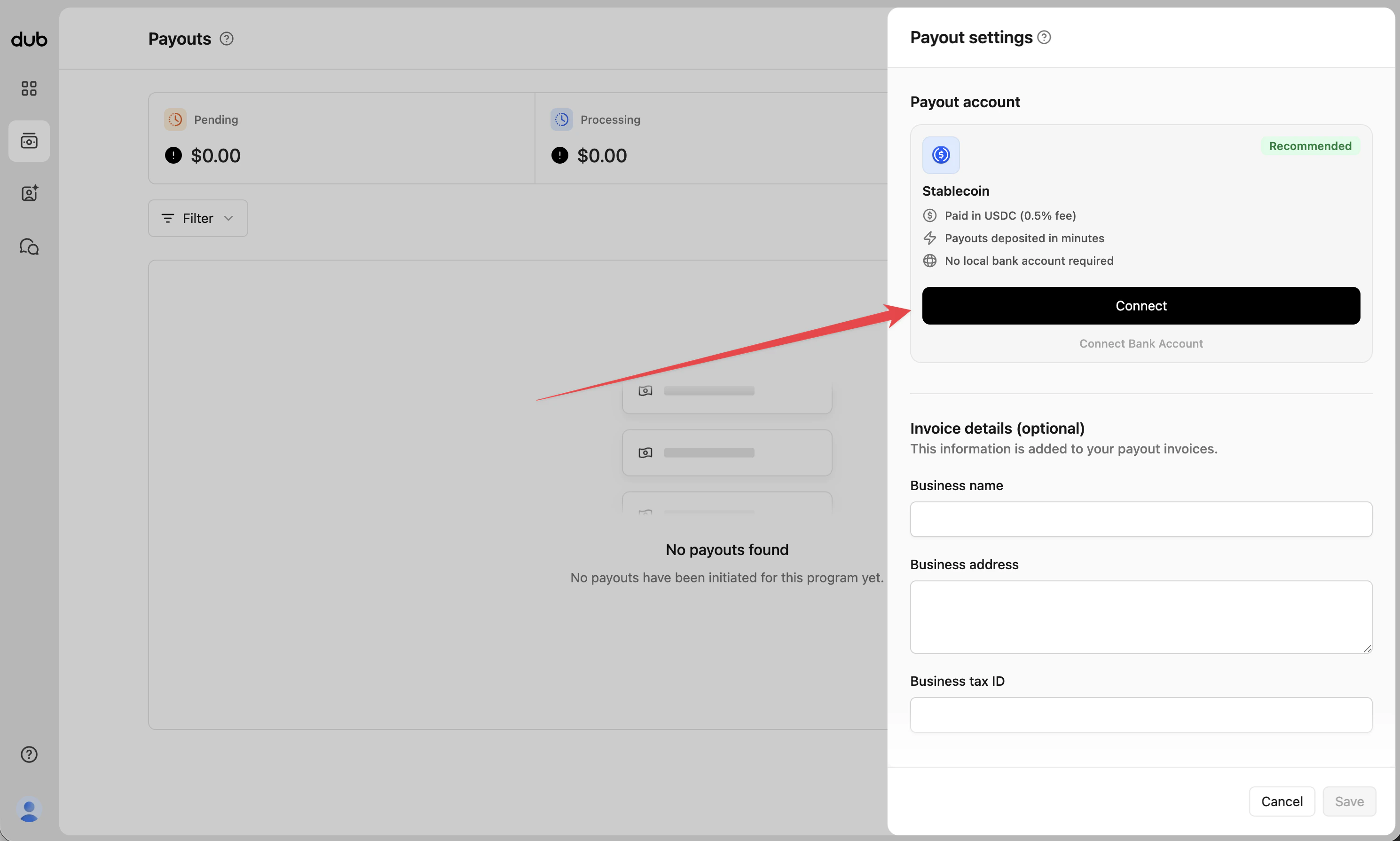
    First, go to your [payout settings on Dub](https://partners.dub.co/payouts?settings=true) and select "Connect stablecoin wallet":

    <Frame>
      <img src="https://mintcdn.com/dub/CNr3UKUJuhiVPX4f/images/payouts/payout-settings-stablecoin.png?fit=max&auto=format&n=CNr3UKUJuhiVPX4f&q=85&s=6a2f6aabbbe2ca197a6b782e5ab29f4d" alt="Payout settings stablecoin" width="2978" height="1788" data-path="images/payouts/payout-settings-stablecoin.png" />
    </Frame>

    This will open up the stablecoin wallet onboarding flow (`accounts.stripe.com/r/acct_xxx...`).
  </Step>

  <Step title="Connect your stablecoin wallet">
    Then, follow the steps in the onboarding flow to connect your stablecoin wallet. You can either use the 1-click connect flow (recommended), or manually input your stablecoin wallet details.

    <Warning>
      Make sure to triple-check that you've entered the correct stablecoin wallet
      address and network to receive USDC payouts. Incorrect details may result in
      payout failures and lost funds.
    </Warning>

    <ImageCarousel
      images={[
{
  src: "https://assets.dub.co/cms/connect-stablecoin-wallet-1.png",
  alt: "Connect stablecoin wallet step 1",
},
{
  src: "https://assets.dub.co/cms/connect-stablecoin-wallet-2.png",
  alt: "Connect stablecoin wallet step 2",
},
{
  src: "https://assets.dub.co/cms/connect-stablecoin-wallet-3.png",
  alt: "Connect stablecoin wallet step 3",
},
]}
      imageClassName="aspect-[4/3]"
    />
  </Step>
</Steps>

## Connecting a bank account

Dub partners with Stripe for secure global payouts. To receive payouts directly to your bank account, you'll need to follow these steps to set up a [Stripe Express](https://support.stripe.com/express) account and connect your bank account:

<Note>
  International (non-US) bank payouts are subject to a 1% FX conversion fee.
</Note>

<Steps>
  <Step title="Initiate the connect payouts flow">
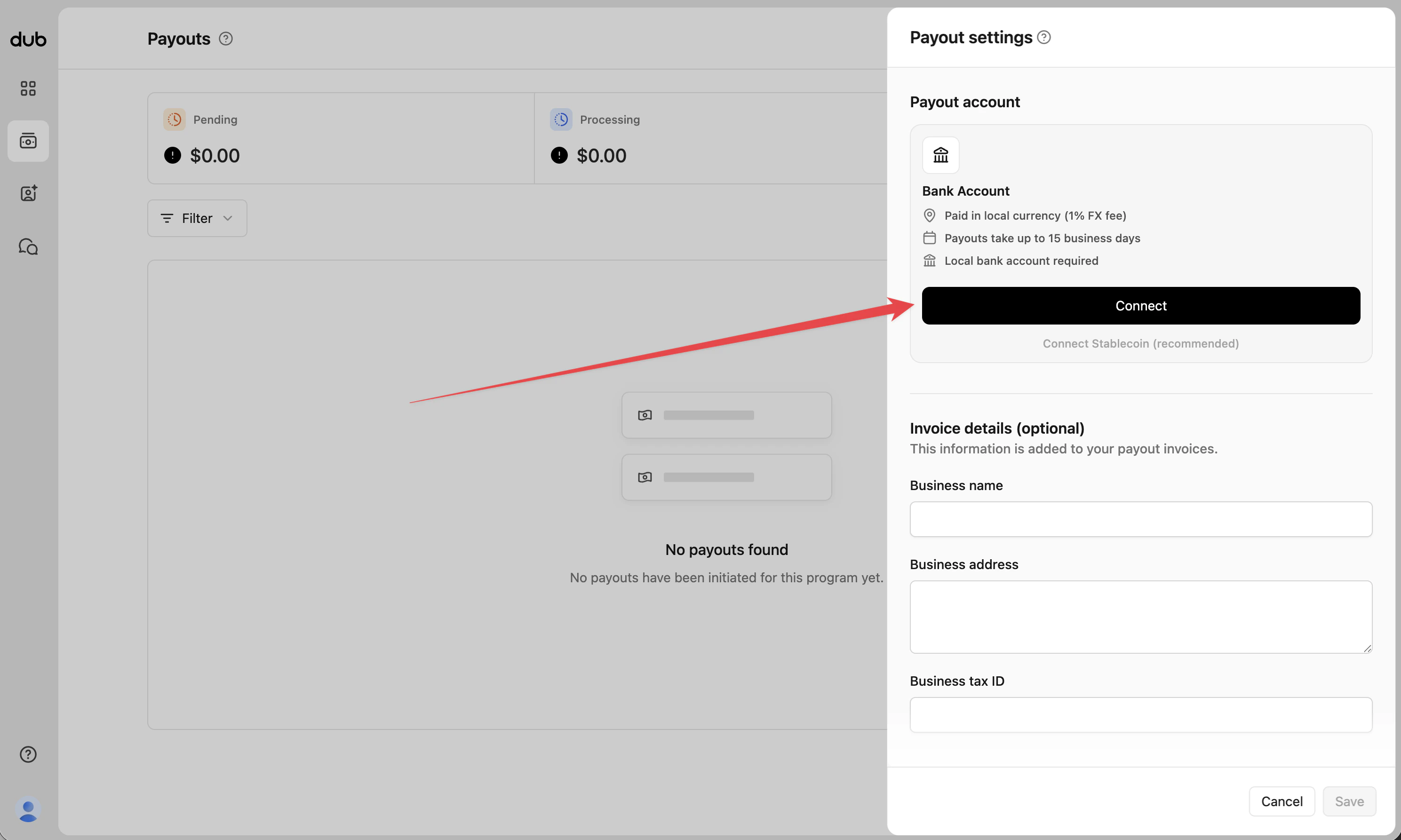
    First, go to your [payout settings on Dub](https://partners.dub.co/payouts?settings=true) and select "Connect bank account":

    <Frame>
      <img src="https://mintcdn.com/dub/CNr3UKUJuhiVPX4f/images/payouts/payout-settings-bank-account.png?fit=max&auto=format&n=CNr3UKUJuhiVPX4f&q=85&s=cc133295555c064afe431d9105faa23a" alt="Payout settings bank account" width="2978" height="1786" data-path="images/payouts/payout-settings-bank-account.png" />
    </Frame>

    This will open up the Stripe Express account onboarding flow (`connect.stripe.com/setup/e/acct_xxx...`).
  </Step>

  <Step title="Create Stripe Express account">
    Then, follow the steps in the onboarding flow to create your Stripe Express account:

    <ImageCarousel
      images={[
{
  src: "https://assets.dub.co/cms/connect-bank-account-1.png",
  alt: "Connect bank account step 1",
},
{
  src: "https://assets.dub.co/cms/connect-bank-account-2.png",
  alt: "Connect bank account step 2",
},
{
  src: "https://assets.dub.co/cms/connect-bank-account-3.png",
  alt: "Connect bank account step 3",
},
]}
      imageClassName="aspect-[4/3]"
    />

    <Tip>
      If you have any questions about the Stripe Express account creation flow, you
      can try the following:

      * Refer to the official [Stripe Express help articles](https://support.stripe.com/express)
      * Reach out to [Stripe Express support](https://support.stripe.com/?contact=true)
      * Reach out to [Dub support](https://dub.co/contact/support)
    </Tip>
  </Step>

  <Step title="Connect your bank account">
    For the final step, you'll be asked to connect your bank account to receive payouts. You can either connect your account using Stripe's [Financial Connections](https://stripe.com/financial-connections) flow, or by manually inputting your bank account details.

    <ImageCarousel
      images={[
{
  src: "https://assets.dub.co/cms/connect-bank-account-4.png",
  alt: "Connect bank account step 4",
},
{
  src: "https://assets.dub.co/cms/connect-bank-account-5.png",
  alt: "Connect bank account step 5",
},
]}
      imageClassName="aspect-[4/3]"
    />

    <Warning>
      **Your payout bank account must match your local currency for compliance
      reasons.** E.g. if you're based in the UK, you will need to connect a GBP bank
      account to receive payouts.

      Related FAQ: ["Can I receive payouts in USD?"](#can-i-receive-payouts-in-usd)
    </Warning>
  </Step>
</Steps>

## Default payout method

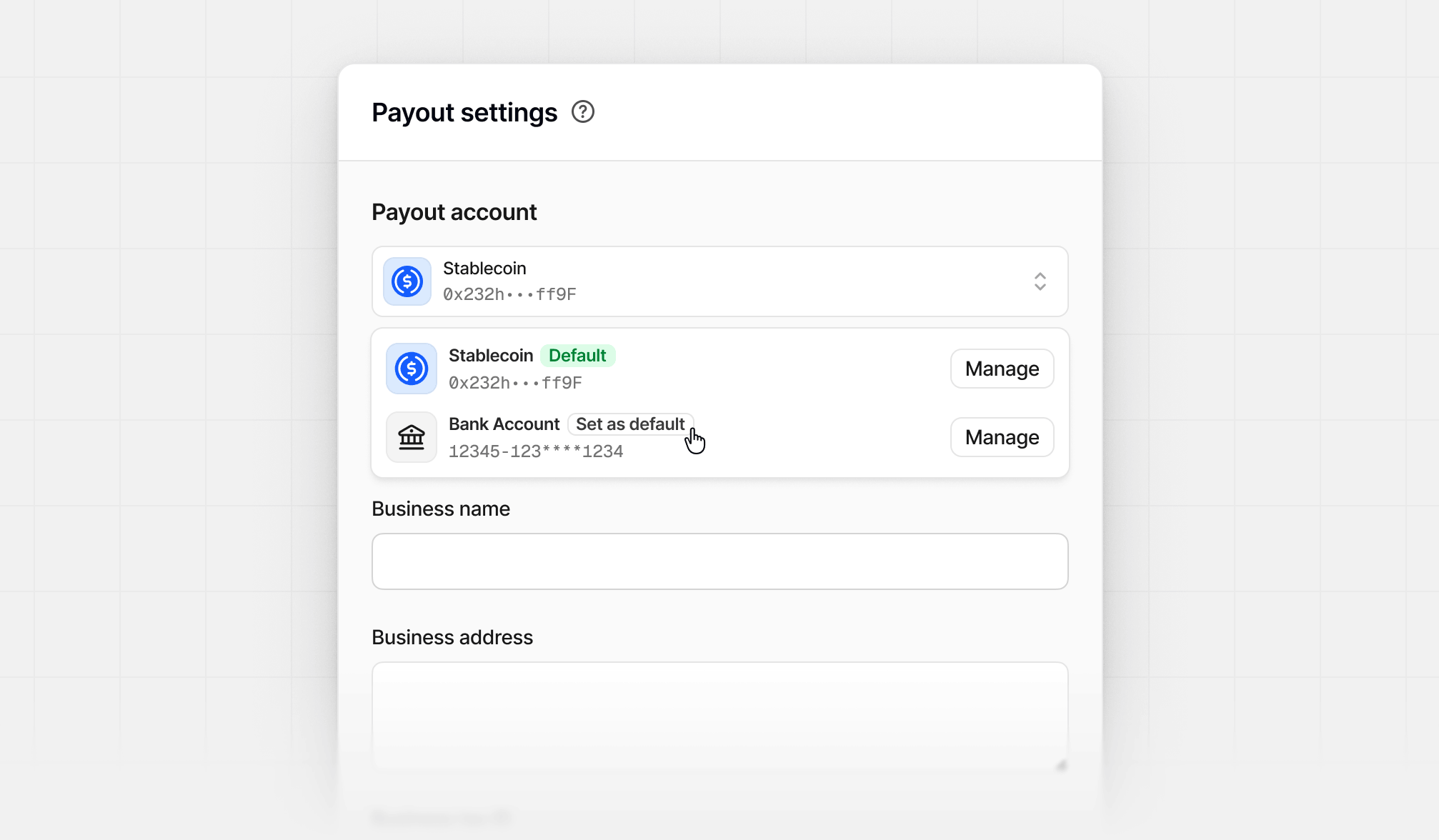
If you reside in a [country](#supported-payout-countries) that supports multiple payout methods, you can select a default payout method if more than one has been added.

From the payout settings panel, click the payout account dropdown and select **"Set as default"** on the payout method you want to set as your default:

<Frame>
  <img src="https://mintcdn.com/dub/RH0SRMEzhYgQp7sO/images/dub-partners/default-payout-method.png?fit=max&auto=format&n=RH0SRMEzhYgQp7sO&q=85&s=a1a6a0396418a6deb55deb71f780a966" alt="Selecting your default payout method" width="2014" height="1176" data-path="images/dub-partners/default-payout-method.png" />
</Frame>

After your default payout method is set, you'll also receive an email informing you of the change.

## Supported payout countries

Here's the full list of countries that we support sending payouts to, along with the available payout methods for each of them:

<PayoutSupportedCountries />

## FAQs

### My country is not supported by Dub, what should I do?

If you're not in a [supported country](#supported-payout-countries), one workaround is to create a legal entity in any of the supported countries above and use that to receive payouts instead.

For example, you can create a US LLC (using something like [Stripe Atlas](http://stripe.com/atlas)), which would let you receive payouts in USD.

Once you have an LLC ready, you can go to your [partner profile settings](https://partners.dub.co/settings) and update your profile details accordingly:

* **Country** – Set to "United States"
* **Profile Type** – Set to "Company"
* **Legal company name** – Enter your LLC's legal name

<Frame>
  <img src="https://assets.dub.co/cms/update-partner-profile.png" alt="update partner profile" />
</Frame>

### Can I receive payouts in USD?

If you're receiving payouts via [bank account](#connecting-a-bank-account), we can only send payouts in your local currency for compliance reasons. For example, if you are based in Australia, you will receive payouts in AUD.

To receive payouts in USD, we recommend switching to [stablecoin payouts](#connecting-a-stablecoin-wallet) instead, which not only lets you receive payouts in USDC, but is also a [lot faster and cheaper](#connecting-a-stablecoin-wallet).

### Can I connect a savings account instead of a checking account?

While it is possible to connect your savings account instead of a checking account, we highly recommend against it for two main reasons:

1. Some banks do not allow third-party deposits into savings accounts, which may cause your payout to fail;
2. Payouts sent to savings accounts can take significantly longer to process (up to 30 business days, depending on the bank), resulting in payout delays.

### Can I connect to my existing Stripe account instead of creating a new one?

Since we use [Stripe Express](https://support.stripe.com/express) for partner payouts, you can only connect an existing Stripe Express account to Dub (and *not an existing Stripe account*).

Here's the difference between the two:

* Stripe Express – login on `connect.stripe.com`
* Regular Stripe accounts – login on `dashboard.stripe.com`

To connect an existing Stripe Express account to Dub, make sure your partner account email matches your Stripe Express account email.

### Do I need to manually withdraw my earnings from Dub?

Unlike platforms like [PartnerStack](https://dub.co/compare/partnerstack), where you have to manually withdraw your earnings to your bank account – you do not need to manually withdraw your earnings on Dub.

Instead, your earnings/payouts are **automatically deposited into your connected bank account** the moment they are paid by the company.

### What is the minimum withdrawal amount, and how does it work?

All payouts above `$10` will be automatically deposited into your bank account as soon as the program processes its payment.

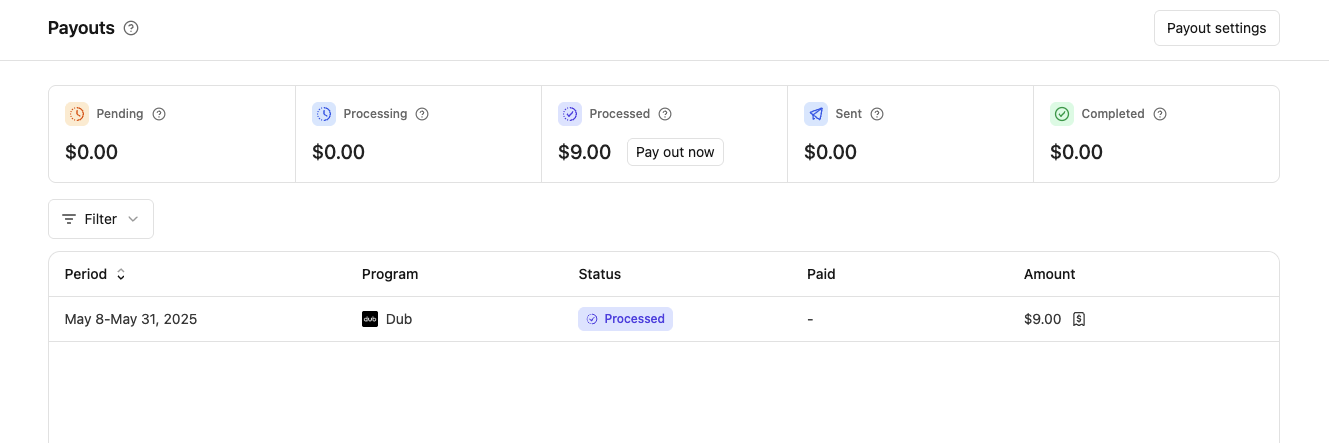
If your payouts are below `$10`, you can still withdraw them for a `$0.50` fee. Go to your [Payouts page](https://partners.dub.co/payouts) and click on "Pay out now" in the "Processed" box to withdraw your payout.
<Frame>
  <img src="https://assets.dub.co/cms/pay out now $10.png" alt="Pay Out Now Button" />
</Frame>