> ## Documentation Index
> Fetch the complete documentation index at: https://dub.co/llms.txt
> Use this file to discover all available pages before exploring further.
# Configuring partner rewards
> Learn how to create custom rewards (pay-per-click, pay-per-lead, pay-per-sale) tailored to each partner with Dub Partners.
This feature is only available on [Business plans and
above](https://dub.co/pricing/partners).
On [Dub Partners](/help/article/dub-partners), you can offer different incentives for your partners to incentivize them to create high-quality content to spread the word about your product:
| Reward type | Description |
| --------------------------- | -------------------------------------------------------------------------------------------------------------------------------------------------- |
| Click-based (pay-per-click) | Rewarding partners for driving clicks to your product – similar to how Google Ads' pay-per-click works. |
| Lead-based (pay-per-lead) | A more effective alternative to pay-per-click, where you reward partners for leads generated (e.g. demo requests, free trial signups, etc.) |
| Sale-based (pay-per-sale) | This is the most common reward type, where you reward partners for driving sales to your product either via a rev-share or fixed-price commission. |
During the program onboarding flow, you'll be asked to create a [default group reward](#program-wide-rewards) that will be automatically applied to all new partners who join your program.
This initial reward will be either a lead or a sale-based reward by default, but you can customize the reward terms accordingly.
## Default group rewards
After initial onboarding, you can create additional rewards for clicks, leads, or sales, depending on how you initially set up the group. These rewards will be made available to all partners who join your program.
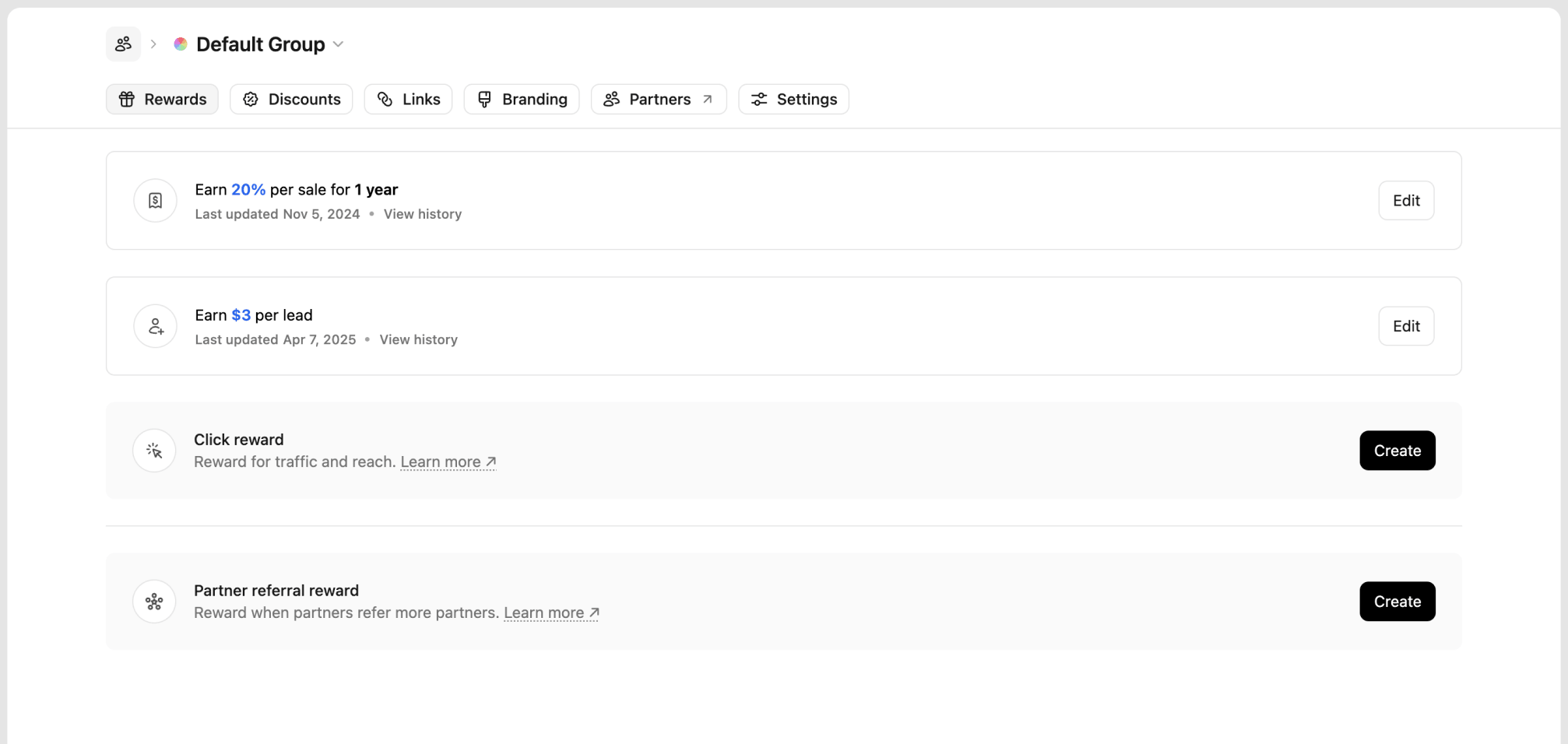 You can create additional rewards for [partner referrals](/help/article/partner-referrals), which allow partners to earn from bringing on new partners to your program.
## Creating a reward
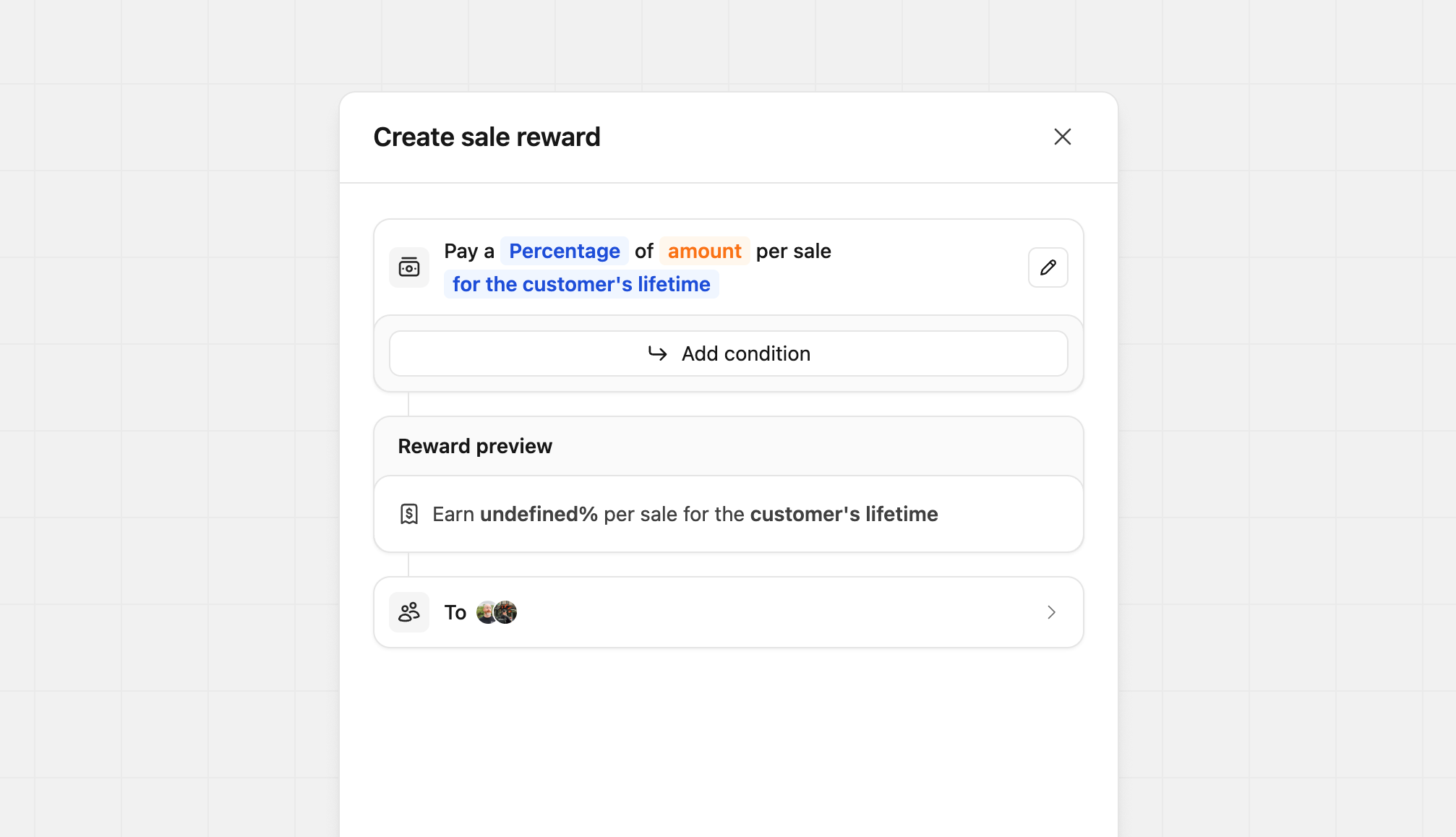
Our reward builder lets you create simple and complex rewards quickly and easily. When the reward builder initially opens, you'll see the basics required to create a reward. Clicking on the different `Blue` and `Orange` input prompts allow you to change the structure of the reward.
You can create additional rewards for [partner referrals](/help/article/partner-referrals), which allow partners to earn from bringing on new partners to your program.
## Creating a reward
Our reward builder lets you create simple and complex rewards quickly and easily. When the reward builder initially opens, you'll see the basics required to create a reward. Clicking on the different `Blue` and `Orange` input prompts allow you to change the structure of the reward.
 ### Configuring reward types
Depending on the type of reward you're creating, you can choose between a flat fee or a percentage-based commission:
| Reward Type | Model | Description | Example |
| ----------- | ---------- | ------------------------------------------------------ | ----------------- |
| **Click** | Flat | Partners receive a fixed fee for each click generated | \$2 per click |
| **Lead** | Flat | Partners receive a fixed fee for each qualified lead | \$50 per lead |
| **Sale** | Percentage | Partners receive a percentage of sales (revenue share) | 30% of sale value |
| **Sale** | Flat | Partners receive a fixed fee for each completed sale | \$50 per sale |
For sale rewards, you can further customize the recurring nature of the commission:
* One time
* For a set period (anywhere between 3 months to 3 years)
* For the customer's lifetime
### Adding reward conditions
Customizing reward conditions is only available on the [Advanced plan and
above](https://dub.co/pricing/partners).
On Dub, you can also set specific requirements for reward completion and can even reward a different type (flat rate or percentage), amount, and duration when they are met. They are available for sale and lead rewards only, and allow you to set conditions like the following:
* [Geo-specific rewards](#geo-specific) (e.g. higher rewards for sales and leads from a specific country)
* [Product-specific rewards](#product-spotlight) (e.g. higher rewards for sales of specific products)
* [Partner performance tiers](#partner-performance-tiers) (e.g. higher rewards for partners with more than 100 conversions)
* [Staggered reward durations](#staggered-reward-durations) (e.g. higher rewards for the first 12 months, then a lower reward for the rest of the customer's lifetime)
* [Sale amount modifiers](#sale-amount-modifiers) (e.g. higher rewards for sales over a specific amount)
Click **Add condition** to set these parameters.
### Configuring reward types
Depending on the type of reward you're creating, you can choose between a flat fee or a percentage-based commission:
| Reward Type | Model | Description | Example |
| ----------- | ---------- | ------------------------------------------------------ | ----------------- |
| **Click** | Flat | Partners receive a fixed fee for each click generated | \$2 per click |
| **Lead** | Flat | Partners receive a fixed fee for each qualified lead | \$50 per lead |
| **Sale** | Percentage | Partners receive a percentage of sales (revenue share) | 30% of sale value |
| **Sale** | Flat | Partners receive a fixed fee for each completed sale | \$50 per sale |
For sale rewards, you can further customize the recurring nature of the commission:
* One time
* For a set period (anywhere between 3 months to 3 years)
* For the customer's lifetime
### Adding reward conditions
Customizing reward conditions is only available on the [Advanced plan and
above](https://dub.co/pricing/partners).
On Dub, you can also set specific requirements for reward completion and can even reward a different type (flat rate or percentage), amount, and duration when they are met. They are available for sale and lead rewards only, and allow you to set conditions like the following:
* [Geo-specific rewards](#geo-specific) (e.g. higher rewards for sales and leads from a specific country)
* [Product-specific rewards](#product-spotlight) (e.g. higher rewards for sales of specific products)
* [Partner performance tiers](#partner-performance-tiers) (e.g. higher rewards for partners with more than 100 conversions)
* [Staggered reward durations](#staggered-reward-durations) (e.g. higher rewards for the first 12 months, then a lower reward for the rest of the customer's lifetime)
* [Sale amount modifiers](#sale-amount-modifiers) (e.g. higher rewards for sales over a specific amount)
Click **Add condition** to set these parameters.
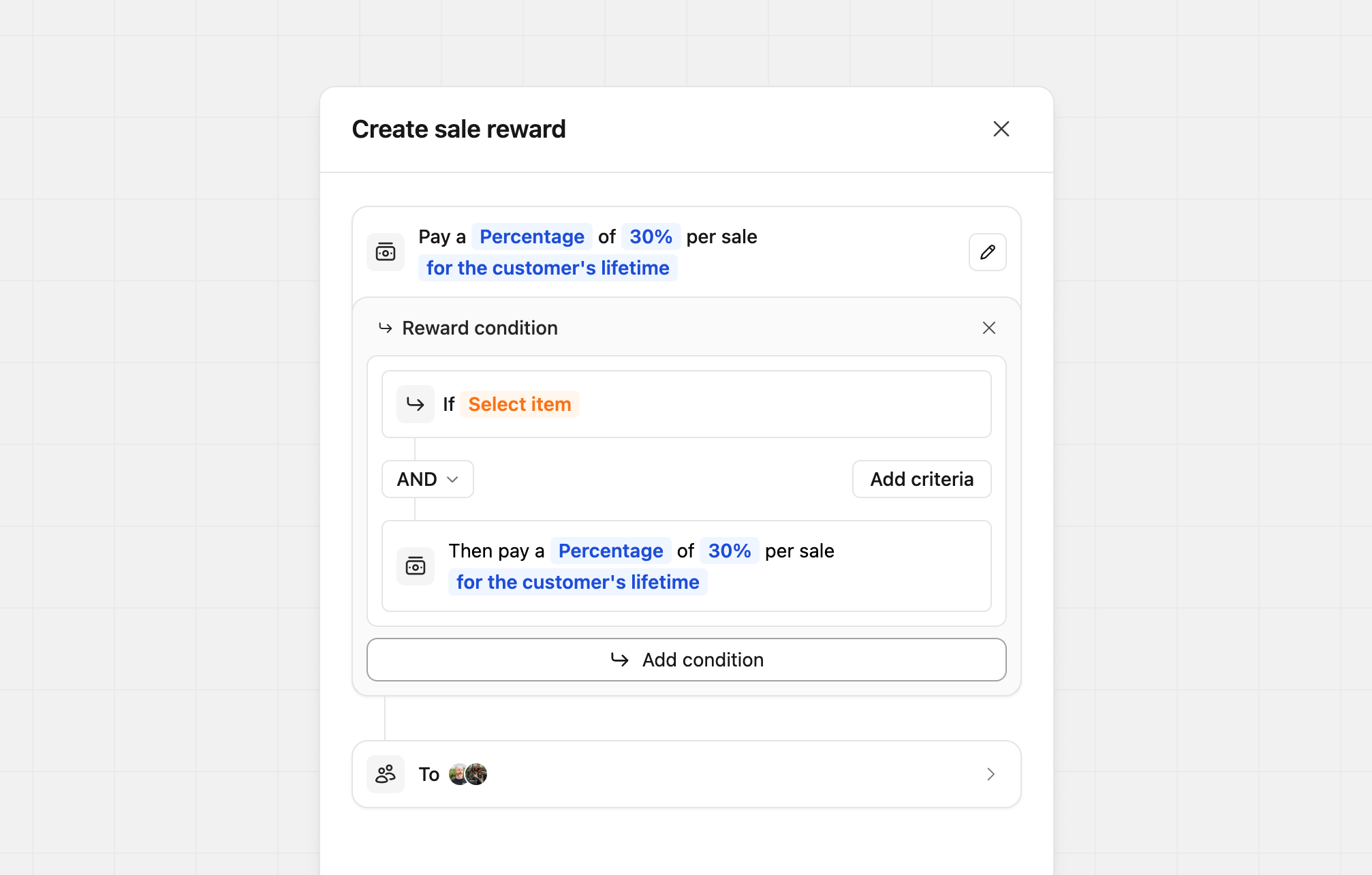 Each condition can be based on either `Customer`, `Sale`, or `Partner`, allowing you to mix and match reward conditions to suit your program best.
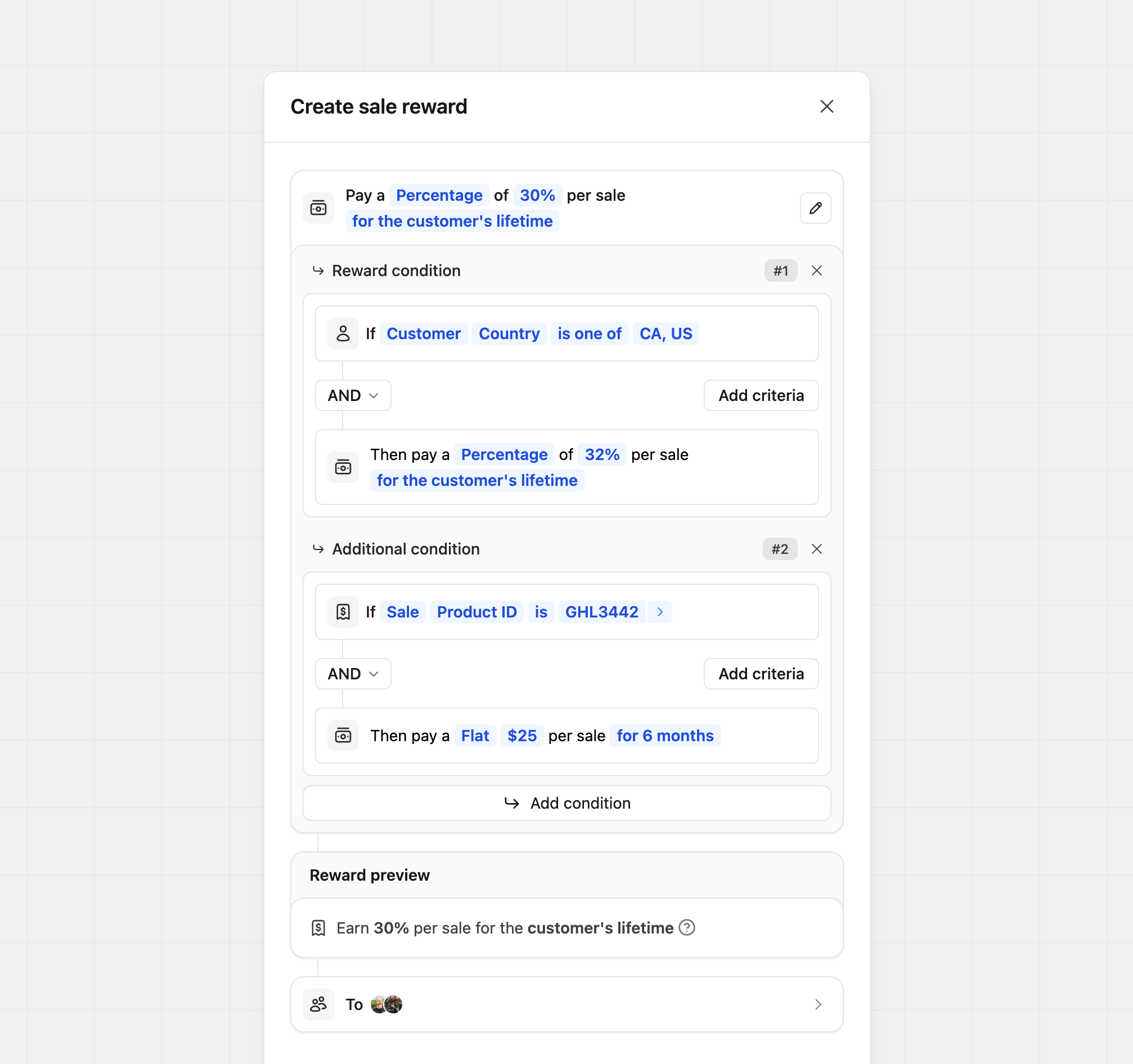
Conditions let you use `AND` or `OR` statements to control how they work. Each condition is tied only to its own reward and doesn't affect others. As shown in the example below, your conditions can be as simple or as complex as you need.
Each condition can be based on either `Customer`, `Sale`, or `Partner`, allowing you to mix and match reward conditions to suit your program best.
Conditions let you use `AND` or `OR` statements to control how they work. Each condition is tied only to its own reward and doesn't affect others. As shown in the example below, your conditions can be as simple or as complex as you need.
 ### Custom reward descriptions
By default, Dub automatically generates reward descriptions when rewards are created. In some cases, you may want to customize how those rewards are presented to partners, whether that’s to better match your brand voice or to make a complex reward easier to understand.
To edit a reward’s content, click the **pencil icon** next to the main reward builder. This opens the content editor, where you can update the primary reward description and optionally add more context using the reward tooltip.
### Custom reward descriptions
By default, Dub automatically generates reward descriptions when rewards are created. In some cases, you may want to customize how those rewards are presented to partners, whether that’s to better match your brand voice or to make a complex reward easier to understand.
To edit a reward’s content, click the **pencil icon** next to the main reward builder. This opens the content editor, where you can update the primary reward description and optionally add more context using the reward tooltip.
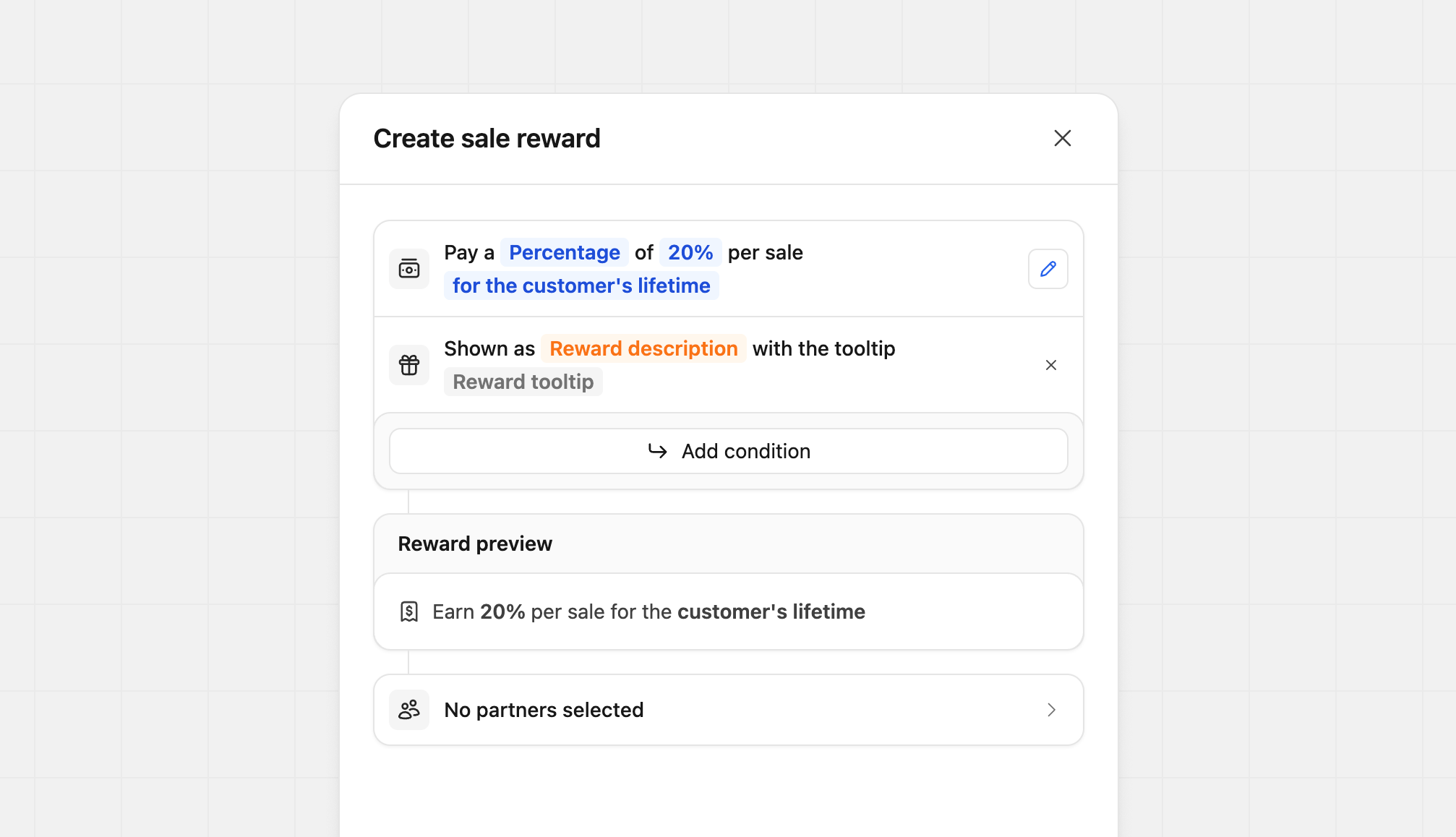 Click `Reward description` to update the main description. You can enter up to 100 characters to clearly explain the reward at a glance.
 Click `Reward tooltip` to edit the tooltip content. Tooltips support basic markdown and allow up to 2,000 characters, making them ideal for adding detailed explanations or terms.
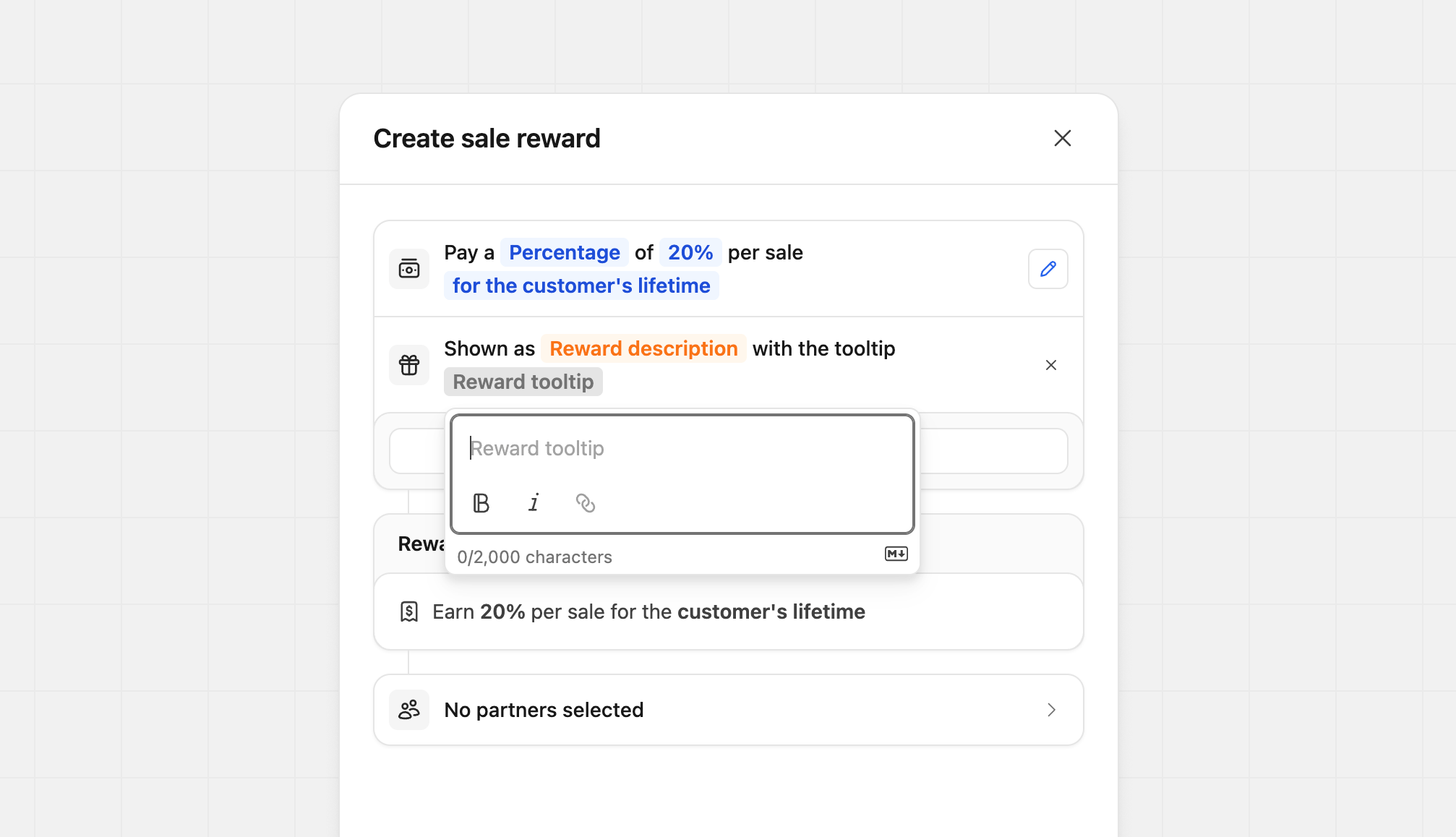 You can customize each field independently. For example, you might only update the tooltip for a more complex reward while leaving the main description unchanged. You can also do the opposite, updating the description without touching the tooltip. This flexibility lets you tailor each reward without extra work.
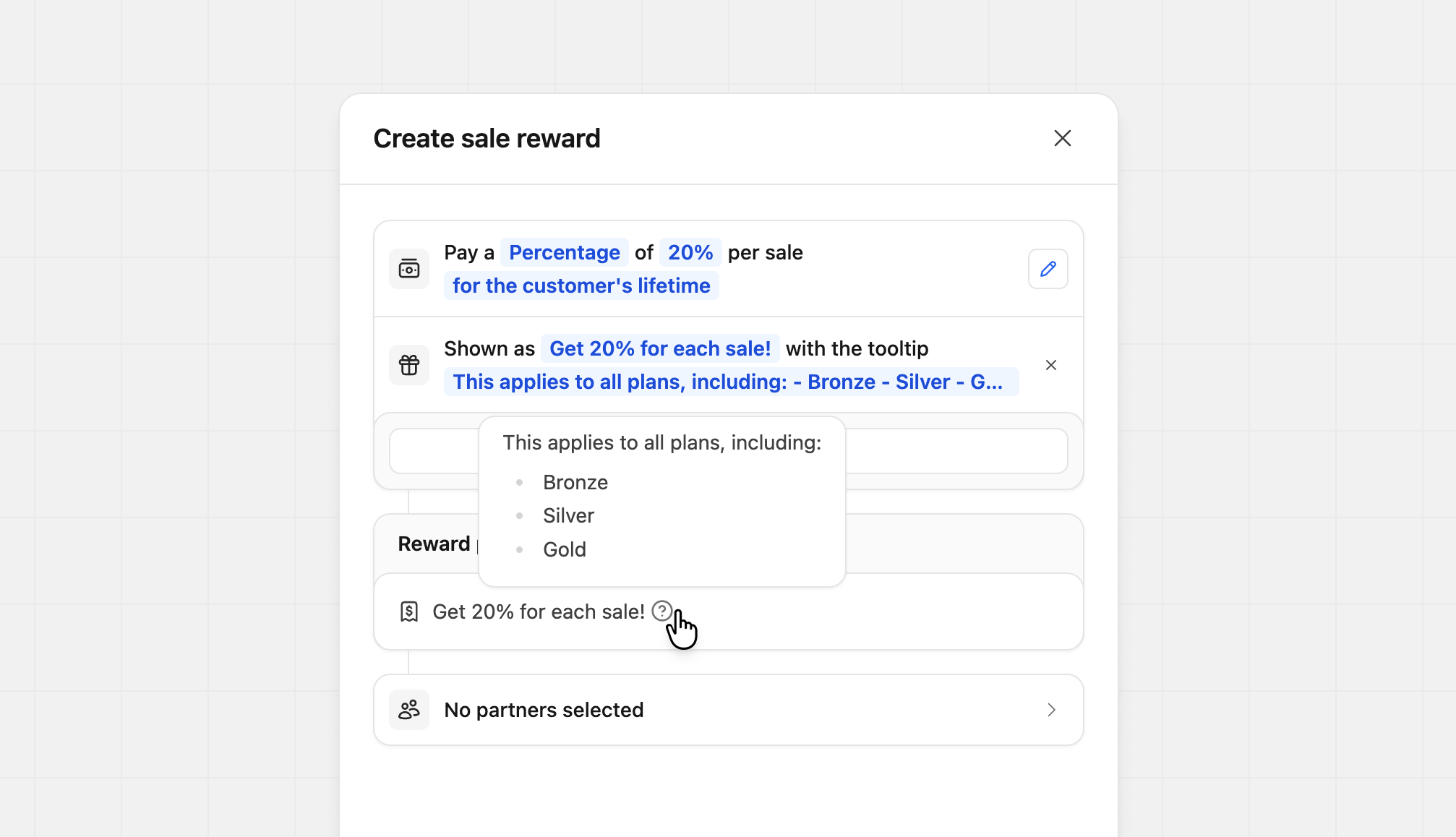 If you want to remove your custom content, click the **X** icon next to the custom description. The reward will revert to Dub’s default description.
### Reward preview
During the creation of your rewards, the reward preview will populate with the settings you've provided. This preview allows you to see exactly what your partner will see on your [program details](/help/article/program-marketplace#program-details) and within [their dashboard](/help/article/navigating-partner-program#overview).
If you want to remove your custom content, click the **X** icon next to the custom description. The reward will revert to Dub’s default description.
### Reward preview
During the creation of your rewards, the reward preview will populate with the settings you've provided. This preview allows you to see exactly what your partner will see on your [program details](/help/article/program-marketplace#program-details) and within [their dashboard](/help/article/navigating-partner-program#overview).
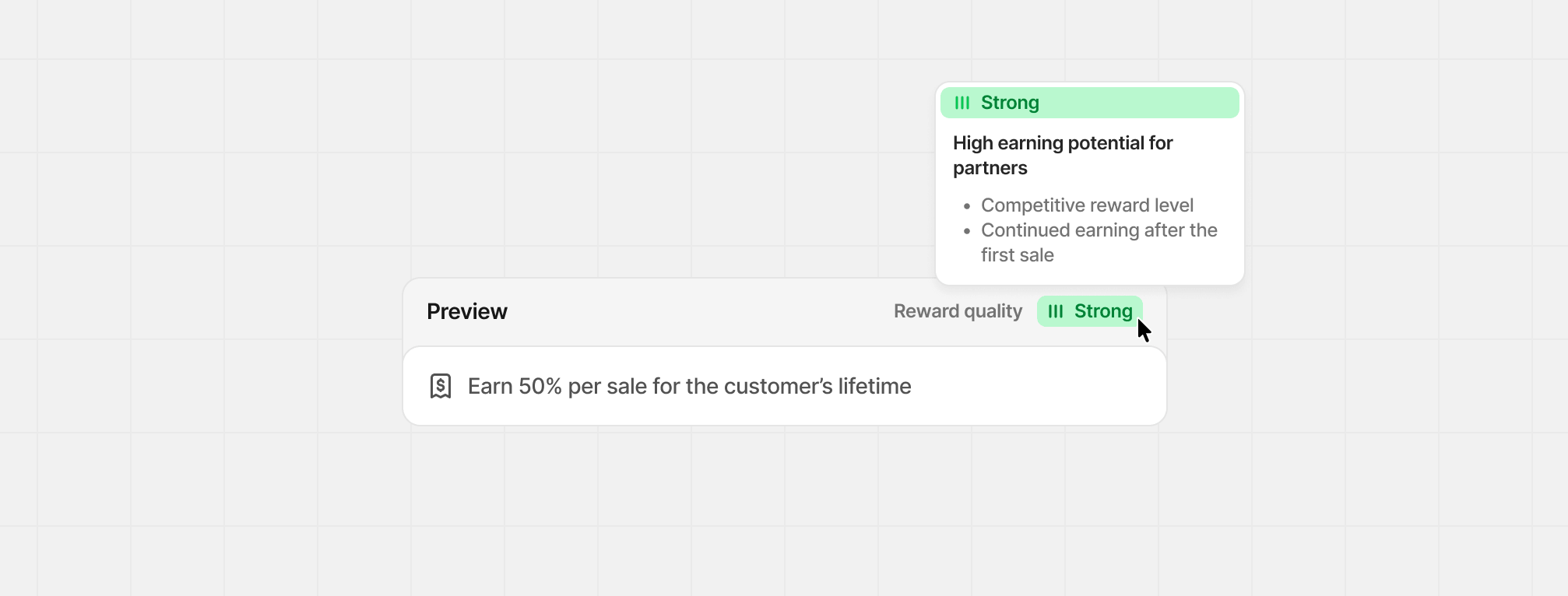
 ### Reward quality
When you're creating or editing a reward, we'll provide you with a reward quality score based on how attractive and compelling your reward is for potential partners. This score is designed to help you optimize your rewards for maximum partner engagement.
### Reward quality
When you're creating or editing a reward, we'll provide you with a reward quality score based on how attractive and compelling your reward is for potential partners. This score is designed to help you optimize your rewards for maximum partner engagement.
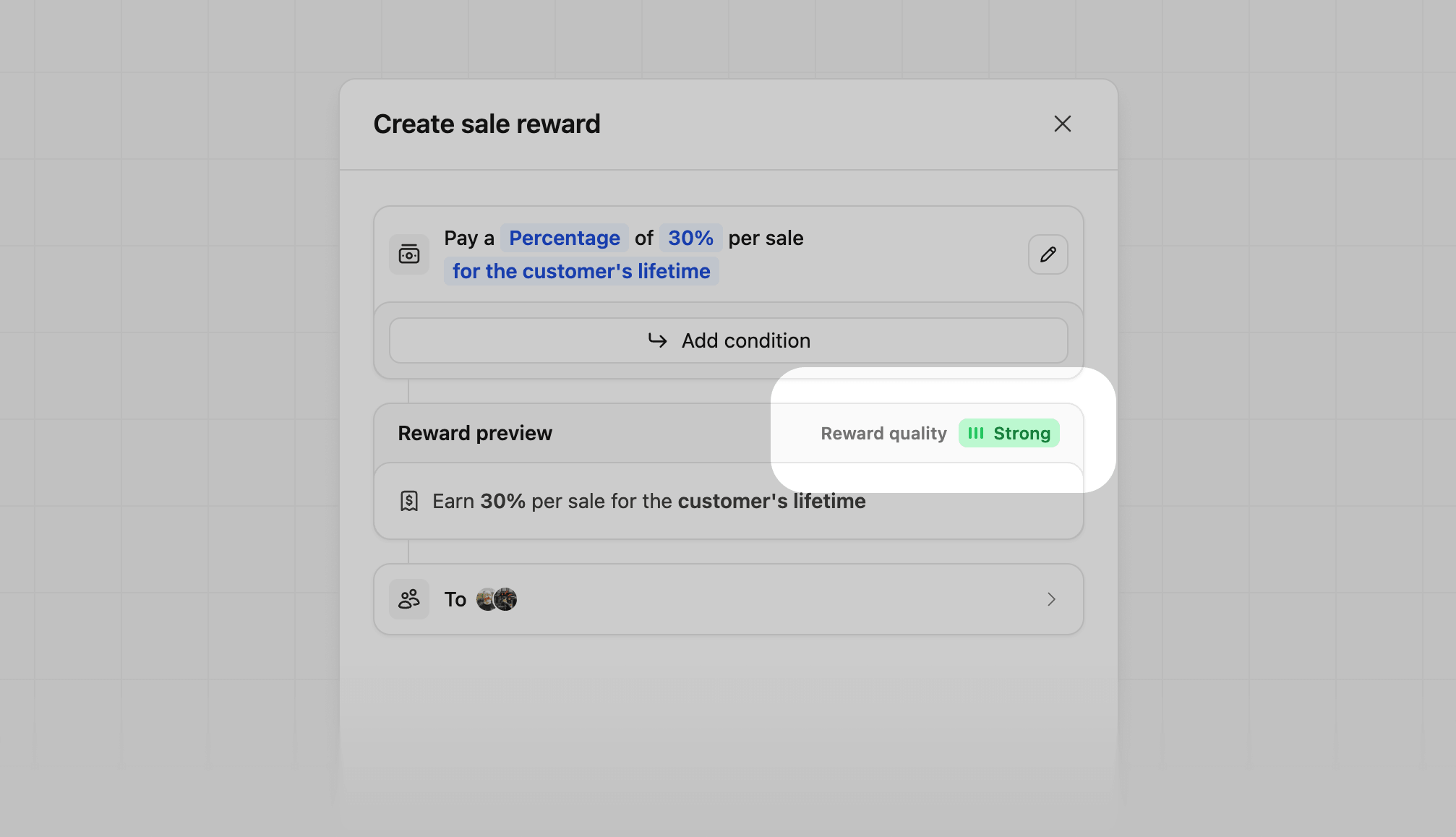 | Quality Score | Reason | Details |
| ------------- | --------------------------------------- | ----------------------------------------------------------------------------------------------------- |
| Low | **May struggle to attract partners** | The reward set is below typical ranges, or there is limited earning potential. |
| Limited | **May struggle to attract partners** | This is a one-time reward, and there's no long-term earning potential. |
| Good | **Solid reward with room to grow** | The reward meets minimum partner expectations, and there's opportunity to increase earning potential. |
| Strong | **High earning potential for partners** | The reward level is competitive, and the partner continues to earn after the first sale. |
Hover over the quality score to see which specific reward factors are contributing to the score.
| Quality Score | Reason | Details |
| ------------- | --------------------------------------- | ----------------------------------------------------------------------------------------------------- |
| Low | **May struggle to attract partners** | The reward set is below typical ranges, or there is limited earning potential. |
| Limited | **May struggle to attract partners** | This is a one-time reward, and there's no long-term earning potential. |
| Good | **Solid reward with room to grow** | The reward meets minimum partner expectations, and there's opportunity to increase earning potential. |
| Strong | **High earning potential for partners** | The reward level is competitive, and the partner continues to earn after the first sale. |
Hover over the quality score to see which specific reward factors are contributing to the score.
 ## Reward examples
Here are a few reward examples with their conditions to give you some starting ideas.
Customizing reward conditions is only available on the [Advanced plan and
above](https://dub.co/pricing/partners).
### Geo-specific
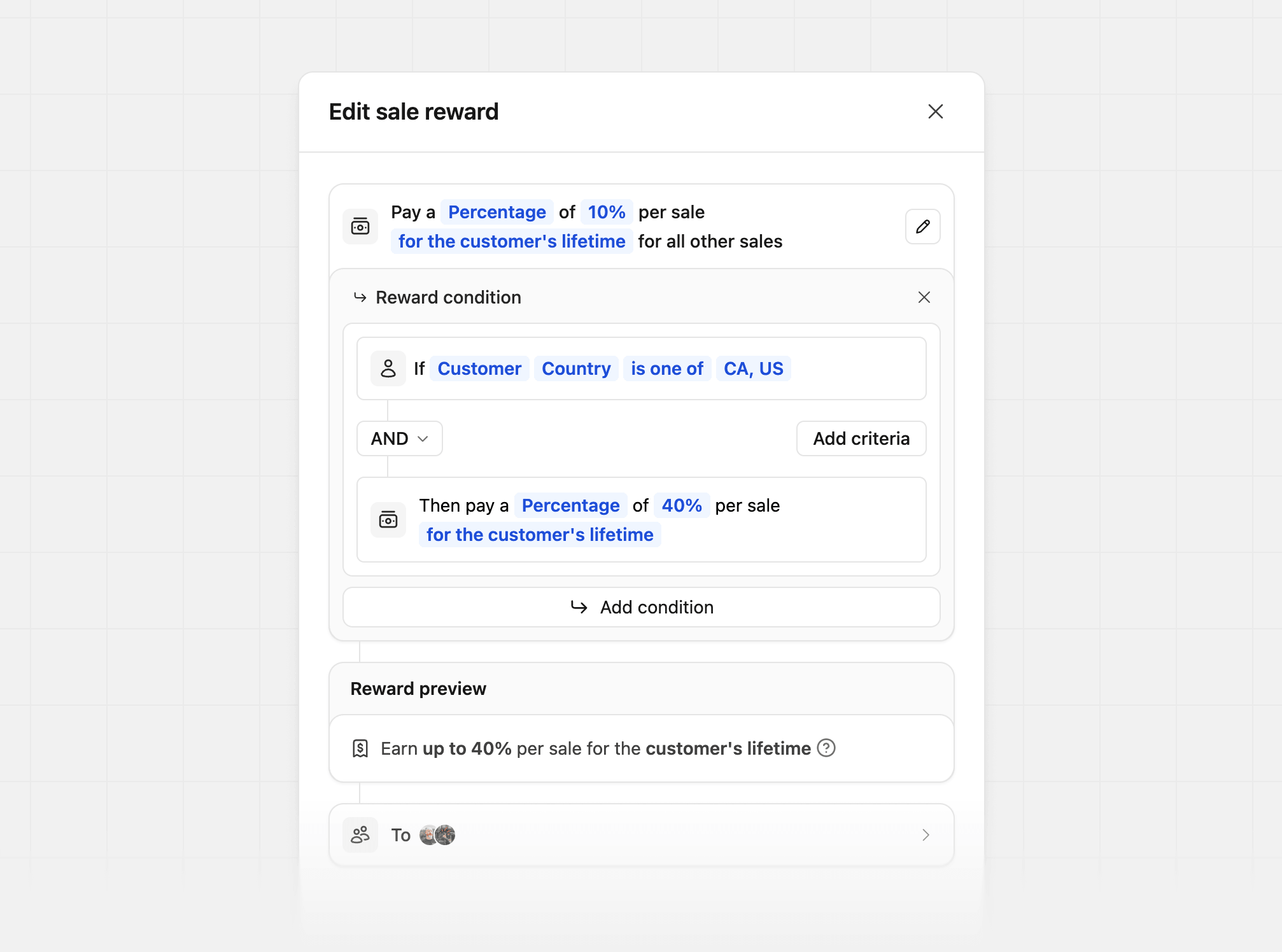
Tailor your reward amount by customer country. In this example, we're rewarding partners with a higher percentage for conversions from Canada and the United States:
## Reward examples
Here are a few reward examples with their conditions to give you some starting ideas.
Customizing reward conditions is only available on the [Advanced plan and
above](https://dub.co/pricing/partners).
### Geo-specific
Tailor your reward amount by customer country. In this example, we're rewarding partners with a higher percentage for conversions from Canada and the United States:
 | Condition | Reward | Description |
| ----------------------------------------------------------- | ----------------------------------------- | ------------------------------------------- |
| If `Customer` `Country` `is one of` `Canada, United States` | Then pay a `Percentage` of `40%` per sale | Higher reward for US and Canadian customers |
| If `Customer` `Country` `is not` `United States` | Then pay a `Percentage` of `10%` per sale | Lower reward for non-US customers |
### Staggered reward durations
Tailor your reward amount by the customer's subscription duration, subscription start date, or signup date.
In this example, we're offering a 25% reward for the first 12 months and a 10% reward for all other sales:
| Condition | Reward | Description |
| ----------------------------------------------------------- | ----------------------------------------- | ------------------------------------------- |
| If `Customer` `Country` `is one of` `Canada, United States` | Then pay a `Percentage` of `40%` per sale | Higher reward for US and Canadian customers |
| If `Customer` `Country` `is not` `United States` | Then pay a `Percentage` of `10%` per sale | Lower reward for non-US customers |
### Staggered reward durations
Tailor your reward amount by the customer's subscription duration, subscription start date, or signup date.
In this example, we're offering a 25% reward for the first 12 months and a 10% reward for all other sales:
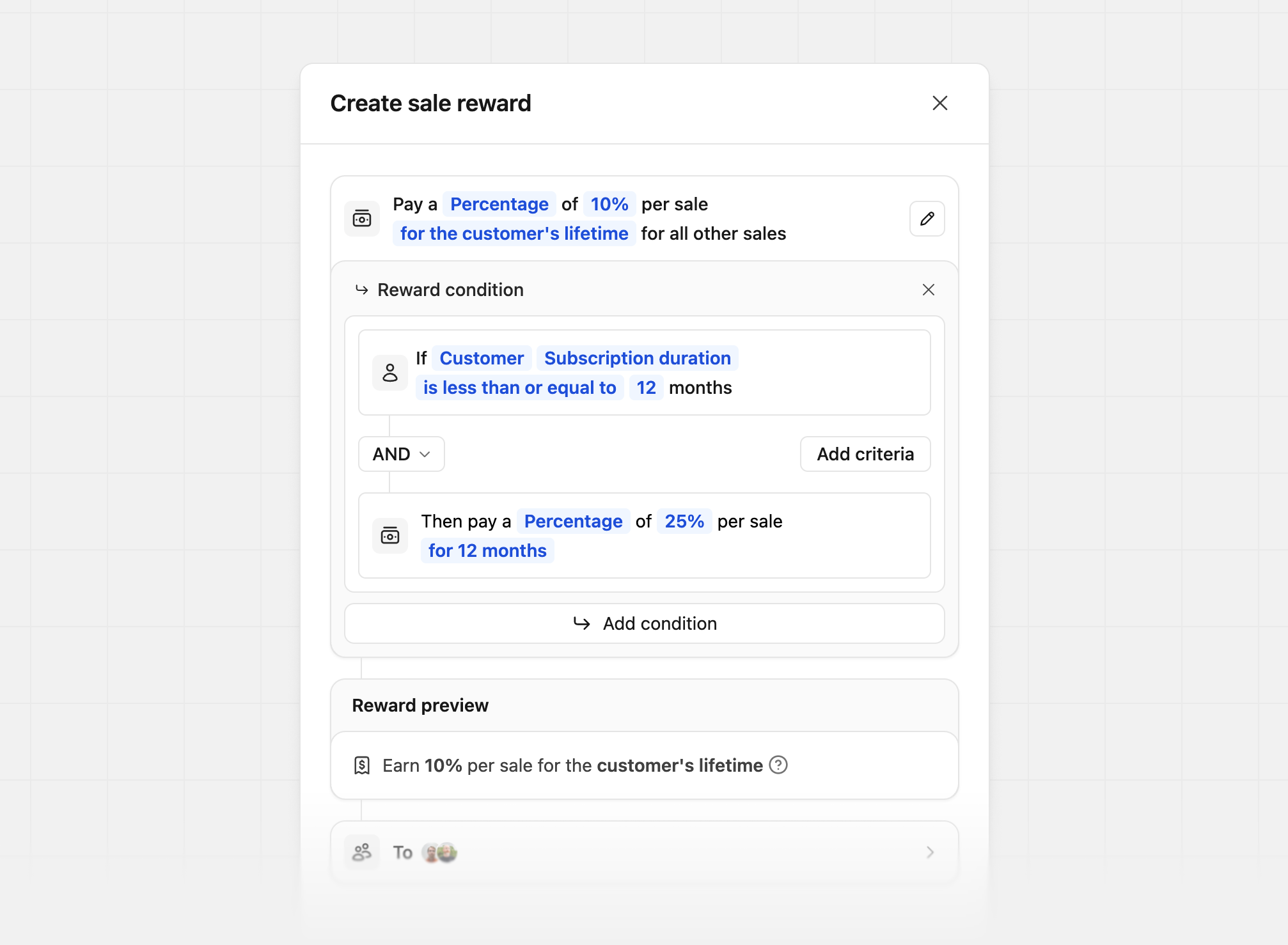 There are 3 different conditions for staggered reward durations:
| Condition type | Description | Example |
| -------------------------------------- | ------------------------------------------------ | ------------------------------------------------------------------------ |
| **Customer's subscription duration** | How long the customer has been subscribed for | 25% for the first 12 months, 10% for the rest of the customer's lifetime |
| **Customer's subscription start date** | The date the customer started their subscription | 25% if subscribed before Jan 1, 2026, else 10% |
| **Customer's signup date** | The date the customer signed up for your product | 25% if signed up before Jan 1, 2026, else 10% |
### Partner performance tiers
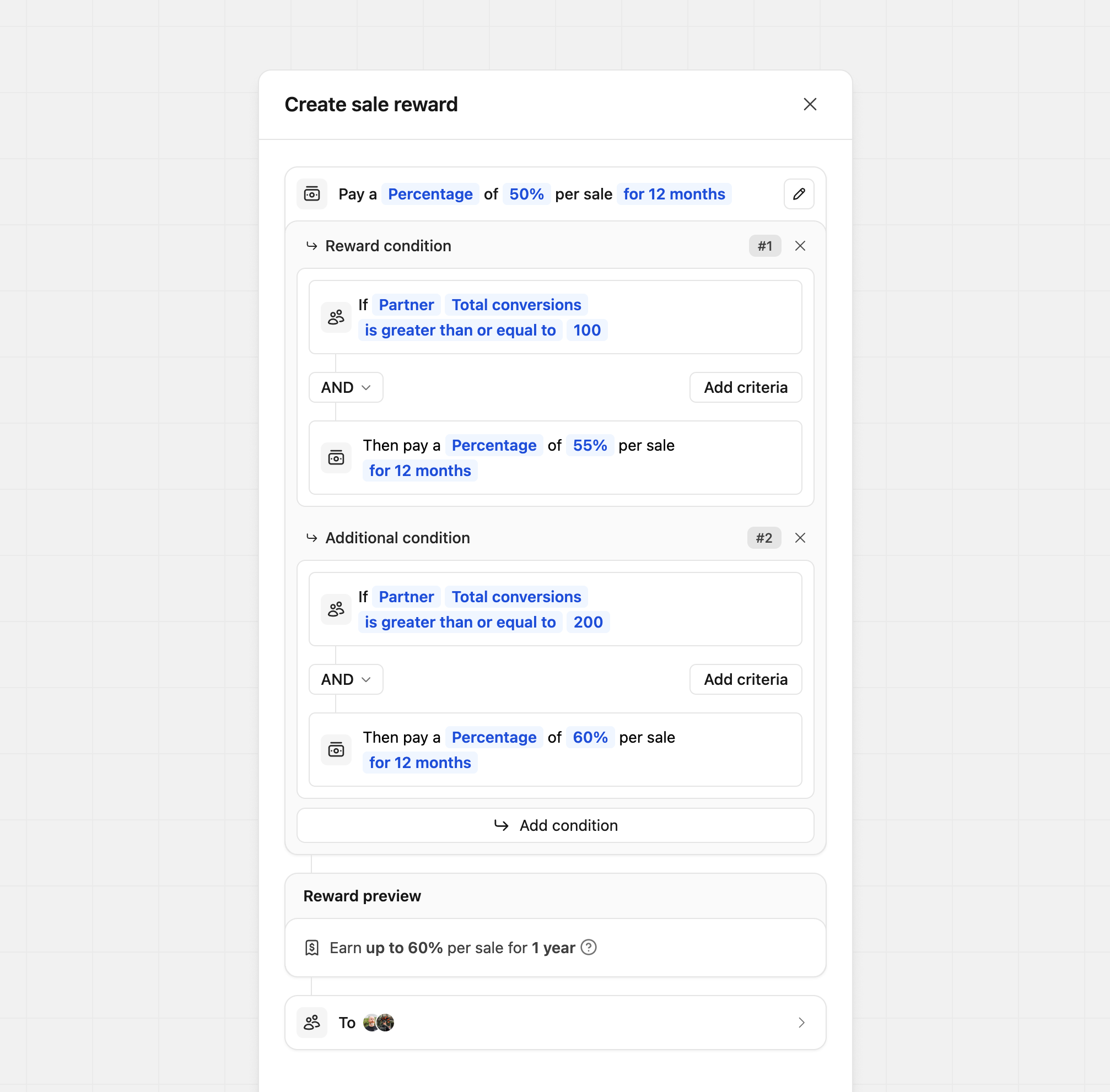
Tailor your reward amount by partner performance. In this example, we offer a 50% base reward and increase it to 60% based on how many conversions the partner has:
There are 3 different conditions for staggered reward durations:
| Condition type | Description | Example |
| -------------------------------------- | ------------------------------------------------ | ------------------------------------------------------------------------ |
| **Customer's subscription duration** | How long the customer has been subscribed for | 25% for the first 12 months, 10% for the rest of the customer's lifetime |
| **Customer's subscription start date** | The date the customer started their subscription | 25% if subscribed before Jan 1, 2026, else 10% |
| **Customer's signup date** | The date the customer signed up for your product | 25% if signed up before Jan 1, 2026, else 10% |
### Partner performance tiers
Tailor your reward amount by partner performance. In this example, we offer a 50% base reward and increase it to 60% based on how many conversions the partner has:
 | Condition | Reward | Description |
| ----------------------------------------------------------------------- | ----------------------------------------- | ------------------------------------------------------------------------ |
| If `Partner` `Total conversions` `is greater than or equal to` `200` | Then pay a `Percentage` of `60%` per sale | Higher reward for partners with more than 200 conversions |
| If `Partner` `Total revenue` `is greater than or equal to` `$10,000` | Then pay a `Percentage` of `60%` per sale | Higher reward for partners with more than \$10K in referral revenue |
| If `Partner` `Total commissions` `is greater than or equal to` `$1,000` | Then pay a `Percentage` of `60%` per sale | Higher reward for partners who have earned more than \$1K in commissions |
Want to move partners to a different partner group based on their performance
instead? [Learn more about group move
rules](/help/article/partner-groups#group-move-rules).
### Product spotlight
Tailor your reward amount by product. In this example, we're rewarding more when the sale is for the Gold Plan:
| Condition | Reward | Description |
| ----------------------------------------------------------------------- | ----------------------------------------- | ------------------------------------------------------------------------ |
| If `Partner` `Total conversions` `is greater than or equal to` `200` | Then pay a `Percentage` of `60%` per sale | Higher reward for partners with more than 200 conversions |
| If `Partner` `Total revenue` `is greater than or equal to` `$10,000` | Then pay a `Percentage` of `60%` per sale | Higher reward for partners with more than \$10K in referral revenue |
| If `Partner` `Total commissions` `is greater than or equal to` `$1,000` | Then pay a `Percentage` of `60%` per sale | Higher reward for partners who have earned more than \$1K in commissions |
Want to move partners to a different partner group based on their performance
instead? [Learn more about group move
rules](/help/article/partner-groups#group-move-rules).
### Product spotlight
Tailor your reward amount by product. In this example, we're rewarding more when the sale is for the Gold Plan:
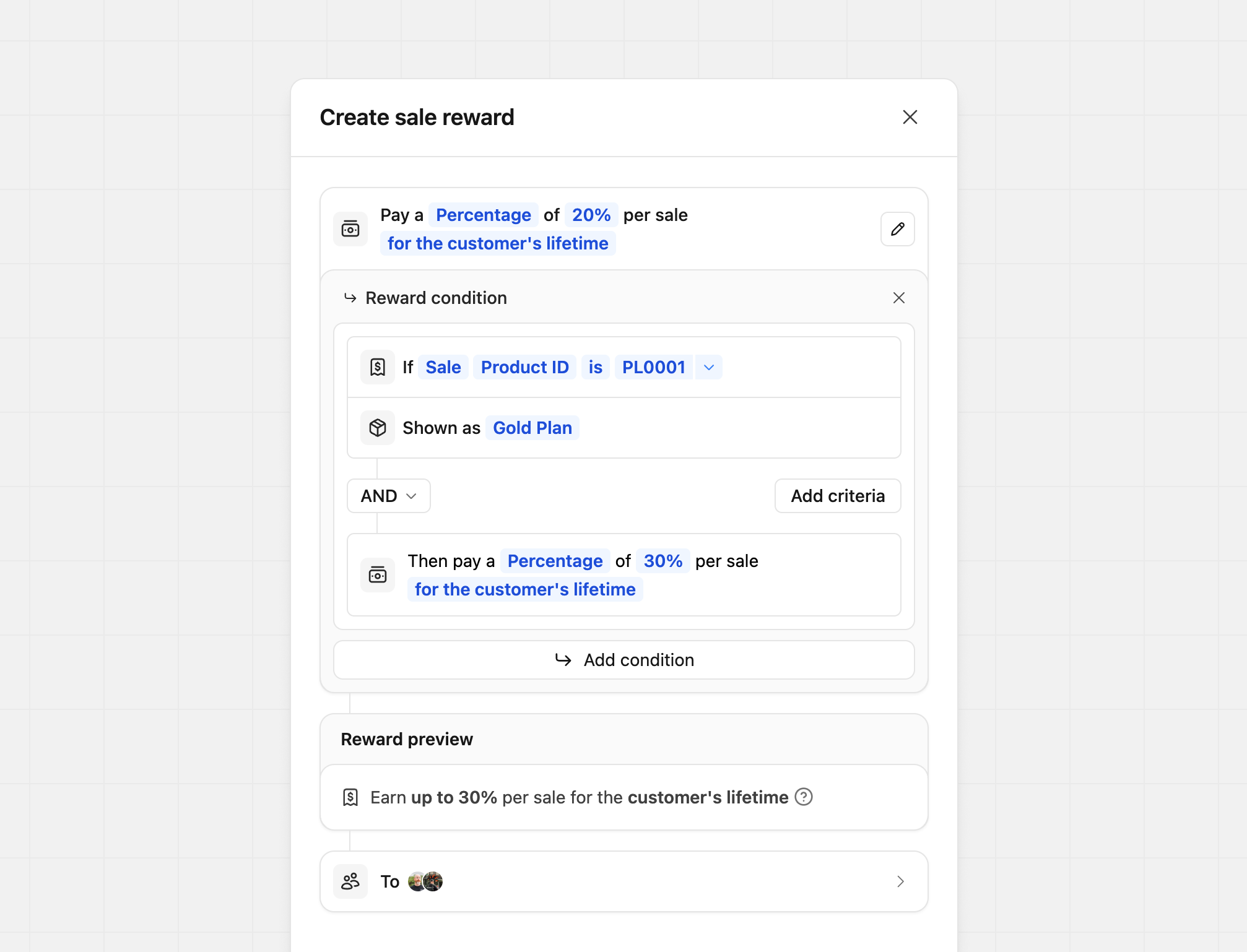 | Condition | Reward | Description |
| ------------------------------------------ | ----------------------------------------- | ------------------------------------- |
| If `Sale` `Product ID` `is` `prod_xxx` | Then pay a `Percentage` of `40%` per sale | Higher reward for `prod_xxx` sales |
| If `Sale` `Product ID` `is not` `prod_xxx` | Then pay a `Percentage` of `10%` per sale | Lower reward for non-`prod_xxx` sales |
You can also set what the partner sees as the product name by adding a `Shown
as` field to the reward.
For example, if you want to show the product as "Gold Plan" instead of the
actual product ID, you can set the `Shown as` to `Gold Plan`.
Where `Your product ID` is listed, you'll enter your product ID (the
screenshot uses an example product ID)
If you're manually tracking a sale event via our `/track/sale` endpoint, you
can pass along the product ID via the [metadata
prop](/docs/api-reference/track/sale#body-metadata-one-of-0)
(e.g. `metadata.productId = "prod_xxx"`).
If you're using our [Stripe
integration](/docs/integrations/stripe), the product ID will be the Stripe
product ID that the subscription is for (starts with `prod_xxx`). If a Stripe invoice contains multiple line
items (e.g. a base subscription plus an add-on), Dub
calculate the commission for each line item using the matching reward
rate. [See full example here](/docs/integrations/stripe#multiple-line-items-per-invoice).
### Sale amount modifiers
For creating tiered rewards based on the sale amount. In this example, we're giving our partners a higher reward if the sale amount is over a specific dollar amount:
| Condition | Reward | Description |
| ------------------------------------------ | ----------------------------------------- | ------------------------------------- |
| If `Sale` `Product ID` `is` `prod_xxx` | Then pay a `Percentage` of `40%` per sale | Higher reward for `prod_xxx` sales |
| If `Sale` `Product ID` `is not` `prod_xxx` | Then pay a `Percentage` of `10%` per sale | Lower reward for non-`prod_xxx` sales |
You can also set what the partner sees as the product name by adding a `Shown
as` field to the reward.
For example, if you want to show the product as "Gold Plan" instead of the
actual product ID, you can set the `Shown as` to `Gold Plan`.
Where `Your product ID` is listed, you'll enter your product ID (the
screenshot uses an example product ID)
If you're manually tracking a sale event via our `/track/sale` endpoint, you
can pass along the product ID via the [metadata
prop](/docs/api-reference/track/sale#body-metadata-one-of-0)
(e.g. `metadata.productId = "prod_xxx"`).
If you're using our [Stripe
integration](/docs/integrations/stripe), the product ID will be the Stripe
product ID that the subscription is for (starts with `prod_xxx`). If a Stripe invoice contains multiple line
items (e.g. a base subscription plus an add-on), Dub
calculate the commission for each line item using the matching reward
rate. [See full example here](/docs/integrations/stripe#multiple-line-items-per-invoice).
### Sale amount modifiers
For creating tiered rewards based on the sale amount. In this example, we're giving our partners a higher reward if the sale amount is over a specific dollar amount:
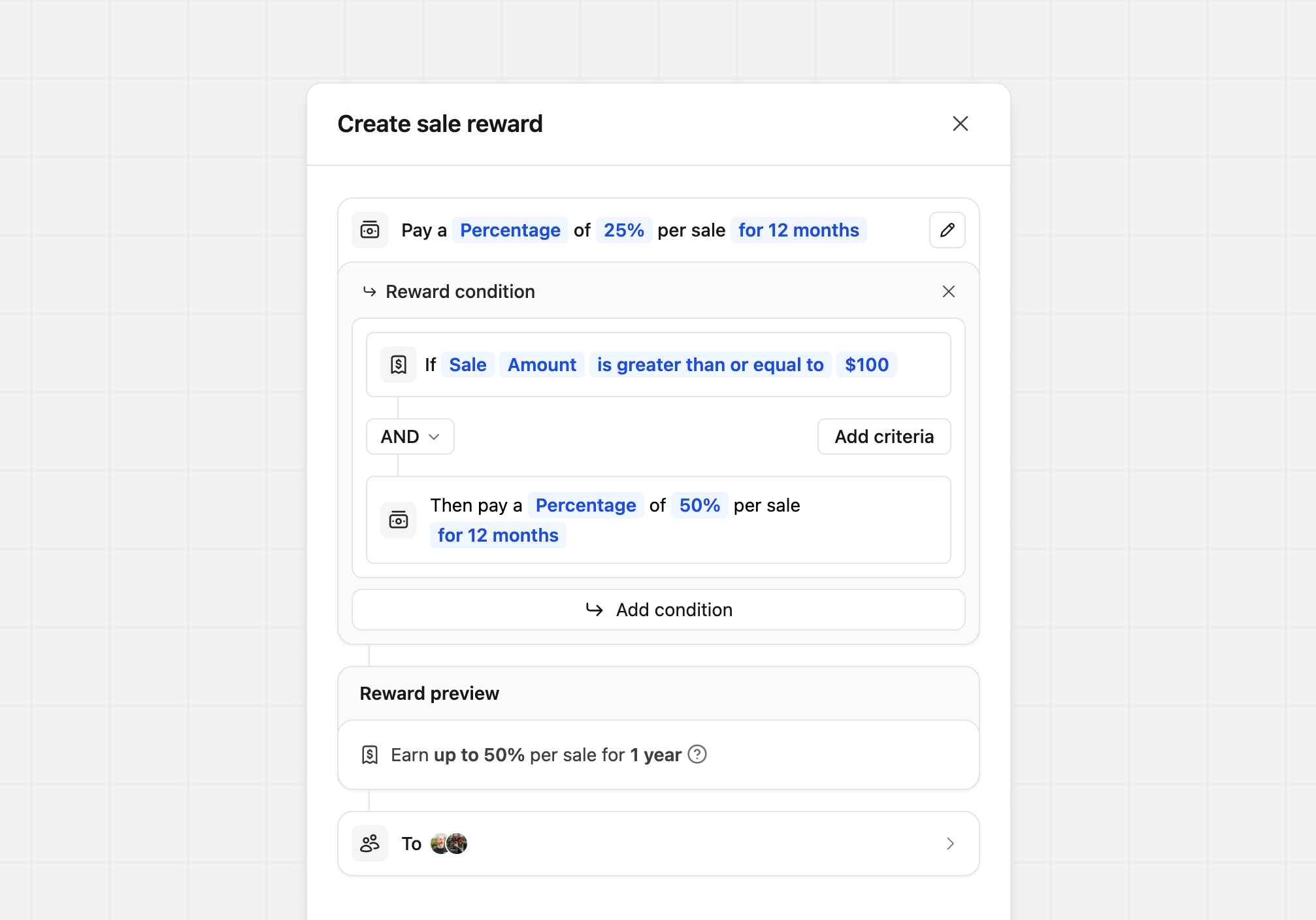 | Condition | Reward | Description |
| ------------------------------------------------------- | ----------------------------------------- | ---------------------------------- |
| If `Sale` `Amount` `is greater than or equal to` `$100` | Then pay a `Percentage` of `60%` per sale | Higher reward for sales over \$100 |
| If `Sale` `Amount` `is less than or equal to` `$100` | Then pay a `Percentage` of `60%` per sale | Lower reward for sales under \$100 |
### New vs. recurring sales
Tailor your reward amount based on whether the sale is the customer's first sale or a recurring sale. During reward creation, select `Sale` as the condition type and then choose `Type` as the condition field. This will allow you to differentiate between new and recurring sales.
| Condition | Reward | Description |
| ------------------------------------------------------- | ----------------------------------------- | ---------------------------------- |
| If `Sale` `Amount` `is greater than or equal to` `$100` | Then pay a `Percentage` of `60%` per sale | Higher reward for sales over \$100 |
| If `Sale` `Amount` `is less than or equal to` `$100` | Then pay a `Percentage` of `60%` per sale | Lower reward for sales under \$100 |
### New vs. recurring sales
Tailor your reward amount based on whether the sale is the customer's first sale or a recurring sale. During reward creation, select `Sale` as the condition type and then choose `Type` as the condition field. This will allow you to differentiate between new and recurring sales.
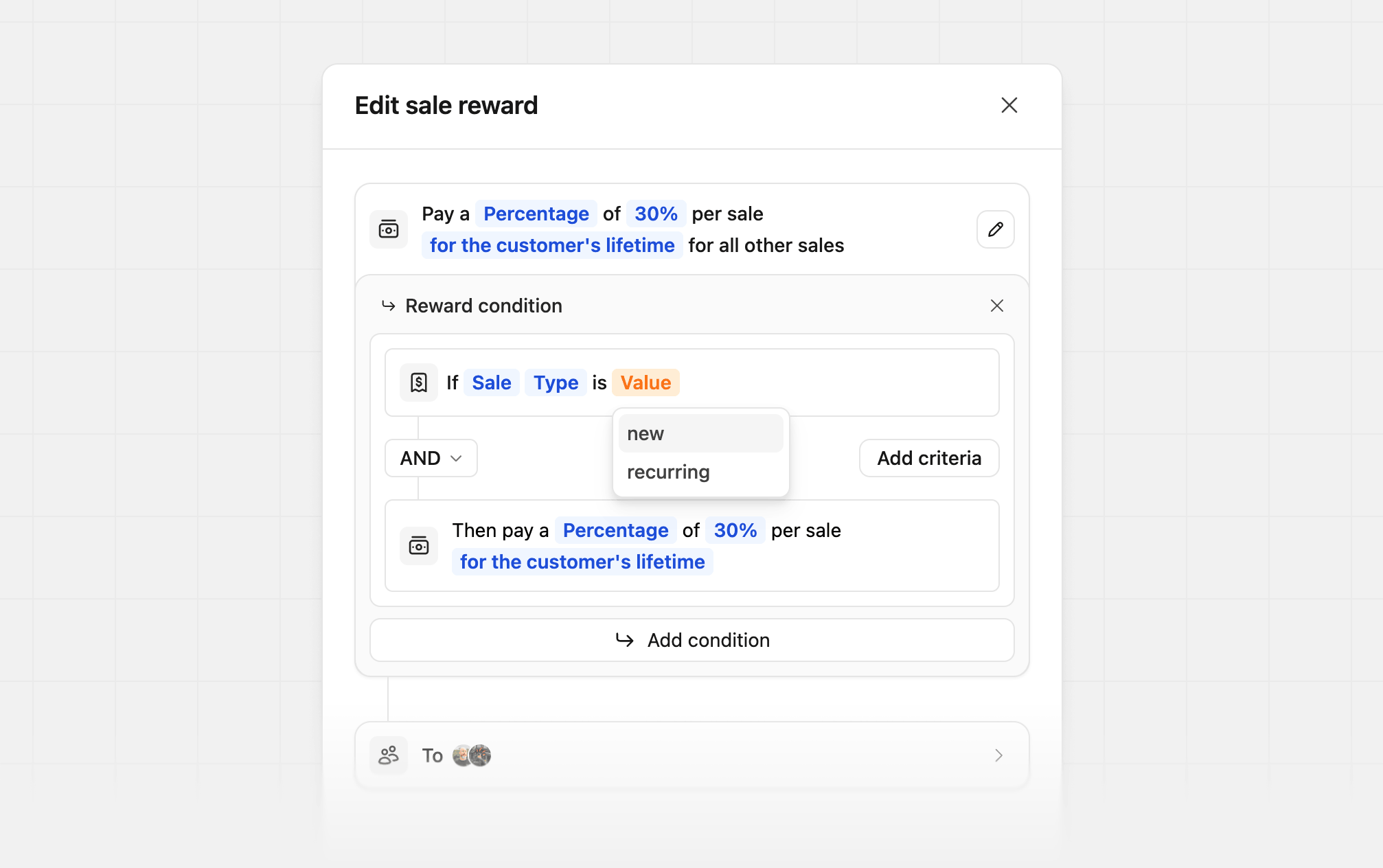 In this example, we're rewarding partners with a 80% reward for the first sale while keeping the standard recurring commission for all other sales:
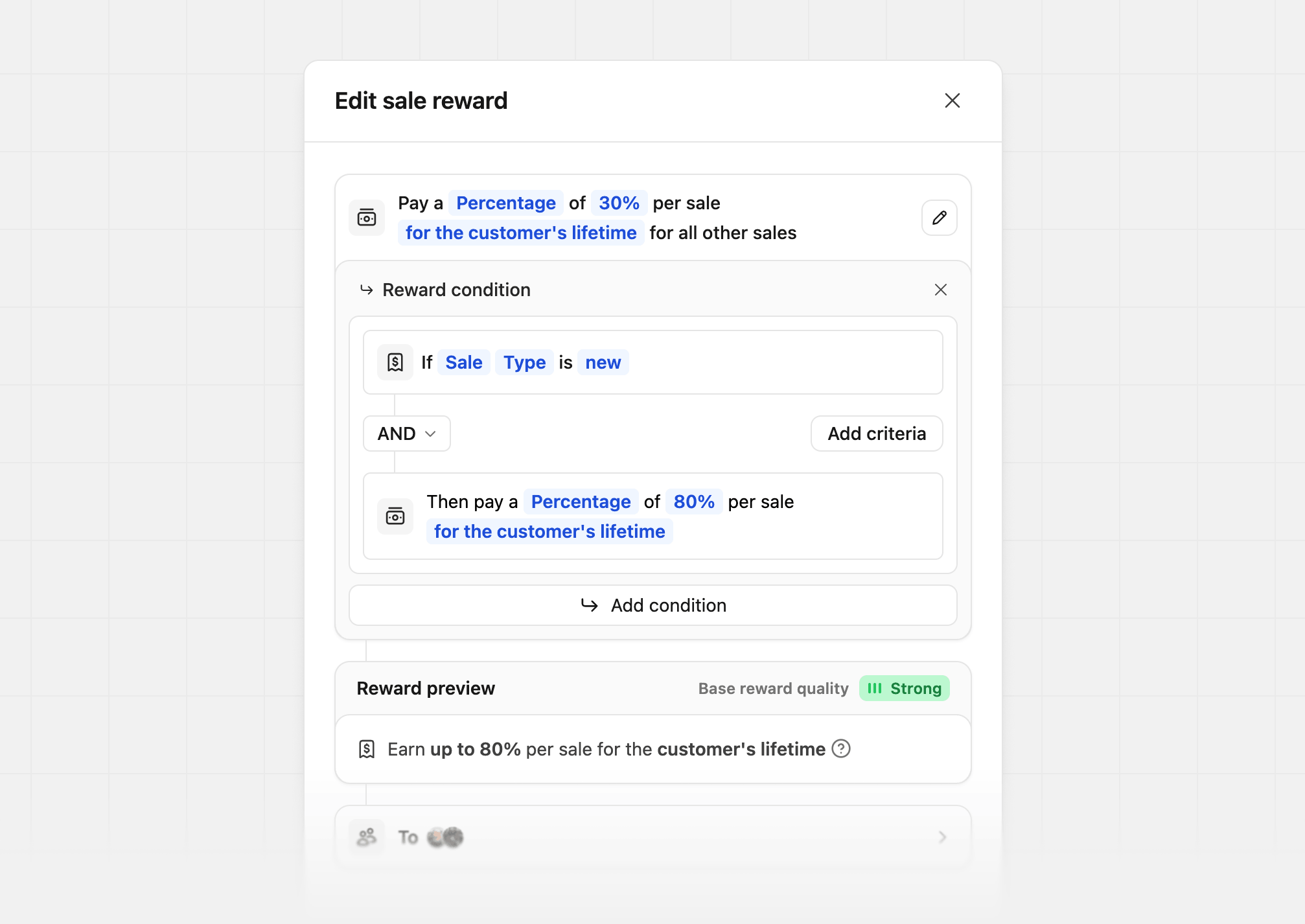 This is especially useful for subscription-based products, where you may want to offer a higher reward for the first sale to incentivize partners to acquire new customers, while offering a lower reward for recurring sales, while combining with other conditions.
| Condition | Reward | Description |
| --------------------------------- | ----------------------------------------- | ----------------------------------- |
| If `Sale` `Type` `is` `new` | Then pay a `Percentage` of `80%` per sale | First-sale bonus for new customers |
| If `Sale` `Type` `is` `recurring` | Then pay a `Percentage` of `30%` per sale | Standard reward for recurring sales |
## Updating a partner group's reward configuration
You can update a [partner group's](/help/article/partner-groups) reward configuration at any time. When this happens, historical commissions won't be updated.
However, the reward configuration for a partner-customer pair will be updated. E.g., if a partner used to be on a one-time reward and was switched to recurring rewards, all subsequent subscription renewals from their **previous referrals** will be eligible for commission again.
To avoid this, instead of editing a given partner group's reward configuration directly, create separate partner groups for one-time vs recurring rewards. This way, when you move partners from one group to the other, the reward configuration for the partner's previous referrals will be preserved.
### Group reward update logs
For transparency and auditability, we also keep a history of all reward updates for a given group:
This is especially useful for subscription-based products, where you may want to offer a higher reward for the first sale to incentivize partners to acquire new customers, while offering a lower reward for recurring sales, while combining with other conditions.
| Condition | Reward | Description |
| --------------------------------- | ----------------------------------------- | ----------------------------------- |
| If `Sale` `Type` `is` `new` | Then pay a `Percentage` of `80%` per sale | First-sale bonus for new customers |
| If `Sale` `Type` `is` `recurring` | Then pay a `Percentage` of `30%` per sale | Standard reward for recurring sales |
## Updating a partner group's reward configuration
You can update a [partner group's](/help/article/partner-groups) reward configuration at any time. When this happens, historical commissions won't be updated.
However, the reward configuration for a partner-customer pair will be updated. E.g., if a partner used to be on a one-time reward and was switched to recurring rewards, all subsequent subscription renewals from their **previous referrals** will be eligible for commission again.
To avoid this, instead of editing a given partner group's reward configuration directly, create separate partner groups for one-time vs recurring rewards. This way, when you move partners from one group to the other, the reward configuration for the partner's previous referrals will be preserved.
### Group reward update logs
For transparency and auditability, we also keep a history of all reward updates for a given group:
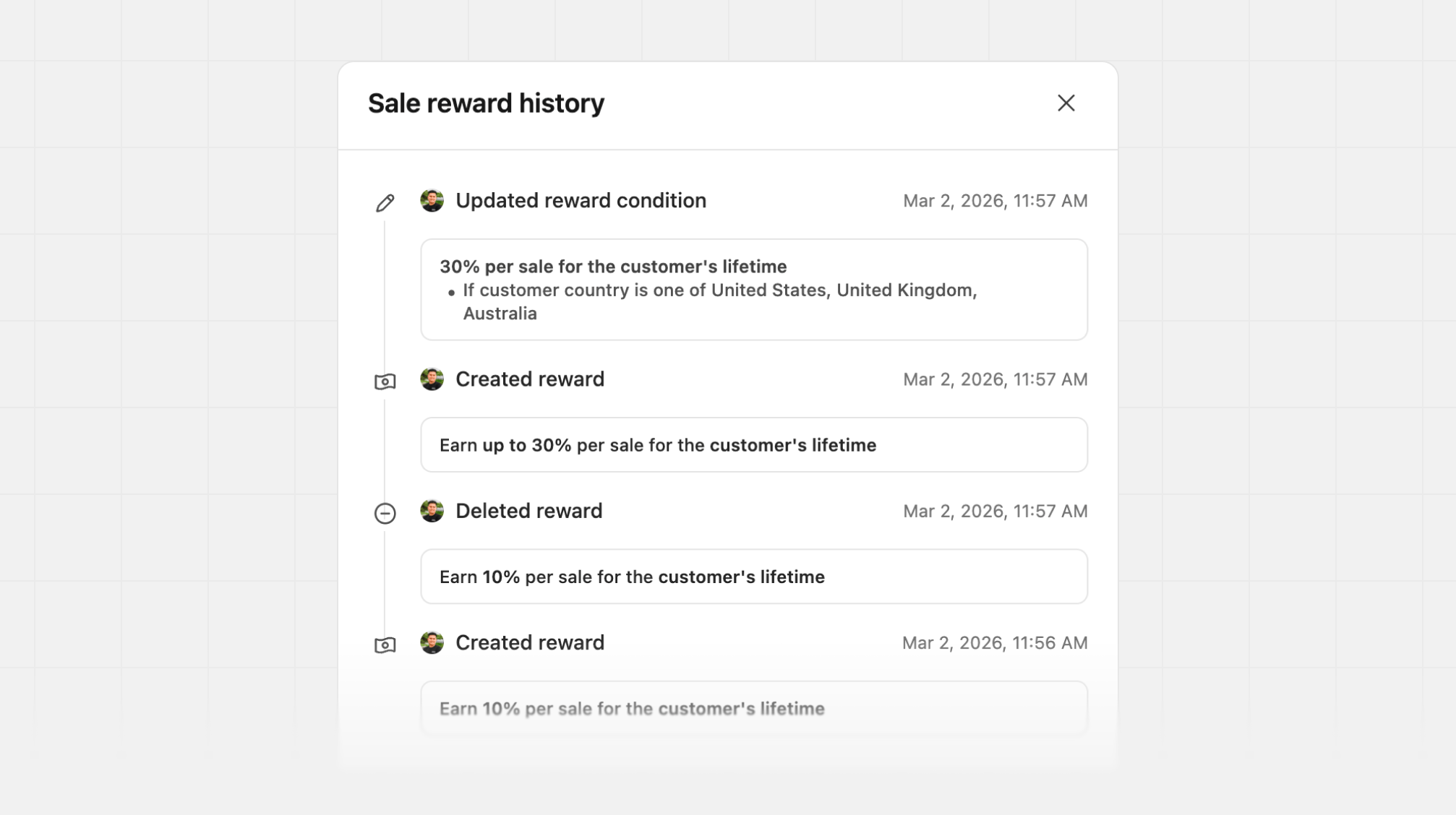 This helps you track changes over time and understand the impact of your reward configurations on the [generated partner commissions](/help/article/partner-commissions).