> ## Documentation Index
> Fetch the complete documentation index at: https://dub.co/llms.txt
> Use this file to discover all available pages before exploring further.
# Non-monetary rewards
> Learn how to create non-monetary rewards (e.g. free credits, free months, etc.) for your referral partners.
This feature is only available on [Business plans and
above](https://dub.co/pricing/partners).
With Dub Partners, you can create non-monetary rewards for your partners, such as:
* Free usage credits for every new user they refer
* Free month of service for every new user they refer – up to 12 months
This is specifically useful for referral programs – especially when you're using the [embedded referral dashboard](/docs/partners/embedded-referrals) – since it gives you an easy way to incentivize your existing userbase to refer new users to your product.
While non-monetary rewards are easy to set up, we've seen that cash incentives are generally more impactful/sustainable in the long run – especially when you're working with influencers and larger affiliates.
To get the best of both worlds, you can potentially start your users on a [non-monetary referral partner group](#step-1-set-up-a-separate-partner-group-for-non-monetary-rewards) and [graduate them to a monetary reward group](#graduating-partners-from-non-monetary-rewards-to-monetary-rewards) once they've referred a certain number of users.
## Step 1: Set up a separate partner group for non-monetary rewards
First, you would want to create a separate [partner group](/help/article/partner-groups) for your user referral program.
In this group, you can set up a [non-monetary reward](/help/article/partner-rewards) that can be either a lead or a sale-based reward:
* Lead reward: Rewarding partners for new user signups (or qualified leads if you're using [deferred lead tracking](/docs/conversions/leads/deferred))
* Sale reward: Rewarding partners for paid customer referrals
When creating the reward, you would want to set the reward amount to \$0 and add a [custom description](/help/article/partner-rewards#custom-reward-descriptions) to explain the reward to your partners:
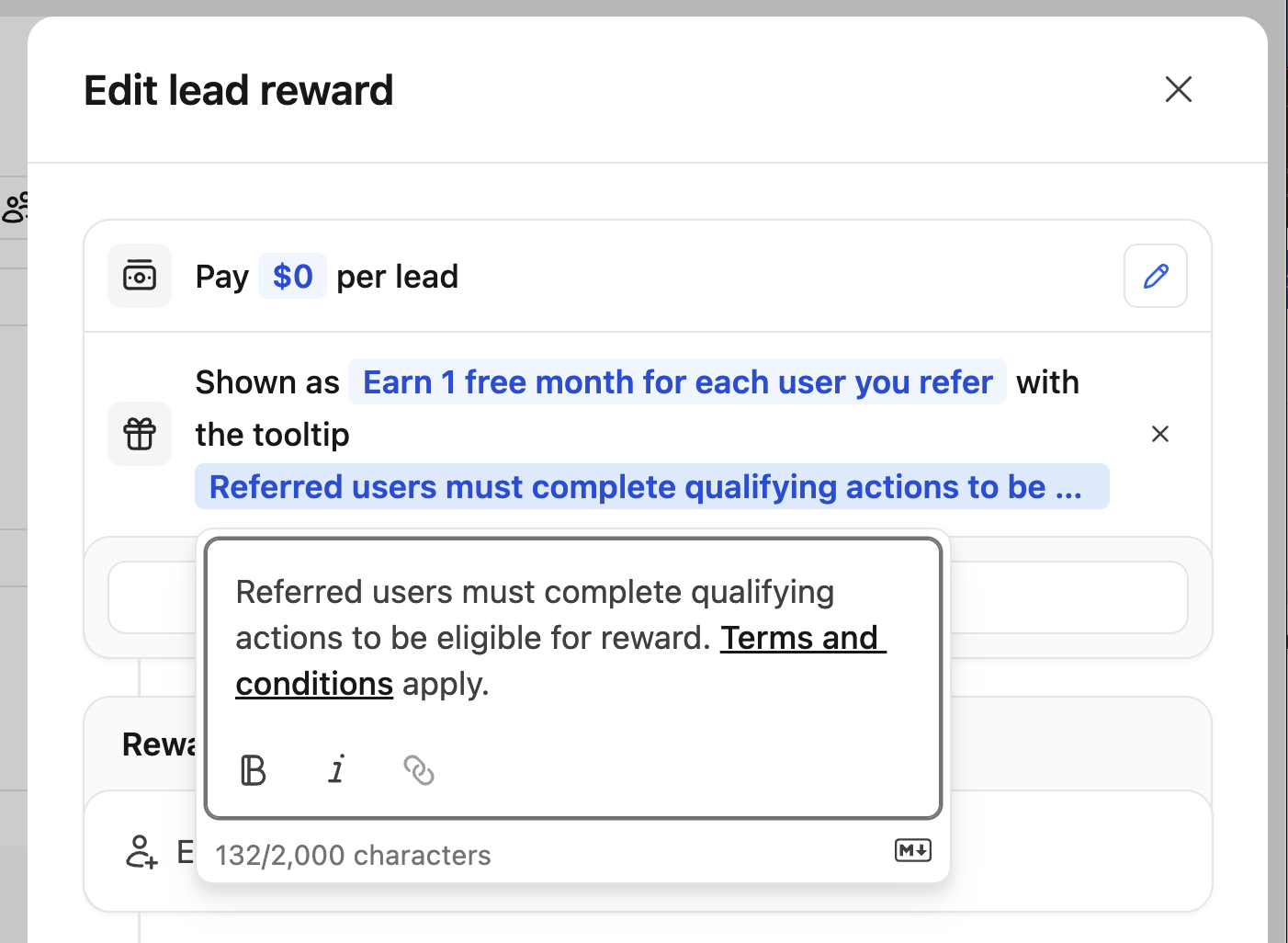 You can also set up a [custom reward
tooltip](/help/article/partner-rewards#custom-reward-descriptions) which
supports markdown formatting, so you'd be able to add links to your terms and
conditions or other relevant information.
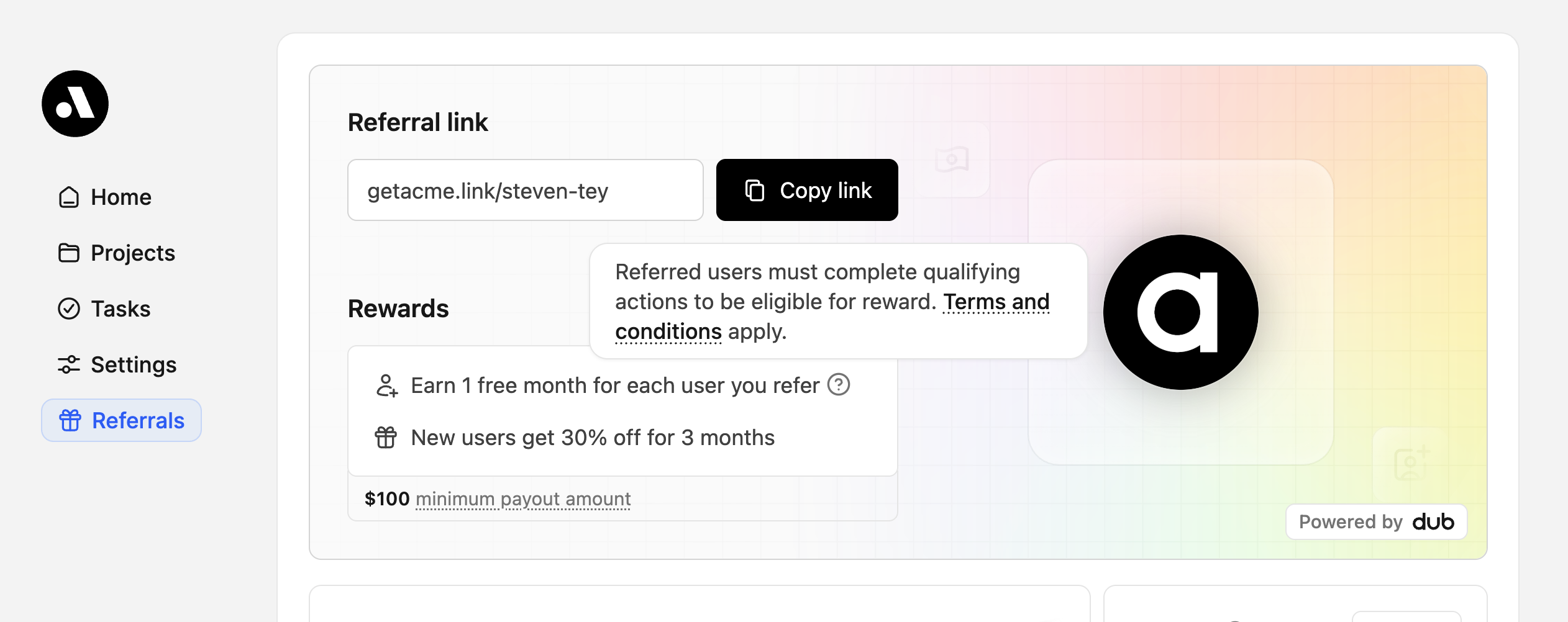
Additionally, you can also set up [dual-sided incentives](/help/article/dual-sided-incentives) for your users to offer discounts to their users who sign up via their referral link (e.g. "25% off for the first 3 months").
Once this is set up, your partners will be able to see the reward and discount in the [embedded referral dashboard](/docs/partners/embedded-referrals):
You can also set up a [custom reward
tooltip](/help/article/partner-rewards#custom-reward-descriptions) which
supports markdown formatting, so you'd be able to add links to your terms and
conditions or other relevant information.
Additionally, you can also set up [dual-sided incentives](/help/article/dual-sided-incentives) for your users to offer discounts to their users who sign up via their referral link (e.g. "25% off for the first 3 months").
Once this is set up, your partners will be able to see the reward and discount in the [embedded referral dashboard](/docs/partners/embedded-referrals):
 ## Step 2: Listen to Dub webhooks and provision rewards to your partners
To provision the non-monetary rewards (credits, free months, etc.) to your partners, you would need to listen to Dub's [webhook events](/docs/webhooks/event-types) to detect when a new signup / sale is tracked.
Depending on the reward you're offering, you would need to listen to:
* [`lead.created`](/docs/webhooks/events/lead-created) - if you're offering a lead reward
* [`sale.created`](/docs/webhooks/events/sale-created) - if you're offering a sale reward
Then, within the webhook handler, you can update the partner's Stripe subscription to provision the free credits / months accordingly:
```ts title="app/api/webhooks/dub/lead-created/route.ts" theme={null}
import Stripe from "stripe";
// Install via npm i dub / yarn add dub / pnpm add dub
import { LeadCreatedEvent } from "dub/models/components";
const stripe = new Stripe(process.env.STRIPE_SECRET_KEY!);
export async function leadCreated(data: LeadCreatedEvent["data"]) {
const { partner } = data;
if (!partner?.tenantId) return;
// Limit the number of free credits / months that a partner can receive (max 10 referrals)
if (partner.totalLeads >= 10) return;
// Get customer based on partner's tenant ID (getCustomerByTenantId is your own function)
const customer = await getCustomerByTenantId(partner.tenantId);
if (!customer?.stripeCustomerId) return;
// Get the customer's active subscription (e.g. for metered usage / free months)
// Get the customer's active subscription (e.g. for metered usage / free months)
const subscriptions = await stripe.subscriptions.list({
customer: customer.stripeCustomerId,
status: "active",
limit: 1,
});
const [subscription] = subscriptions.data;
if (!subscription?.items.data[0]) return;
// Option A: Add free credits via metered usage
await stripe.subscriptionItems.createUsageRecord(
subscription.items.data[0].id,
{ quantity: 500, timestamp: Math.floor(Date.now() / 1000) },
);
// Option B: Or extend the subscription (e.g. add 1 free month via promotion/coupon)
// await stripe.subscriptions.update(subscription.id, {
// promotion_code: "promo_free_month_per_referral",
// });
}
```
## Step 3: Graduating partners from non-monetary rewards to monetary rewards
Once a partner has referred a certain number of users, you can move them to a separate [partner group](/help/article/partner-groups) with monetary rewards (e.g. 30% commission per sale for 12 months).
There are two ways to do this:
1. [Manually move the partner](/help/article/partner-groups#moving-partners-between-groups) to the new group from the [partner details page](/help/article/managing-program-partners#viewing-partner-details) or via the [partner table](https://app.dub.co/program/partners).
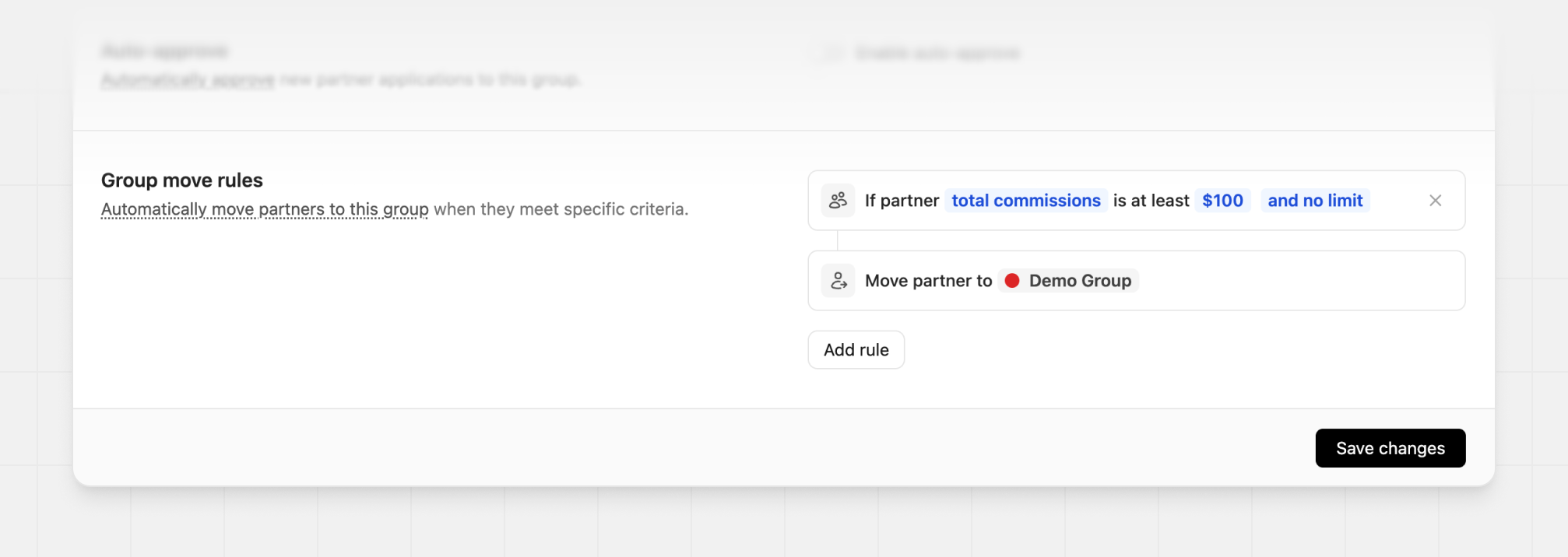
2. Automatically move the partner to the new group via [group move rules](/help/article/partner-groups#group-move-rules) based on their performance metrics (e.g. total leads, total sales, total commissions, etc.).
## Step 2: Listen to Dub webhooks and provision rewards to your partners
To provision the non-monetary rewards (credits, free months, etc.) to your partners, you would need to listen to Dub's [webhook events](/docs/webhooks/event-types) to detect when a new signup / sale is tracked.
Depending on the reward you're offering, you would need to listen to:
* [`lead.created`](/docs/webhooks/events/lead-created) - if you're offering a lead reward
* [`sale.created`](/docs/webhooks/events/sale-created) - if you're offering a sale reward
Then, within the webhook handler, you can update the partner's Stripe subscription to provision the free credits / months accordingly:
```ts title="app/api/webhooks/dub/lead-created/route.ts" theme={null}
import Stripe from "stripe";
// Install via npm i dub / yarn add dub / pnpm add dub
import { LeadCreatedEvent } from "dub/models/components";
const stripe = new Stripe(process.env.STRIPE_SECRET_KEY!);
export async function leadCreated(data: LeadCreatedEvent["data"]) {
const { partner } = data;
if (!partner?.tenantId) return;
// Limit the number of free credits / months that a partner can receive (max 10 referrals)
if (partner.totalLeads >= 10) return;
// Get customer based on partner's tenant ID (getCustomerByTenantId is your own function)
const customer = await getCustomerByTenantId(partner.tenantId);
if (!customer?.stripeCustomerId) return;
// Get the customer's active subscription (e.g. for metered usage / free months)
// Get the customer's active subscription (e.g. for metered usage / free months)
const subscriptions = await stripe.subscriptions.list({
customer: customer.stripeCustomerId,
status: "active",
limit: 1,
});
const [subscription] = subscriptions.data;
if (!subscription?.items.data[0]) return;
// Option A: Add free credits via metered usage
await stripe.subscriptionItems.createUsageRecord(
subscription.items.data[0].id,
{ quantity: 500, timestamp: Math.floor(Date.now() / 1000) },
);
// Option B: Or extend the subscription (e.g. add 1 free month via promotion/coupon)
// await stripe.subscriptions.update(subscription.id, {
// promotion_code: "promo_free_month_per_referral",
// });
}
```
## Step 3: Graduating partners from non-monetary rewards to monetary rewards
Once a partner has referred a certain number of users, you can move them to a separate [partner group](/help/article/partner-groups) with monetary rewards (e.g. 30% commission per sale for 12 months).
There are two ways to do this:
1. [Manually move the partner](/help/article/partner-groups#moving-partners-between-groups) to the new group from the [partner details page](/help/article/managing-program-partners#viewing-partner-details) or via the [partner table](https://app.dub.co/program/partners).
2. Automatically move the partner to the new group via [group move rules](/help/article/partner-groups#group-move-rules) based on their performance metrics (e.g. total leads, total sales, total commissions, etc.).