> ## Documentation Index
> Fetch the complete documentation index at: https://dub.co/llms.txt
> Use this file to discover all available pages before exploring further.
# Migrating from FirstPromoter
> Easily migrate your affiliate program from FirstPromoter to Dub Partners in just a few clicks.
export const ImageLink = ({src, alt, href, cta, className = ""}) => ;
Dub Partners is only available on [Business plans and
above](https://dub.co/pricing/partners).
FirstPromoter is a practical option for companies just starting out with their affiliate programs.
Over time, companies outgrow FirstPromoter's basic features and look for more advanced solutions to overcome some limitations, including:
1. **Frequent payout failures**: FirstPromoter supports multiple payout methods. PayPal and Wise mass payments are manual and often result in payout failures. Companies must handle tax compliance themselves, which becomes time-consuming as their affiliate base grows. FirstPromoter also offers 1-click global payouts, but this feature is only available on their [Enterprise 2 plan or higher](https://help.firstpromoter.com/en/articles/9998853-how-managed-auto-payouts-work).
2. **No affiliate network**: Since FirstPromoter doesn't offer an affiliate network, companies have to recruit affiliates on their own.
3. **Basic reward structures:** Companies can choose between two reward types: recurring or one-time sales rewards.
**With [Dub Partners](https://dub.co/partners), scaling affiliate programs is seamless.**
1. **Payouts you can rely on:** We let you [pay your partners globally](/help/article/partner-payouts) in 1-click, with tax compliance built-in, so you can have peace of mind knowing that all payouts are completed successfully.
2. **Powerful affiliate network**: With over 5,000 active affiliates in our network, Dub makes it easy to find and recruit high-performing partners with a proven track record of driving results.
3. **Advanced reward structures**: On Dub, you can choose between [3 reward types](/help/article/partner-rewards#configuring-reward-types) – per click, per lead, and per sale (flat/percentage). You can also set different [reward conditions](/help/article/partner-rewards#adding-reward-conditions) (e.g., a higher reward for customers based in the U.S. vs other countries) and create [bounties](/help/article/program-bounties) to provide additional rewards for your affiliates.
[Learn how Framer switched from FirstPromoter to
Dub](https://dub.co/customers/framer) to power 7,000+ global affiliates and
\$900,000+ in monthly payouts.
In this article, we'll learn how to import your FirstPromoter affiliate program to[ Dub Partners](/help/article/dub-partners) for a more powerful and scalable partner management experience.
## How to migrate from FirstPromoter to Dub?
If you're looking to migrate from FirstPromoter to Dub Partners, we've built a custom migration tool that will help you migrate everything over in just 2-3 clicks – without breaking any existing FirstPromoter affiliate links.
Before starting the migration process, you'll need to add a custom domain to Dub. This domain will be used to create short links for each affiliate link that we import from FirstPromoter.
If you haven't added a custom domain to Dub yet, you can [follow this guide to set that up](/help/article/how-to-add-custom-domain).
Next, [set up conversion tracking](/docs/quickstart/server) to track signup and sale events. We also have some [in-app guides that you can reference here](https://app.dub.co/guides).
For backward compatibility, we also recommend setting up [client-side click-tracking](/docs/sdks/client-side/features/click-tracking) when installing the [Dub Analytics script](/docs/sdks/client-side/introduction) on your site. This will ensure all your existing `domain.com?fp_ref=affiliate` links will keep working as expected, which gives affiliates time to update their links to the new format.
You can [follow our guide](/docs/sdks/client-side/features/click-tracking) on how to set up client-side click-tracking for your Dub short links to set that up.
[Follow this guide](https://docs.firstpromoter.com/api-reference-v1/authentication) to get your FirstPromoter API key – API keys can be created in the [Settings tab of your FirstPromoter dashboard](https://app.firstpromoter.com/settings/integrations).
You will also need to get your FirstPromoter Account ID under your [Settings tab](https://app.firstpromoter.com/settings/integrations) as well.
We will use the API key and Account ID to retrieve and import your existing FirstPromoter affiliate program campaigns to Dub.
Once you've [set up your Dub partner program](/help/article/setting-up-your-program), go to your [Partners tab](https://app.dub.co/program/partners), click on the `⋮` button and select "Import from FirstPromoter".
To save you some time, [here's a quicklink](https://app.dub.co/program/partners?import=firstpromoter) that will get you directly to the FirstPromoter import flow.
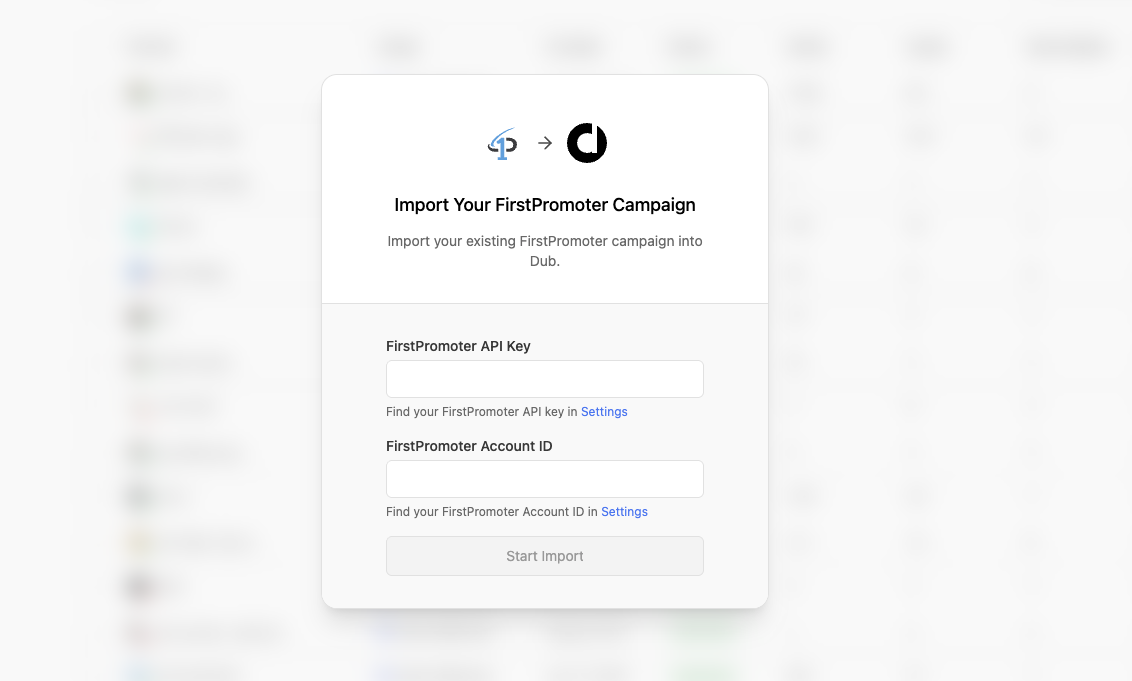 Then, add your FirstPromoter API key + Account ID and select **Continue.**
## What data is migrated?
Our FirstPromoter migration tool imports the following attributes to Dub Partners:
### Campaigns / Groups
Each of your [campaigns](https://help.firstpromoter.com/en/articles/8971305-what-are-campaigns) on FirstPromoter will be mapped to a [partner group](/help/article/partner-groups) on Dub.
Since FirstPromoter doesn't expose a `/rewards` endpoint, your FirstPromoter
program terms will not be migrated – all partners will be assigned to your
program's default reward and you would need to manually update the reward terms afterwards.
Learn more about how [Partner
rewards](/help/article/partner-rewards) work on Dub.
### Promoters / Partners
To ensure the efficiency of your partner program, we automatically filter out dormant promoters and only import the ones that are both:
* In an "accepted" state ([docs](https://docs.firstpromoter.com/api-reference-v2/api-admin/promoters/get-available-promoters#parameter-filters-state))
* Have at least 1 referral (`referrals_count > 1` → [docs](https://docs.firstpromoter.com/api-reference-v2/api-admin/promoters/get-available-promoters#parameter-filters-referrals-count))
We also automatically import all your promoters' links and recreate them in Dub using your program's domain and default URL.
### Referrals / Customers
By default, we import all referrals that are associated with an affiliate in your FirstPromoter program. This ensures that all subsequent subscription renewal events will continue to be tracked on Dub.
Some referrals might not have a valid Stripe customer ID. Those referrals will
still be imported, with the Stripe customer ID updated afterwards.
### Commissions
We also import all commissions associated with any customers that were imported above. Depending on the commission state on FirstPromoter, they will be marked accordingly on Dub as well:
| FirstPromoter | Dub |
| ------------- | ----------- |
| `Pending` | `Pending` |
| `Approved` | `Processed` |
| `Denied` | `Canceled` |
Dub also supports 4 additional commission states:
* `Paid`: When the payout containing the commission has been paid.
* `Refunded`: If the sale for the commission was refunded.
* `Fraud`: Useful for marking a sale as fraudulent and excluding it from any future payouts.
* `Duplicate`: Useful for marketing if a commission was rewarded more than once and needs to be marked as a duplicate event.
Commissions for a referral that do not have a valid Stripe customer ID or a
transaction trace will not be imported.
If there are any other attributes that you'd like to see migrated (or if you would like to customize any of the rules above), please [reach out to us](https://dub.co/contact/support) and let us know!
## Next steps
After importing your program, here are some recommended next steps:
### 1. Set up your bank account for partner payouts
Dub Partners supports [1-click payouts](/help/article/partner-payouts) to partners all across the globe.
We generally recommend using ACH for partner payouts as it is the most cost-effective option. Here's [how you can set up your bank account](/help/article/how-to-set-up-bank-account) for ACH payouts.
### 2. Notify your affiliates about the platform change
Next, you'd want to reach out to your existing partners and let them know about the platform change. To do that, you can send them an email with the following example verbiage:
> Hey,
>
> Starting today, we are switching the \[Your Company] Affiliate Program from FirstPromoter to [Dub Partners](https://dub.co/partners/).
>
> To get started, follow these steps:
>
> 1. Sign up for a Dub Partners account here: `partners.dub.co/{your_program_slug}/register`
> 2. [Connect a payout method](https://partners.dub.co/settings/payouts) to receive your commissions.
> 3. Start sharing your shiny new referral link with your audience 🚀
>
> Let us know if you have any questions!
## Take your affiliate program to the next level with Dub
Ready to take your affiliate program to the next level? [Sign up today](https://app.dub.co/register) and join companies like [Framer](https://dub.co/customers/framer) that have migrated from FirstPromoter to Dub.
Have any questions? Feel free to [reach out to us](https://dub.co/contact)!
Then, add your FirstPromoter API key + Account ID and select **Continue.**
## What data is migrated?
Our FirstPromoter migration tool imports the following attributes to Dub Partners:
### Campaigns / Groups
Each of your [campaigns](https://help.firstpromoter.com/en/articles/8971305-what-are-campaigns) on FirstPromoter will be mapped to a [partner group](/help/article/partner-groups) on Dub.
Since FirstPromoter doesn't expose a `/rewards` endpoint, your FirstPromoter
program terms will not be migrated – all partners will be assigned to your
program's default reward and you would need to manually update the reward terms afterwards.
Learn more about how [Partner
rewards](/help/article/partner-rewards) work on Dub.
### Promoters / Partners
To ensure the efficiency of your partner program, we automatically filter out dormant promoters and only import the ones that are both:
* In an "accepted" state ([docs](https://docs.firstpromoter.com/api-reference-v2/api-admin/promoters/get-available-promoters#parameter-filters-state))
* Have at least 1 referral (`referrals_count > 1` → [docs](https://docs.firstpromoter.com/api-reference-v2/api-admin/promoters/get-available-promoters#parameter-filters-referrals-count))
We also automatically import all your promoters' links and recreate them in Dub using your program's domain and default URL.
### Referrals / Customers
By default, we import all referrals that are associated with an affiliate in your FirstPromoter program. This ensures that all subsequent subscription renewal events will continue to be tracked on Dub.
Some referrals might not have a valid Stripe customer ID. Those referrals will
still be imported, with the Stripe customer ID updated afterwards.
### Commissions
We also import all commissions associated with any customers that were imported above. Depending on the commission state on FirstPromoter, they will be marked accordingly on Dub as well:
| FirstPromoter | Dub |
| ------------- | ----------- |
| `Pending` | `Pending` |
| `Approved` | `Processed` |
| `Denied` | `Canceled` |
Dub also supports 4 additional commission states:
* `Paid`: When the payout containing the commission has been paid.
* `Refunded`: If the sale for the commission was refunded.
* `Fraud`: Useful for marking a sale as fraudulent and excluding it from any future payouts.
* `Duplicate`: Useful for marketing if a commission was rewarded more than once and needs to be marked as a duplicate event.
Commissions for a referral that do not have a valid Stripe customer ID or a
transaction trace will not be imported.
If there are any other attributes that you'd like to see migrated (or if you would like to customize any of the rules above), please [reach out to us](https://dub.co/contact/support) and let us know!
## Next steps
After importing your program, here are some recommended next steps:
### 1. Set up your bank account for partner payouts
Dub Partners supports [1-click payouts](/help/article/partner-payouts) to partners all across the globe.
We generally recommend using ACH for partner payouts as it is the most cost-effective option. Here's [how you can set up your bank account](/help/article/how-to-set-up-bank-account) for ACH payouts.
### 2. Notify your affiliates about the platform change
Next, you'd want to reach out to your existing partners and let them know about the platform change. To do that, you can send them an email with the following example verbiage:
> Hey,
>
> Starting today, we are switching the \[Your Company] Affiliate Program from FirstPromoter to [Dub Partners](https://dub.co/partners/).
>
> To get started, follow these steps:
>
> 1. Sign up for a Dub Partners account here: `partners.dub.co/{your_program_slug}/register`
> 2. [Connect a payout method](https://partners.dub.co/settings/payouts) to receive your commissions.
> 3. Start sharing your shiny new referral link with your audience 🚀
>
> Let us know if you have any questions!
## Take your affiliate program to the next level with Dub
Ready to take your affiliate program to the next level? [Sign up today](https://app.dub.co/register) and join companies like [Framer](https://dub.co/customers/framer) that have migrated from FirstPromoter to Dub.
Have any questions? Feel free to [reach out to us](https://dub.co/contact)!