> ## Documentation Index
> Fetch the complete documentation index at: https://dub.co/llms.txt
> Use this file to discover all available pages before exploring further.
# What is the Dub link builder?
> Learn more about the Dub link builder, how to open it (with various shortcuts), and how to use it to create a short link.
Short links are the bread and butter of Dub. With Dub's link management platform, you can create short links and [QR codes](/help/article/custom-qr-codes) for your marketing campaigns and get [world-class analytics](/help/article/dub-analytics) on them.
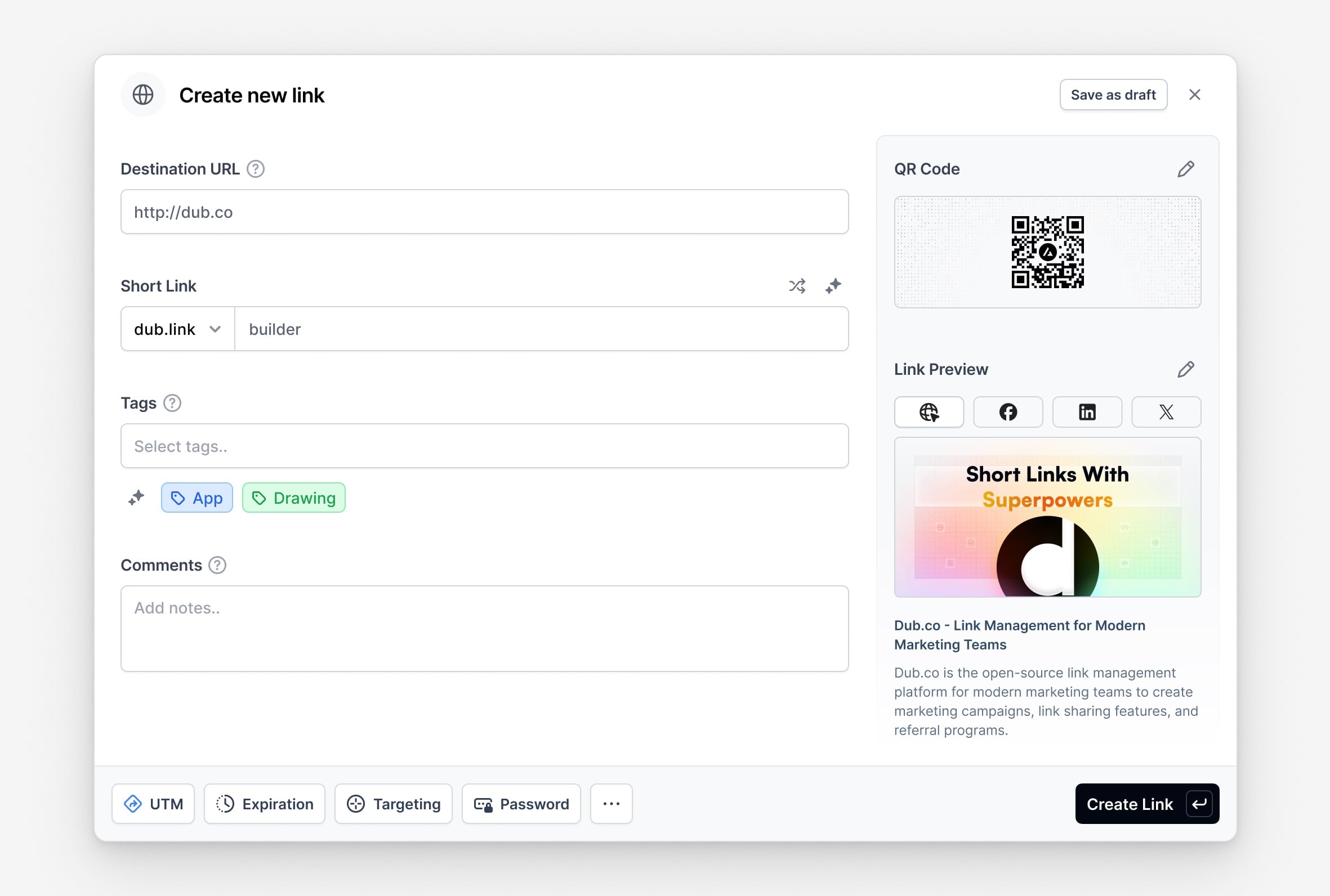
At the center of Dub is the Dub link builder. This is where you'll find all the tools & features you need to create a short link on Dub.
 ## Features of the Dub link builder
On the left half of the link builder, Dub offers a variety of advanced link features that you can use to create and manage your short links.
1. **Tag selector**: Organize your links with tags to make them easy to find. [Learn more](/help/article/how-to-use-tags).
2. **Custom link previews**: Customize how your link appears on social media with the help of AI to improve conversion rates [Learn more](/help/article/custom-link-previews).
3. **UTM Builder**: Add UTM parameters to your links. [Learn more](/help/article/utm-builder).
4. **Link Cloaking**: Mask your destination URL with your short link. [Learn more](/help/article/link-cloaking).
5. **Password Protection**: Protect your links with a password. [Learn more](/help/article/password-protected-links).
6. **Expiration Date**: Set an expiration date for your links. [Learn more](/help/article/link-expiration).
7. **Device Targeting**: Set a custom destination URL for iOS and Android devices. [Learn more](/help/article/device-targeting).
8. **Geo Targeting**: Redirect your users to different links based on their location. [Learn more](/help/article/geo-targeting).
9. **Search Engine Indexing**: Control how your links are indexed by search engines. [Learn more](/help/article/how-noindex-works).
10. **Comments**: Add comments to your links – for you and your team. [Learn more](/help/article/link-comments).
On the right half of the link builder, you get a live preview of how your short link will look on social media platforms like **X (formerly Twitter)**, **Facebook**, and **LinkedIn**.
## Keyboard shortcuts in the Dub link builder
The Dub link builder also comes with a variety of keyboard shortcuts to help you create links faster. Here's a list of all the keyboard shortcuts you can use:
| Shortcut | Action |
| -------- | ---------------------------------------------------------------------- |
| `D` | Open the domain selector |
| `T` | Open the tag selector |
| `Q` | Open the QR code modal |
| `L` | Open the [link preview](/help/article/custom-link-previews) modal |
| `U` | Open the [UTM builder](/help/article/utm-builder) |
| `E` | Open the [link expiration](/help/article/link-expiration) modal |
| `G` | Open the [geo/device targeting](/help/article/geo-targeting) modal |
| `P` | Open the [link password](/help/article/password-protected-links) modal |
| `K` | Toggle [link cloaking](/help/article/link-cloaking) |
| `S` | Toggle [search engine indexing](/help/article/how-noindex-works) |
| `A` | Open the advanced settings modal |
## How to open the Dub link builder
There are 3 ways to open the Dub link builder:
* 🐢 **Slowest**: Click on the "Create link" button on the dashboard.
* 🐇 **Faster**: Use the keyboard shortcut `c` to open the link builder.
* 🐅 **Fastest**: Just paste in a valid URL into the dashboard. This will automatically open the link builder and pre-fill the URL field.
## Link creation shortcuts on Dub
We also have a 2 nifty shortcuts that you can use to open the link builder from anywhere on the internet:
1. Enter `dub.new` in your browser. This will open the link builder in your [default Dub workspace](/help/article/how-to-change-default-workspace).
2. Prepend your short link domain in front of any URL. This will open the link builder in your [default Dub workspace](/help/article/how-to-change-default-workspace) with the URL and domain pre-filled.
## Features of the Dub link builder
On the left half of the link builder, Dub offers a variety of advanced link features that you can use to create and manage your short links.
1. **Tag selector**: Organize your links with tags to make them easy to find. [Learn more](/help/article/how-to-use-tags).
2. **Custom link previews**: Customize how your link appears on social media with the help of AI to improve conversion rates [Learn more](/help/article/custom-link-previews).
3. **UTM Builder**: Add UTM parameters to your links. [Learn more](/help/article/utm-builder).
4. **Link Cloaking**: Mask your destination URL with your short link. [Learn more](/help/article/link-cloaking).
5. **Password Protection**: Protect your links with a password. [Learn more](/help/article/password-protected-links).
6. **Expiration Date**: Set an expiration date for your links. [Learn more](/help/article/link-expiration).
7. **Device Targeting**: Set a custom destination URL for iOS and Android devices. [Learn more](/help/article/device-targeting).
8. **Geo Targeting**: Redirect your users to different links based on their location. [Learn more](/help/article/geo-targeting).
9. **Search Engine Indexing**: Control how your links are indexed by search engines. [Learn more](/help/article/how-noindex-works).
10. **Comments**: Add comments to your links – for you and your team. [Learn more](/help/article/link-comments).
On the right half of the link builder, you get a live preview of how your short link will look on social media platforms like **X (formerly Twitter)**, **Facebook**, and **LinkedIn**.
## Keyboard shortcuts in the Dub link builder
The Dub link builder also comes with a variety of keyboard shortcuts to help you create links faster. Here's a list of all the keyboard shortcuts you can use:
| Shortcut | Action |
| -------- | ---------------------------------------------------------------------- |
| `D` | Open the domain selector |
| `T` | Open the tag selector |
| `Q` | Open the QR code modal |
| `L` | Open the [link preview](/help/article/custom-link-previews) modal |
| `U` | Open the [UTM builder](/help/article/utm-builder) |
| `E` | Open the [link expiration](/help/article/link-expiration) modal |
| `G` | Open the [geo/device targeting](/help/article/geo-targeting) modal |
| `P` | Open the [link password](/help/article/password-protected-links) modal |
| `K` | Toggle [link cloaking](/help/article/link-cloaking) |
| `S` | Toggle [search engine indexing](/help/article/how-noindex-works) |
| `A` | Open the advanced settings modal |
## How to open the Dub link builder
There are 3 ways to open the Dub link builder:
* 🐢 **Slowest**: Click on the "Create link" button on the dashboard.
* 🐇 **Faster**: Use the keyboard shortcut `c` to open the link builder.
* 🐅 **Fastest**: Just paste in a valid URL into the dashboard. This will automatically open the link builder and pre-fill the URL field.
## Link creation shortcuts on Dub
We also have a 2 nifty shortcuts that you can use to open the link builder from anywhere on the internet:
1. Enter `dub.new` in your browser. This will open the link builder in your [default Dub workspace](/help/article/how-to-change-default-workspace).
2. Prepend your short link domain in front of any URL. This will open the link builder in your [default Dub workspace](/help/article/how-to-change-default-workspace) with the URL and domain pre-filled.