> ## Documentation Index
> Fetch the complete documentation index at: https://dub.co/llms.txt
> Use this file to discover all available pages before exploring further.

# Client-side click tracking

> Track clicks on the client-side using query parameters

With the [Dub Analytics script](/docs/sdks/client-side/introduction), you can track clicks on the client-side using query parameters (e.g. `?via=john`, `?ref=jane`).

A few use cases include:

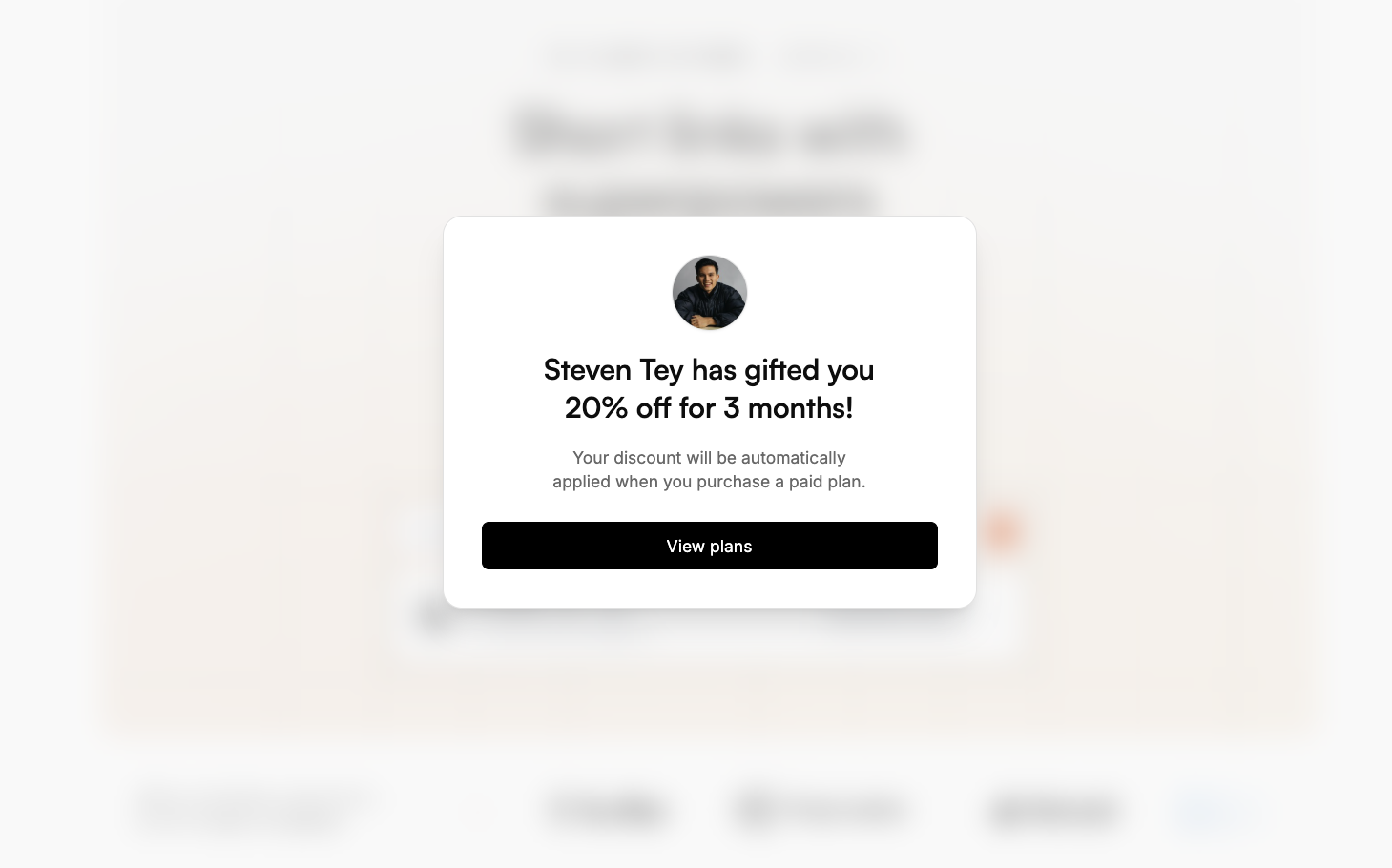
* You're using [Dub Partners](/help/article/dub-partners) with [dual-sided incentives](/help/article/dual-sided-incentives) and want to display a banner that says: *"John referred you to Acme and gave you 25% off"*
* You are migrating from an existing affiliate management platform (e.g. [Rewardful](/help/article/migrating-from-rewardful)) that uses query parameters to track conversions.
* You are running an ad on a platform like Google/Reddit that requires you to use your main site domain for the URL (no short links allowed) – so instead of using a short link, you can use a query parameter to track clicks.
* You have dynamically generated referral pages (e.g. [Tesla](https://www.tesla.com/referral/peeroke520149)) and want to track clicks [using a `trackClick()` function](#manually-tracking-clicks-with-the-trackclick-function) inside your application code.

## Quickstart

Here's how you can enable client-side click-tracking with the Dub Analytics script:

<Steps>
  <Step title="Add a custom domain to your Dub workspace">
    First, you'll need to [add a custom short link domain](/help/article/how-to-add-custom-domain) to your Dub workspace. You can use a domain you already own, or leverage our [free .link domain offer](/help/article/free-dot-link-domain) to register a custom domain like `yourcompany.link` for free.

    This is the domain that you'll use for your short links on Dub.
  </Step>

  <Step title="Allowlist your site's domain">
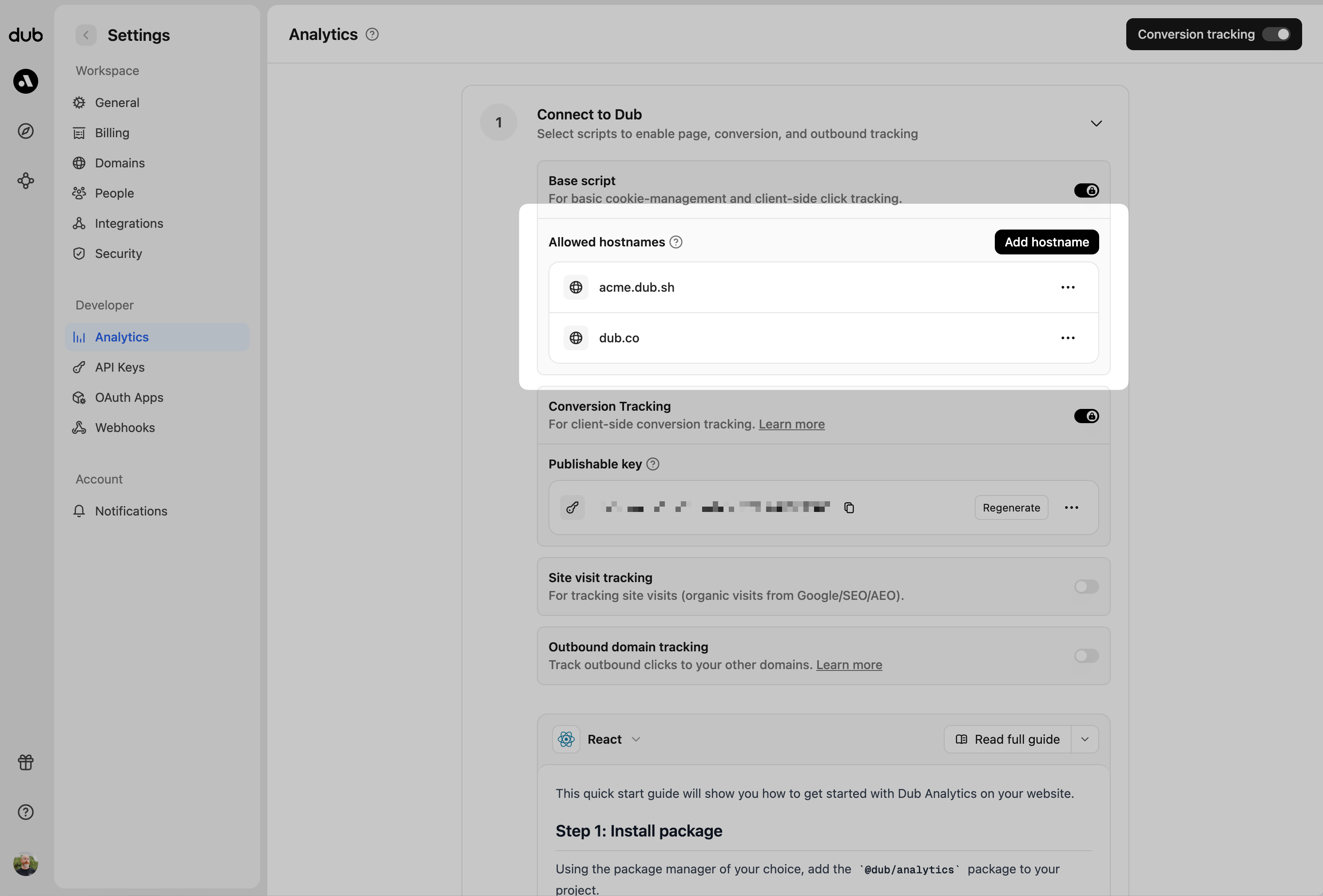
    Then, you'll need to allowlist your site's domain to allow the client-side click events to be ingested by Dub. To do that, navigate to your [workspace's Tracking settings page](https://app.dub.co/settings/tracking) and add your site's domain to the **Allowed Hostnames** list.

    <Frame>
      <img src="https://mintcdn.com/dub/7gz73MV2fRr5fJas/images/conversions/allowed-hostnames.png?fit=max&auto=format&n=7gz73MV2fRr5fJas&q=85&s=da26eba128e89211e7bfd7cf46ba32e0" alt="Enabling conversion tracking for a workspace" width="2979" height="2018" data-path="images/conversions/allowed-hostnames.png" />
    </Frame>

    You can group your hostnames when adding them to the allow list:

    * `example.com`: Tracks traffic **only** from `example.com`.
    * `*.example.com`: Tracks traffic from **all subdomains** of `example.com`, but **not** from `example.com` itself.

    <Tip>
      When testing things out locally, you can add `localhost` to the **Allowed
      Hostnames** list temporarily. This will allow local events to be ingested by
      Dub. Don't forget to remove it once you're ready to go live!
    </Tip>
  </Step>

  <Step title="Install the Dub client-side SDK">
    Next, install the Dub [client-side SDK](/docs/sdks/client-side/introduction) and initialize it with the domain you added in the previous step.

    <CodeGroup>
      ```javascript HTML theme={null}
      // include this script tag in your HTML Head tag
      <script
        src="https://www.dubcdn.com/analytics/script.js"
        data-domains='{"refer": "go.example.com"}'
        defer
      ></script>
      ```

      ```typescript React/Next.js theme={null}
      // install the package (e.g. npm install @dub/analytics)
      import { Analytics as DubAnalytics } from "@dub/analytics/react";

      export default function App() {
        return (
          <Layout>
            <DubAnalytics
              domainsConfig={{
                refer: "go.example.com", // the custom domain you're using on Dub for your short links
              }}
            />
            {/* Your app code here */}
          </Layout>
        );
      }
      ```
    </CodeGroup>

    Here's the full list of parameters you can pass to the script:

    <Accordion title="Parameters">
      <ParamField body="apiHost" type="url" default="https://api.dub.co">
        The base URL for the Dub API. This is useful for [setting up reverse
        proxies](/docs/sdks/client-side/features/reverse-proxy-support) to avoid
        adblockers.
      </ParamField>

      <ParamField body="attributionModel" type="first-click | last-click" default="last-click">
        The attribution model to use for the analytics event. The following
        attribution models are available:

        * `first-click`: The first click model
          gives all the credit to the first touchpoint in the customer journey.
        * `last-click`: The last click model gives all the credit to the last
          touchpoint in the customer journey.
      </ParamField>

      <ParamField body="cookieOptions" type="CookieOption Object">
        <Expandable title="properties">
          <ParamField body="domain" type="string">
            Specifies the value for the `Domain` Set-Cookie attribute. This is useful
            for cross-domain tracking. Example: `.example.com`
          </ParamField>

          <ParamField body="expires" type="integer" default="90">
            Specifies the `Date` object to be the value for the `Expires` Set-Cookie
            attribute. Example: `new Date('2024-12-31')`
          </ParamField>

          <ParamField body="expiresInDays" type="integer" default="90">
            Specifies the number (in days) to be the value for the `Expires`
            Set-Cookie attribute. Example: `90`
          </ParamField>

          <ParamField body="path" type="string" default="/">
            Specifies the value for the `Path` Set-Cookie attribute. By default, the
            path is considered the "default path". Example: `/`
          </ParamField>
        </Expandable>
      </ParamField>

      <ParamField body="domainsConfig" type="JSON-stringified object">
        Configure the domains that Dub will track. The following properties are available:

        <Expandable title="properties">
          <ParamField body="refer" type="string">
            The Dub custom domain for [referral program client-side click tracking](http://d.to/clicks/refer)
            (previously `shortDomain`).
            Example: `refer.dub.co`
          </ParamField>

          <ParamField body="site" type="string">
            The Dub short domain for tracking site visits.
            Example: `site.dub.co`
          </ParamField>

          <ParamField body="outbound" type="string | string[]">
            An array of domains for cross-domain tracking. When configured, the existing
            `dub_id` cookie will be automatically appended to all outbound links
            targeting these domains to enable cross-domain tracking across different
            applications.
            Example: `["dub.sh", "git.new"]`
          </ParamField>
        </Expandable>
      </ParamField>

      <ParamField body="queryParams" type="string[]" default="[&#x22;via&#x22;]">
        An array of query parameters to listen to for client-side click-tracking (e.g.
        `?via=abc123`).
      </ParamField>

      <ParamField body="scriptProps" type="HTMLScriptElement Object">
        Custom properties to pass to the script tag. Refer to
        [MDN](https://developer.mozilla.org/en-US/docs/Web/API/HTMLScriptElement) for
        all available options.
      </ParamField>
    </Accordion>
  </Step>

  <Step title="(Optional, but recommended): Set up a reverse proxy">
    To avoid ad-blockers from blocking your click-tracking requests, we recommend setting up a reverse proxy.

    Refer to the [Reverse-proxy support](/docs/sdks/client-side/features/reverse-proxy-support) guide to learn how to set one up.
  </Step>

  <Step title="Verify your setup">
    To verify that your click-tracking is working, run your website locally and append the URL with the unique key of your short link

    For example, if your short link is `https://go.example.com/abc123`, you'll need to append `?via=abc123` to the URL.

    Once you've done that, check if the following is true:

    1. There is a successful `/track/click` request in your browser's **Network** tab (and no errors in the **Console** tab).
    2. The `dub_id` cookie is being set upon a successful `/track/click` request.
    3. The click tracked correctly in the [**Events**](https://app.dub.co/events) tab of your Dub workspace.
  </Step>
</Steps>

## Automatically fetching partner and discount data

If you're using [Dub Partners](https://dub.co/partners) with [dual-sided incentives](/help/article/dual-sided-incentives), the script will automatically fetch the partner and discount data for you when someone lands on your site via a valid referral link.

This data will be stored as a JSON-stringified object in the `dub_partner_data` cookie in the following format:

```json theme={null}
{
  "clickId": "xxx", // unique ID of the click event
  "partner": {
    "id": "pn_xxx", // unique ID of the partner on Dub
    "name": "John Doe", // name of the partner
    "image": "https://example.com/john.png", // avatar of the partner
    "groupId": "grp_xxx", // unique ID of the group the partner belongs to
    "tenantId": "user_xxx" // partner's unique ID in your database
  },
  "discount": {
    "id": "disc_xxx", // unique ID of the discount on Dub
    "amount": 25, // discount amount (either a percentage or a fixed amount)
    "type": "percentage", // type of the discount (either "percentage" or "fixed")
    "maxDuration": 3, // maximum duration of the discount in months
    "couponId": "XZuejd0Q", // Stripe coupon code
    "couponTestId": "2NMXz81x" // Stripe test coupon ID
  }
}
```

You can access partner and discount data in your application code using the `useAnalytics()` hook. If you’re working in a non-React environment, you can use the `DubAnalytics` object directly.

Here is a quick example of how you can display a discount banner using the `useAnalytics()` hook:

<CodeGroup>
  ```javascript HTML theme={null}
  // Display a banner that says: _"John referred you to Acme and gave you 25% off"_
  dubAnalytics("ready", function () {
    if (DubAnalytics.partner && DubAnalytics.discount) {
      const banner = document.createElement("div");

      banner.innerHTML = `
        <div class="flex items-center gap-2">
          <img src="${DubAnalytics.partner.image}" alt="${DubAnalytics.partner.name}" class="size-6 rounded-full" />
          <p>${DubAnalytics.partner.name} referred you to Acme and gave you ${DubAnalytics.discount.amount} ${DubAnalytics.discount.type} off</p>
        </div>
      `;
      document.body.appendChild(banner);
    }
  });
  ```

  ```typescript React/Next.js theme={null}
  // Display a banner that says: _"John referred you to Acme and gave you 25% off"_
  import { useAnalytics } from "@dub/analytics/react";

  function DiscountBanner() {
    const { partner, discount } = useAnalytics();

    if (!partner || !discount) {
      return null;
    }

    return (
      <div className="flex items-center gap-2">
        <img
          src={partner.image}
          alt={partner.name}
          className="size-6 rounded-full"
        />
        <p>
          {partner.name} referred you to Acme and gave you {discount.amount}{" "}
          {discount.type} off
        </p>
      </div>
    );
  }
  ```
</CodeGroup>

Here's an example of how the discount banner will look like:

<Frame>
  <img src="https://mintcdn.com/dub/F9cdc9nB_SI4yl65/images/dub-partner-data.png?fit=max&auto=format&n=F9cdc9nB_SI4yl65&q=85&s=26eca59d43a93804f2307991c6c83381" alt="A screenshot of the Dub partner data example" width="1459" height="910" data-path="images/dub-partner-data.png" />
</Frame>

## Manually tracking clicks with the `trackClick()` function

This is helpful for tracking clicks on:

* Dynamically generated referral pages (e.g. [Tesla](https://www.tesla.com/referral/peeroke520149))
* Dynamic user-generated content/webpages:
  * Dub's public analytics dashboards (e.g. [app.dub.co/share/:slug](https://app.dub.co/share/dash_6NSA6vNm017MZwfzt8SubNSZ))
  * v0 template pages (e.g. [v0.app/templates/:slug](https://v0.app/templates/evasion-e-commerce-template-annqMtFCROP))
  * Tella's video pages (e.g. [tella.tv/video/:slug](https://www.tella.tv/video/cluvcfcfi00tw0fjrgizr4pw2))

The `trackClick()` function allows you to manually trigger click events from your application code. This is useful when you want to track clicks that happen programmatically.

The `trackClick()` function accepts an object with the following parameters:

<ParamField body="domain" type="string" required>
  The domain of the short link (e.g. `getacme.link`)
</ParamField>

<ParamField body="key" type="string" required>
  The short link slug (e.g. `john`)
</ParamField>

Here's how you can use the `trackClick()` function in your application:

<CodeGroup>
  ```javascript HTML theme={null}
  document.addEventListener("DOMContentLoaded", function () {
    // Extract the key from the URL path (e.g., /share/dash_6NSA6vNm017MZwfzt8SubNSZ -> dash_6NSA6vNm017MZwfzt8SubNSZ)
    const pathSegments = window.location.pathname.split("/");
    const key = pathSegments[2]; // e.g. dash_6NSA6vNm017MZwfzt8SubNSZ

    if (key) {
      dubAnalytics.trackClick({
        domain: "getacme.link",
        key,
      });
    }
  });

  // This will track clicks for URLs like app.dub.co/share/dash_6NSA6vNm017MZwfzt8SubNSZ
  ```

  ```typescript React/Next.js theme={null}
  import { useAnalytics } from "@dub/analytics/react";
  import { useRouter } from "next/router";

  function BookingPage() {
    const router = useRouter();
    const { trackClick } = useAnalytics();

    // Extract the key from the URL path (e.g., /john -> john)
    const { slug: key } = router.query;

    useEffect(() => {
      if (key) {
        trackClick({
          domain: "getacme.link",
          key,
        });
      }
    }, [key, trackClick]);

    return <></>;
  }
  ```
</CodeGroup>

## Differences from server-side click-tracking

Server-side click-tracking is enabled by default for all Dub links and come with the following attributes:

| Attribute    | Type    | Description                                                                                      |
| :----------- | :------ | :----------------------------------------------------------------------------------------------- |
| `timestamp`  | string  | The timestamp of the click event                                                                 |
| `id`         | string  | The unique ID of the click event                                                                 |
| `url`        | string  | The destination URL that the link resolved to – this can vary if geo/device-targeting is enabled |
| `continent`  | string  | The continent of the user who clicked the link                                                   |
| `country`    | string  | The country of the user who clicked the link                                                     |
| `city`       | string  | The city of the user who clicked the link                                                        |
| `device`     | string  | The device of the user who clicked the link                                                      |
| `browser`    | string  | The browser of the user who clicked the link                                                     |
| `os`         | string  | The operating system of the user who clicked the link                                            |
| `referer`    | string  | The referrer of the user who clicked the link                                                    |
| `refererUrl` | string  | The full referrer URL of the user who clicked the link                                           |
| `qr`         | boolean | Whether the click event was triggered by a QR code scan                                          |
| `ip`         | string  | The IP address of the user who clicked the link (non-EU users only)                              |

These events happen on the server-side and cannot be blocked by browser extensions or ad-blockers, which improves the accuracy of your analytics data.
