> ## Documentation Index
> Fetch the complete documentation index at: https://dub.co/llms.txt
> Use this file to discover all available pages before exploring further.
# External payouts
> Learn how to process partner payouts externally through your own payment systems using webhooks.
External payouts allow you to process partner payments through your own internal systems while still leveraging Dub's tracking, commission calculation, and partner management features.
This is useful if you:
* Already have an existing payout infrastructure
* Need to use a specific payment provider not supported by Dub
* Want to consolidate all payouts through a single system
* Have custom compliance or regulatory requirements
## Payout modes
Dub supports three payout modes for your partner program:
**Hybrid** and **External only** payout modes require an [Enterprise
plan](https://dub.co/enterprise) subscription.
### Internal (Recommended)
This is the default payout mode for new programs. All partners are paid directly by Dub through Stripe Connect & PayPal based on the partner's country. This is the simplest option and requires no additional setup beyond [connecting your bank account](/help/article/how-to-set-up-bank-account).
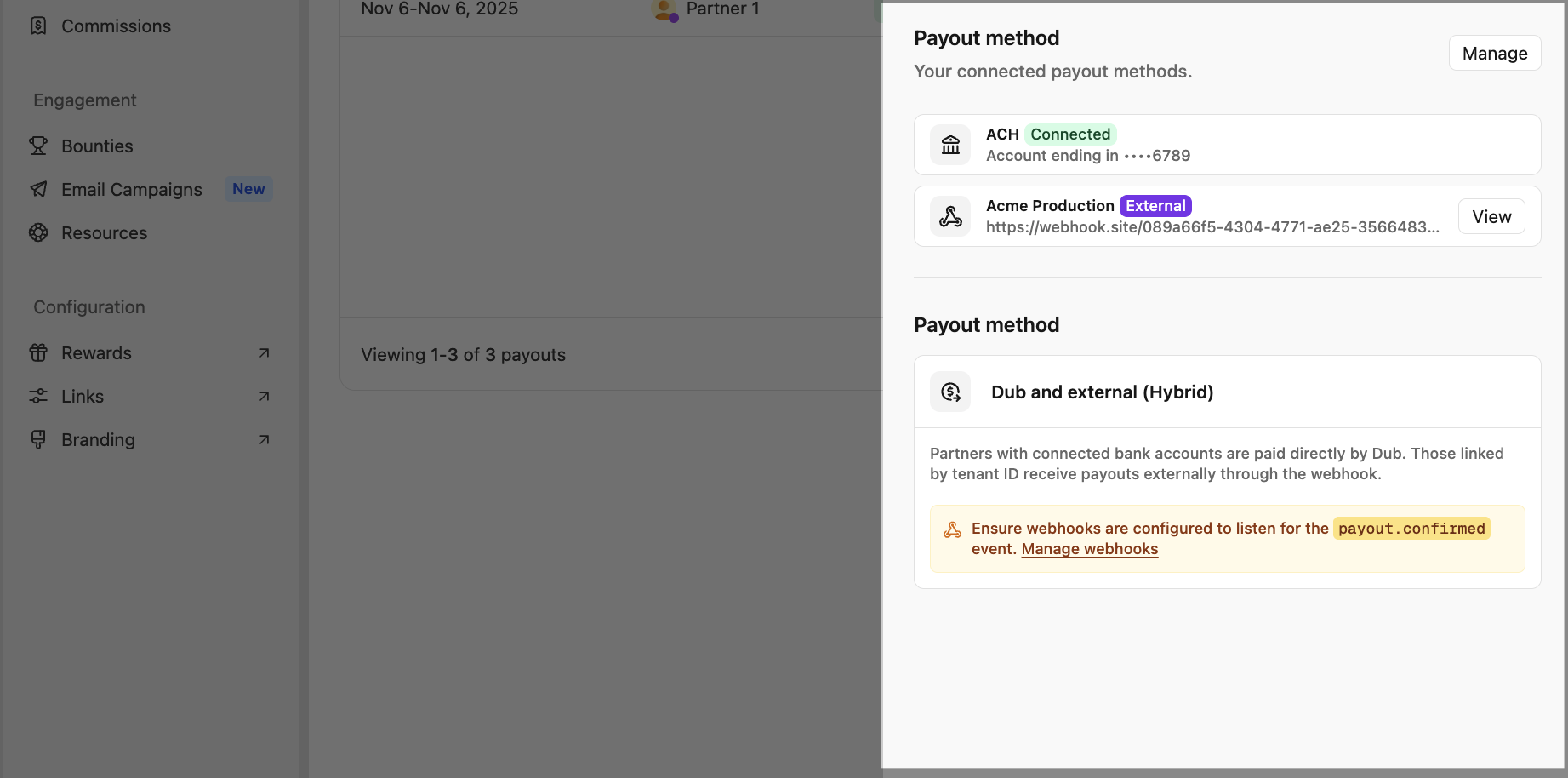
### Hybrid
Partners with connected bank accounts are paid directly by Dub, while all other partners
with tenant IDs configured receive payouts via the [`payout.confirmed`](/docs/webhooks/events/payout-confirmed) webhook event.
This mode offers the best of both worlds:
* Partners who prefer direct bank transfers can connect their accounts
* You maintain control over payouts for partners without bank accounts
* Gradual migration path if you're transitioning from external to internal payouts
### External only
All payouts are processed through the [`payout.confirmed`](/docs/webhooks/events/payout-confirmed) webhook event to your platform. Dub handles commission tracking and payout calculations, but you're responsible for the actual money transfer.
 ## How external payouts work
The external payout flow follows these steps:
When a payout period ends and you confirm the payout in your Dub dashboard,
eligible external payouts are marked as confirmed.
Once the payout is processed by Stripe, Dub sends a
[`payout.confirmed`](/docs/webhooks/events/payout-confirmed) webhook event for
each external payout.
Your webhook receiver processes the event and initiates the payout through
your internal systems using the partner's `tenantId` to identify them.
Based on the webhook delivery status:
* **Success (200-299 response)**: Payout is marked as `completed`.
* **Failure (non-2xx response or timeout)**: Payout is marked as `failed` after all retries attempts are exhausted.
If the webhook fails after all retries, you'll need to manually process the payout and update its status in your dashboard.
External payout modes require an active webhook subscribed to the
[`payout.confirmed`](/docs/webhooks/events/payout-confirmed) event. You'll be
prompted to set one up if you haven't already.
## Setting up external payouts
### 1. Configure partner tenant IDs
For external payouts to work, each partner must have a `tenantId` configured. This is your internal identifier for the partner in your system.
You can set the tenant ID when:
* [Creating a partner via API](/docs/api-reference/partners/create)
* [Updating a partner in your dashboard](/help/article/managing-program-partners#advanced-settings)
* Importing partners from another platform
## How external payouts work
The external payout flow follows these steps:
When a payout period ends and you confirm the payout in your Dub dashboard,
eligible external payouts are marked as confirmed.
Once the payout is processed by Stripe, Dub sends a
[`payout.confirmed`](/docs/webhooks/events/payout-confirmed) webhook event for
each external payout.
Your webhook receiver processes the event and initiates the payout through
your internal systems using the partner's `tenantId` to identify them.
Based on the webhook delivery status:
* **Success (200-299 response)**: Payout is marked as `completed`.
* **Failure (non-2xx response or timeout)**: Payout is marked as `failed` after all retries attempts are exhausted.
If the webhook fails after all retries, you'll need to manually process the payout and update its status in your dashboard.
External payout modes require an active webhook subscribed to the
[`payout.confirmed`](/docs/webhooks/events/payout-confirmed) event. You'll be
prompted to set one up if you haven't already.
## Setting up external payouts
### 1. Configure partner tenant IDs
For external payouts to work, each partner must have a `tenantId` configured. This is your internal identifier for the partner in your system.
You can set the tenant ID when:
* [Creating a partner via API](/docs/api-reference/partners/create)
* [Updating a partner in your dashboard](/help/article/managing-program-partners#advanced-settings)
* Importing partners from another platform
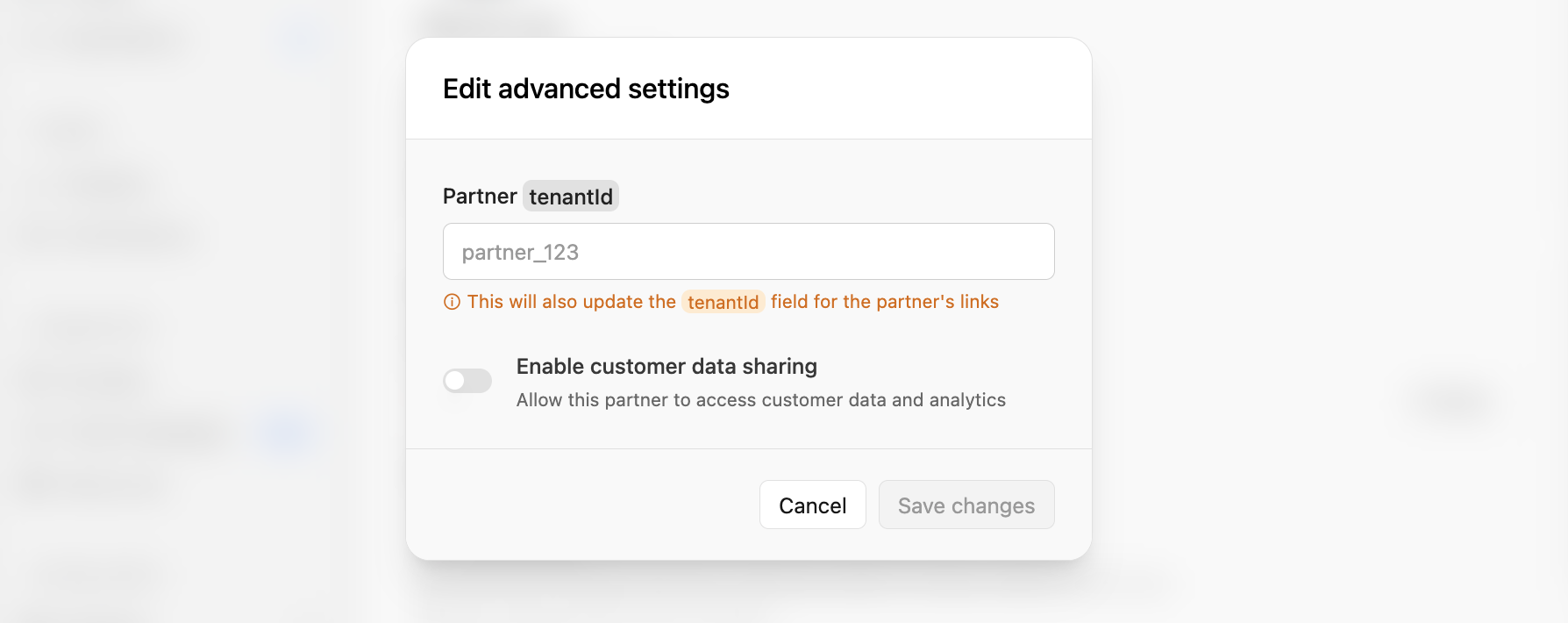 Partners without a `tenantId` will not receive external payouts. In hybrid
mode, they'll need to connect a bank account to receive payments directly from
Dub.
### 2. Set up webhook receiver
Create a webhook endpoint that listens for the [`payout.confirmed`](/docs/webhooks/events/payout-confirmed) event. See our [webhook setup guide](/docs/webhooks/introduction) for detailed instructions.
Your webhook endpoint should:
1. Verify the [webhook signature](/docs/webhooks/verify-webhook-requests) to ensure it's from Dub
2. Extract the payout and partner information from the payload
3. Initiate the payout through your payment system
4. Return a 2xx status code on success
Here's an example webhook handler in Node.js:
```typescript theme={null}
export const POST = async (req: Request) => {
const webhookSignature = req.headers.get("Dub-Signature");
if (!webhookSignature) {
return new Response("No signature provided.", { status: 401 });
}
// Copy this from the webhook details page
const secret = process.env.DUB_WEBHOOK_SECRET;
if (!secret) {
return new Response("No secret provided.", { status: 401 });
}
// Make sure to get the raw body from the request
const rawBody = await req.text();
const computedSignature = crypto
.createHmac("sha256", secret)
.update(rawBody)
.digest("hex");
if (webhookSignature !== computedSignature) {
return new Response("Invalid signature", { status: 400 });
}
const payload = JSON.parse(rawBody);
if (payload.event === "payout.confirmed") {
// Process the payout
}
return new Response("OK");
};
```
### 3. Verify setup
After configuring your partners and webhook receiver, test the integration to ensure everything works correctly:
1. **Confirm a payout** in your Dub dashboard for a partner with a configured `tenantId`
2. **Check your webhook receiver** to verify it received the [`payout.confirmed`](/docs/webhooks/events/payout-confirmed) event
3. **Verify the payout status** in your Dub dashboard shows as "completed" after your webhook returns a 2xx response
If the payout is marked as "completed", your external payout integration is working correctly. If it's marked as "failed", check the [troubleshooting section](#troubleshooting) below.
## Webhook payload
The [`payout.confirmed`](/docs/webhooks/events/payout-confirmed) webhook event contains the following information:
```json payout-confirmed.json theme={null}
{
"id": "evt_...",
"event": "payout.confirmed",
"createdAt": "2025-10-22T15:50:13.661Z",
"data": {
"id": "po_1K869T6CWEH4NB78NS3QYHDJE",
"invoiceId": "inv_1K94KX5ZWHTWFG07NP96AY90F",
"amount": 5000,
"currency": "USD",
"status": "completed",
"description": "Dub Partners payout (Acme)",
"periodStart": "2025-10-22T15:49:33.343Z",
"periodEnd": "2025-10-31T18:29:59.999Z",
"createdAt": "2025-10-22T15:50:13.661Z",
"paidAt": null,
"mode": "external",
"partner": {
"id": "cm6v2l38p000zubyl5fly3i7w",
"name": "Matthew Hayden",
"email": "matthew@example.com",
"image": null,
"country": "US",
"tenantId": "64dc9a8c-5cf9-4446-b53b-cdc15199fafc",
"status": "approved"
}
}
}
```
Key fields:
* `amount`: Payout amount in cents
* `currency`: Currency code (e.g., "USD")
* `partner.tenantId`: Your internal identifier for the partner
* `periodStart` / `periodEnd`: The commission period this payout covers
* `mode`: This will be **external** for external payouts
## Best practices
Use the `id` field from the webhook payload as an idempotency key to prevent duplicate payouts if the webhook is retried.
```typescript theme={null}
const payoutId = event.data.id;
// Check if payout already processed
const existing = await db.payouts.findUnique({
where: {
dubPayoutId: payoutId,
},
});
if (existing) {
return new Response("Already processed", { status: 200 });
}
// Process payout...
```
Return appropriate HTTP status codes:
* `200-299`: Payout processed successfully
* `400-499`: Invalid request (won't be retried)
* `500-599`: Server error (will be retried)
Log all webhook events for debugging and reconciliation.
Set up alerts for webhook failures in your [webhook
settings](https://app.dub.co/settings/webhooks). Dub will automatically
disable webhooks after 20 consecutive failures.
## Troubleshooting
* Verify your webhook is subscribed to the
[`payout.confirmed`](/docs/webhooks/events/payout-confirmed) event - Check
that your webhook URL is publicly accessible - Ensure your endpoint returns a
2xx status code - Review webhook logs in your [webhook
settings](https://app.dub.co/settings/webhooks)
* Verify the partner has a `tenantId` configured - Check that your program's
payout mode is set to Hybrid or External - Ensure the partner meets the
minimum payout threshold - Confirm the partner's status is "approved"
Check the failure reason in your dashboard. Common causes: - Webhook endpoint
returned non-2xx status code - Webhook endpoint timed out (30 second limit) -
Webhook endpoint is unreachable
## Related resources
* [`payout.confirmed` webhook event](/docs/webhooks/events/payout-confirmed)
* [Webhook setup guide](/docs/webhooks/introduction)
* [Webhook event types](/docs/webhooks/event-types)
* [Verifying webhook requests](/docs/webhooks/verify-webhook-requests)
* [Partners API reference](/docs/api-reference/partners/create)
Partners without a `tenantId` will not receive external payouts. In hybrid
mode, they'll need to connect a bank account to receive payments directly from
Dub.
### 2. Set up webhook receiver
Create a webhook endpoint that listens for the [`payout.confirmed`](/docs/webhooks/events/payout-confirmed) event. See our [webhook setup guide](/docs/webhooks/introduction) for detailed instructions.
Your webhook endpoint should:
1. Verify the [webhook signature](/docs/webhooks/verify-webhook-requests) to ensure it's from Dub
2. Extract the payout and partner information from the payload
3. Initiate the payout through your payment system
4. Return a 2xx status code on success
Here's an example webhook handler in Node.js:
```typescript theme={null}
export const POST = async (req: Request) => {
const webhookSignature = req.headers.get("Dub-Signature");
if (!webhookSignature) {
return new Response("No signature provided.", { status: 401 });
}
// Copy this from the webhook details page
const secret = process.env.DUB_WEBHOOK_SECRET;
if (!secret) {
return new Response("No secret provided.", { status: 401 });
}
// Make sure to get the raw body from the request
const rawBody = await req.text();
const computedSignature = crypto
.createHmac("sha256", secret)
.update(rawBody)
.digest("hex");
if (webhookSignature !== computedSignature) {
return new Response("Invalid signature", { status: 400 });
}
const payload = JSON.parse(rawBody);
if (payload.event === "payout.confirmed") {
// Process the payout
}
return new Response("OK");
};
```
### 3. Verify setup
After configuring your partners and webhook receiver, test the integration to ensure everything works correctly:
1. **Confirm a payout** in your Dub dashboard for a partner with a configured `tenantId`
2. **Check your webhook receiver** to verify it received the [`payout.confirmed`](/docs/webhooks/events/payout-confirmed) event
3. **Verify the payout status** in your Dub dashboard shows as "completed" after your webhook returns a 2xx response
If the payout is marked as "completed", your external payout integration is working correctly. If it's marked as "failed", check the [troubleshooting section](#troubleshooting) below.
## Webhook payload
The [`payout.confirmed`](/docs/webhooks/events/payout-confirmed) webhook event contains the following information:
```json payout-confirmed.json theme={null}
{
"id": "evt_...",
"event": "payout.confirmed",
"createdAt": "2025-10-22T15:50:13.661Z",
"data": {
"id": "po_1K869T6CWEH4NB78NS3QYHDJE",
"invoiceId": "inv_1K94KX5ZWHTWFG07NP96AY90F",
"amount": 5000,
"currency": "USD",
"status": "completed",
"description": "Dub Partners payout (Acme)",
"periodStart": "2025-10-22T15:49:33.343Z",
"periodEnd": "2025-10-31T18:29:59.999Z",
"createdAt": "2025-10-22T15:50:13.661Z",
"paidAt": null,
"mode": "external",
"partner": {
"id": "cm6v2l38p000zubyl5fly3i7w",
"name": "Matthew Hayden",
"email": "matthew@example.com",
"image": null,
"country": "US",
"tenantId": "64dc9a8c-5cf9-4446-b53b-cdc15199fafc",
"status": "approved"
}
}
}
```
Key fields:
* `amount`: Payout amount in cents
* `currency`: Currency code (e.g., "USD")
* `partner.tenantId`: Your internal identifier for the partner
* `periodStart` / `periodEnd`: The commission period this payout covers
* `mode`: This will be **external** for external payouts
## Best practices
Use the `id` field from the webhook payload as an idempotency key to prevent duplicate payouts if the webhook is retried.
```typescript theme={null}
const payoutId = event.data.id;
// Check if payout already processed
const existing = await db.payouts.findUnique({
where: {
dubPayoutId: payoutId,
},
});
if (existing) {
return new Response("Already processed", { status: 200 });
}
// Process payout...
```
Return appropriate HTTP status codes:
* `200-299`: Payout processed successfully
* `400-499`: Invalid request (won't be retried)
* `500-599`: Server error (will be retried)
Log all webhook events for debugging and reconciliation.
Set up alerts for webhook failures in your [webhook
settings](https://app.dub.co/settings/webhooks). Dub will automatically
disable webhooks after 20 consecutive failures.
## Troubleshooting
* Verify your webhook is subscribed to the
[`payout.confirmed`](/docs/webhooks/events/payout-confirmed) event - Check
that your webhook URL is publicly accessible - Ensure your endpoint returns a
2xx status code - Review webhook logs in your [webhook
settings](https://app.dub.co/settings/webhooks)
* Verify the partner has a `tenantId` configured - Check that your program's
payout mode is set to Hybrid or External - Ensure the partner meets the
minimum payout threshold - Confirm the partner's status is "approved"
Check the failure reason in your dashboard. Common causes: - Webhook endpoint
returned non-2xx status code - Webhook endpoint timed out (30 second limit) -
Webhook endpoint is unreachable
## Related resources
* [`payout.confirmed` webhook event](/docs/webhooks/events/payout-confirmed)
* [Webhook setup guide](/docs/webhooks/introduction)
* [Webhook event types](/docs/webhooks/event-types)
* [Verifying webhook requests](/docs/webhooks/verify-webhook-requests)
* [Partners API reference](/docs/api-reference/partners/create)