> ## Documentation Index
> Fetch the complete documentation index at: https://dub.co/llms.txt
> Use this file to discover all available pages before exploring further.
# Embedded referral dashboard
> Learn how to create an embedded referral dashboard with Dub for your users to join your partner program without leaving your app.
This feature is only available on [Advanced plans and
above](https://dub.co/pricing/partners).
With [Dub Partners](https://dub.co/partners), you can build an embedded referral dashboard that lives directly inside your application in just a few lines of code.
This way, your users can automatically enroll in your partner program **without needing to leave your app and sign up on a third-party platform**.
In this guide, we'll walk you through the steps to get started with Dub's embedded referral dashboard feature.
Looking to set up non-monetary rewards for your user referral partners? [Read
the guide](/help/article/non-monetary-rewards) on how to set that up.
## Example App
Before we dive in, here's an open-source example app showing Dub's embedded referral dashboard in action: [acme.dub.sh](https://acme.dub.sh)
You can also view the source code for the example app on [GitHub](https://github.com/dubinc/examples/tree/main/embed/referrals):
View the source code for [acme.dub.sh](https://acme.dub.sh) on GitHub.
## Step 1: Generate embed token
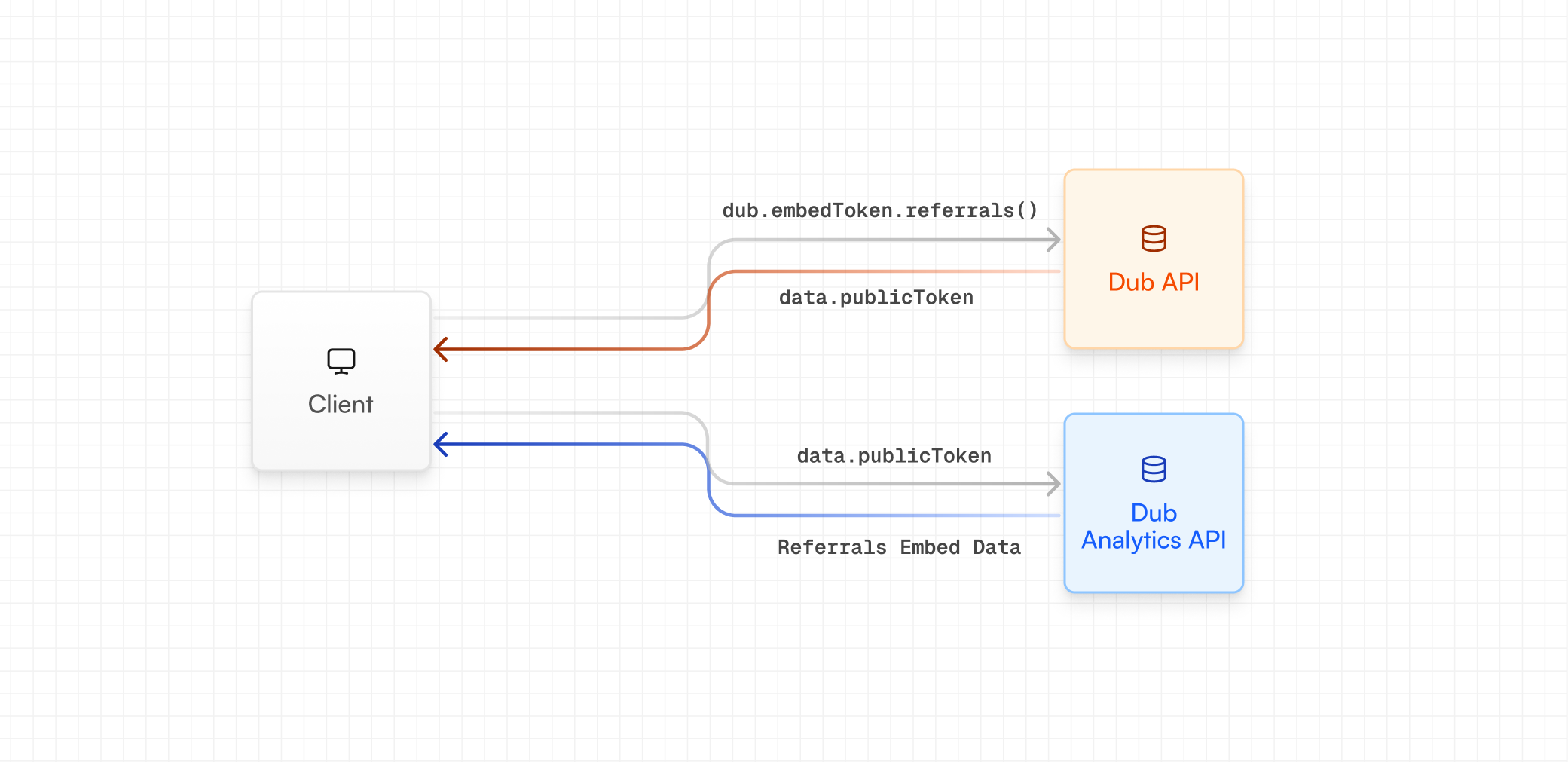
First, you need to create a server API route that generates a public token, which will be used by the embedded referral dashboard to fetch real-time conversions and earnings data from the client-side.
 ### Using server-side SDKs
If you're using our [server-side SDKs](/docs/sdks/overview), you can generate an embed token using the `dub.embedTokens.referrals` method.
```ts TypeScript theme={null}
const { publicToken } = await dub.embedTokens.referrals({
tenantId: user.id, // the user's ID within your application
partner: {
name: user.name, // the user's name
email: user.email, // the user's email
image: user.image, // the user's image/avatar
tenantId: user.id, // the user's ID within your application
groupId: "grp_xxxxxx", // optional: the partner's group ID on Dub (https://d.to/groups)
},
});
```
```python Python theme={null}
from dub import Dub
with Dub(
token="DUB_API_KEY",
) as d_client:
res = d_client.embed_tokens.referrals(request={
"tenant_id": user.id, # the user's ID within your application
"partner": {
"name": user.name, # the user's name
"email": user.email, # the user's email
"image": user.image, # the user's image/avatar
"tenant_id": user.id, # the user's ID within your application
"group_id": "grp_xxxxxx", # optional: the partner's group ID on Dub (https://d.to/groups)
},
})
# Handle response
print(res.public_token)
```
```go Go theme={null}
package main
import(
"context"
dubgo "github.com/dubinc/dub-go"
"github.com/dubinc/dub-go/models/operations"
"log"
)
func main() {
ctx := context.Background()
s := dubgo.New(
dubgo.WithSecurity("DUB_API_KEY"),
)
res, err := s.EmbedTokens.Referrals(ctx, &operations.CreateReferralsEmbedTokenRequestBody{
TenantID: user.ID, // the user's ID within your application
Partner: &operations.Partner{
Name: user.Name, // the user's name
Email: user.Email, // the user's email
Image: user.Image, // the user's image/avatar
TenantID: user.ID, // the user's ID within your application
GroupID: "grp_xxxxxx", // optional: the partner's group ID on Dub (https://d.to/groups)
},
})
if err != nil {
log.Fatal(err)
}
if res != nil {
// Handle response
log.Printf("Public token: %s", res.PublicToken)
}
}
```
```php PHP theme={null}
declare(strict_types=1);
require 'vendor/autoload.php';
use Dub;
use Dub\Models\Operations;
$sdk = Dub\Dub::builder()
->setSecurity('DUB_API_KEY')
->build();
$request = new Operations\CreateReferralsEmbedTokenRequestBody(
tenantId: $user->id, // the user's ID within your application
partner: new Operations\Partner(
name: $user->name, // the user's name
email: $user->email, // the user's email
image: $user->image, // the user's image/avatar
tenantId: $user->id, // the user's ID within your application
groupId: "grp_xxxxxx", // optional: the partner's group ID on Dub (https://d.to/groups)
),
);
$response = $sdk->embedTokens->referrals(
request: $request
);
if ($response->object !== null) {
// Handle response
echo $response->object->publicToken;
}
```
```ruby Ruby theme={null}
require 'dub'
s = ::OpenApiSDK::Dub.new(
security: ::OpenApiSDK::Shared::Security.new(
token: "DUB_API_KEY",
),
)
req = ::OpenApiSDK::Operations::CreateReferralsEmbedTokenRequestBody.new(
tenant_id: user.id, # the user's ID within your application
partner: ::OpenApiSDK::Operations::Partner.new(
name: user.name, # the user's name
email: user.email, # the user's email
image: user.image, # the user's image/avatar
tenant_id: user.id, # the user's ID within your application
group_id: "grp_xxxxxx", # optional: the partner's group ID on Dub (https://d.to/groups)
),
)
res = s.embed_tokens.referrals(req)
if !res.object.nil?
# Handle response
puts res.object.public_token
end
```
### Using REST API
If you're not using our server-side SDKs, you can generate an embed token using our REST API instead (via the [`POST /tokens/embed/referrals`](/docs/api-reference/endpoint/create-referrals-embed-token) endpoint).
```js JavaScript theme={null}
const response = await fetch("https://api.dub.co/tokens/embed/referrals", {
method: "POST",
body: JSON.stringify({
tenantId: user.id, // the user's ID within your application
partner: {
name: user.name, // the user's name
email: user.email, // the user's email
image: user.image, // the user's image/avatar
tenantId: user.id, // the user's ID within your application
groupId: "grp_xxxxxx", // optional: the partner's group ID on Dub (https://d.to/groups)
},
}),
});
const data = await response.json();
const { publicToken } = data;
```
Refer to the [full API reference](/docs/api-reference/endpoint/create-referrals-embed-token) to learn more about the properties you can pass to the `POST /tokens/embed/referrals` endpoint.
When you call this endpoint, it first attempts to find an existing enrollment
using the provided `tenantId`. If no enrollment is found, it resolves the
partner by `email` and creates a new enrollment automatically. This means you
don't need to handle enrollment logic separately – the endpoint guarantees a
valid enrollment and returns a usable embed token every time.
## Step 2: Install the embed
Then, with the `publicToken` from Step 1, you can install and initialize the embedded referral dashboard. There are two ways to do this:
### React component
First, install the [NPM package](https://www.npmjs.com/package/@dub/embed-react):
```bash npm theme={null}
npm install @dub/embed-react
```
```bash yarn theme={null}
yarn add @dub/embed-react
```
```bash pnpm theme={null}
pnpm add @dub/embed-react
```
```bash bun theme={null}
bun add @dub/embed-react
```
Then use the component in your React application:
```tsx theme={null}
import { useState, useEffect } from "react";
import { DubEmbed } from "@dub/embed-react";
export default function App() {
const [publicToken, setPublicToken] = useState("");
useEffect(() => {
const fetchPublicToken = async () => {
// fetching from the server API route you created in Step 1
const response = await fetch("/api/embed-token");
const data = await response.json();
setPublicToken(data.publicToken);
};
fetchPublicToken();
}, []);
if (!publicToken) {
return
### Using server-side SDKs
If you're using our [server-side SDKs](/docs/sdks/overview), you can generate an embed token using the `dub.embedTokens.referrals` method.
```ts TypeScript theme={null}
const { publicToken } = await dub.embedTokens.referrals({
tenantId: user.id, // the user's ID within your application
partner: {
name: user.name, // the user's name
email: user.email, // the user's email
image: user.image, // the user's image/avatar
tenantId: user.id, // the user's ID within your application
groupId: "grp_xxxxxx", // optional: the partner's group ID on Dub (https://d.to/groups)
},
});
```
```python Python theme={null}
from dub import Dub
with Dub(
token="DUB_API_KEY",
) as d_client:
res = d_client.embed_tokens.referrals(request={
"tenant_id": user.id, # the user's ID within your application
"partner": {
"name": user.name, # the user's name
"email": user.email, # the user's email
"image": user.image, # the user's image/avatar
"tenant_id": user.id, # the user's ID within your application
"group_id": "grp_xxxxxx", # optional: the partner's group ID on Dub (https://d.to/groups)
},
})
# Handle response
print(res.public_token)
```
```go Go theme={null}
package main
import(
"context"
dubgo "github.com/dubinc/dub-go"
"github.com/dubinc/dub-go/models/operations"
"log"
)
func main() {
ctx := context.Background()
s := dubgo.New(
dubgo.WithSecurity("DUB_API_KEY"),
)
res, err := s.EmbedTokens.Referrals(ctx, &operations.CreateReferralsEmbedTokenRequestBody{
TenantID: user.ID, // the user's ID within your application
Partner: &operations.Partner{
Name: user.Name, // the user's name
Email: user.Email, // the user's email
Image: user.Image, // the user's image/avatar
TenantID: user.ID, // the user's ID within your application
GroupID: "grp_xxxxxx", // optional: the partner's group ID on Dub (https://d.to/groups)
},
})
if err != nil {
log.Fatal(err)
}
if res != nil {
// Handle response
log.Printf("Public token: %s", res.PublicToken)
}
}
```
```php PHP theme={null}
declare(strict_types=1);
require 'vendor/autoload.php';
use Dub;
use Dub\Models\Operations;
$sdk = Dub\Dub::builder()
->setSecurity('DUB_API_KEY')
->build();
$request = new Operations\CreateReferralsEmbedTokenRequestBody(
tenantId: $user->id, // the user's ID within your application
partner: new Operations\Partner(
name: $user->name, // the user's name
email: $user->email, // the user's email
image: $user->image, // the user's image/avatar
tenantId: $user->id, // the user's ID within your application
groupId: "grp_xxxxxx", // optional: the partner's group ID on Dub (https://d.to/groups)
),
);
$response = $sdk->embedTokens->referrals(
request: $request
);
if ($response->object !== null) {
// Handle response
echo $response->object->publicToken;
}
```
```ruby Ruby theme={null}
require 'dub'
s = ::OpenApiSDK::Dub.new(
security: ::OpenApiSDK::Shared::Security.new(
token: "DUB_API_KEY",
),
)
req = ::OpenApiSDK::Operations::CreateReferralsEmbedTokenRequestBody.new(
tenant_id: user.id, # the user's ID within your application
partner: ::OpenApiSDK::Operations::Partner.new(
name: user.name, # the user's name
email: user.email, # the user's email
image: user.image, # the user's image/avatar
tenant_id: user.id, # the user's ID within your application
group_id: "grp_xxxxxx", # optional: the partner's group ID on Dub (https://d.to/groups)
),
)
res = s.embed_tokens.referrals(req)
if !res.object.nil?
# Handle response
puts res.object.public_token
end
```
### Using REST API
If you're not using our server-side SDKs, you can generate an embed token using our REST API instead (via the [`POST /tokens/embed/referrals`](/docs/api-reference/endpoint/create-referrals-embed-token) endpoint).
```js JavaScript theme={null}
const response = await fetch("https://api.dub.co/tokens/embed/referrals", {
method: "POST",
body: JSON.stringify({
tenantId: user.id, // the user's ID within your application
partner: {
name: user.name, // the user's name
email: user.email, // the user's email
image: user.image, // the user's image/avatar
tenantId: user.id, // the user's ID within your application
groupId: "grp_xxxxxx", // optional: the partner's group ID on Dub (https://d.to/groups)
},
}),
});
const data = await response.json();
const { publicToken } = data;
```
Refer to the [full API reference](/docs/api-reference/endpoint/create-referrals-embed-token) to learn more about the properties you can pass to the `POST /tokens/embed/referrals` endpoint.
When you call this endpoint, it first attempts to find an existing enrollment
using the provided `tenantId`. If no enrollment is found, it resolves the
partner by `email` and creates a new enrollment automatically. This means you
don't need to handle enrollment logic separately – the endpoint guarantees a
valid enrollment and returns a usable embed token every time.
## Step 2: Install the embed
Then, with the `publicToken` from Step 1, you can install and initialize the embedded referral dashboard. There are two ways to do this:
### React component
First, install the [NPM package](https://www.npmjs.com/package/@dub/embed-react):
```bash npm theme={null}
npm install @dub/embed-react
```
```bash yarn theme={null}
yarn add @dub/embed-react
```
```bash pnpm theme={null}
pnpm add @dub/embed-react
```
```bash bun theme={null}
bun add @dub/embed-react
```
Then use the component in your React application:
```tsx theme={null}
import { useState, useEffect } from "react";
import { DubEmbed } from "@dub/embed-react";
export default function App() {
const [publicToken, setPublicToken] = useState("");
useEffect(() => {
const fetchPublicToken = async () => {
// fetching from the server API route you created in Step 1
const response = await fetch("/api/embed-token");
const data = await response.json();
setPublicToken(data.publicToken);
};
fetchPublicToken();
}, []);
if (!publicToken) {
return Loading...
;
}
return ;
}
```
### Iframe embed
Alternatively, if you're not using React (or you're not on React `v18.2.0` or higher), you can add the iframe directly to your HTML:
```tsx theme={null}
import { useState, useEffect } from "react";
export default function App() {
const [publicToken, setPublicToken] = useState("");
useEffect(() => {
const fetchPublicToken = async () => {
// fetching from the server API route you created in Step 1
const response = await fetch("/api/embed-token");
const data = await response.json();
setPublicToken(data.publicToken);
};
fetchPublicToken();
}, []);
if (!publicToken) {
return Loading...
;
}
return (
);
}
```
## Embed options
The embedded referral dashboard supports the following options for styling and behavior:
The type of embed to use. In this case, we're using the `referrals` type.
The theme of the embed.
Available options:
* `backgroundColor`: The background color of the embed.
Depending on the embed type, you can use the following examples to initialize the embed options:
```tsx React component theme={null}
import { DubEmbed } from "@dub/embed-react";
const publicToken = "...";
;
```
```tsx iFrame embed theme={null}
const publicToken = "...";
const iframeUrl = "https://app.dub.co/embed/referrals";
const iframeParams = new URLSearchParams({
token: publicToken,
theme: "light",
themeOptions: JSON.stringify({ backgroundColor: "#F5F5F5" }),
});
;
```