> ## Documentation Index
> Fetch the complete documentation index at: https://dub.co/llms.txt
> Use this file to discover all available pages before exploring further.
# Build your own integration
> Learn how to authenticate users with OAuth 2.0. for your Dub integration.
Integrations allow you to extend the capabilities of Dub and seamlessly connect with third-party platforms and services.
You can build your own integrations with Dub using our [API](/docs/api-reference/introduction).
1. Read the documentation on how to [create links](/docs/api-reference/links/create) or [track sale conversions](/docs/api-reference/track/sale).
2. Learn how to [integrate Dub into your application](/docs/integrations/quickstart).
3. [Reach out to us](https://dub.co/contact/support) to feature your integration in the integrations marketplace.
In this guide, you will learn how to create and manage integrations on Dub, allowing you to incorporate Dub's link attribution platform into your application.
## Integrating via OAuth 2.0 (recommended)
Dub supports OAuth 2.0 authentication, which is **recommended** if you build integrations extending Dub's functionality.
We recommend you use a OAuth client library to integrate the OAuth flow. You can find recommended libraries in a variety of programming languages [here](https://oauth.net/code/).
OAuth endpoints (`/oauth/authorize`, `/oauth/token`, `/oauth/userinfo`) are
not available in the Dub SDKs. You'll need to call these endpoints directly
using HTTP requests or an OAuth client library.
### Set up OAuth 2.0
Here is a step-by-step guide on how to set up OAuth 2.0 authentication with Dub.
* Go to the [OAuth Apps tab](https://app.dub.co/settings/oauth-apps) in your workspace.
* Click on **Create OAuth App**.
* Fill in the required fields to create an OAuth2 application.
When you want to authenticate a user, you need to redirect them to the Dub OAuth authorization URL.
```
GET https://app.dub.co/oauth/authorize
```
Parameters:
| Property | Description |
| ----------------------- | --------------------------------------------------------------------------------------------------------------------------------- |
| `client_id` | The client ID of your OAuth application. |
| `redirect_uri` | The URL to redirect the user to after they authorize the application. Make sure this URL is registered in your OAuth application. |
| `response_type` | Expected response type. It should be `code`. |
| `scope` | A space separated list of scopes that you want to request access to. Read more about scopes [here](#scopes). |
| `state` | The state parameter to prevent against CSRF attacks. Read more about it [here](https://auth0.com/docs/protocols/state-parameters) |
| `code_challenge` | Required for PKCE. The code challenge generated from the `code_verifier`. |
| `code_challenge_method` | Required for PKCE. The method used to generate the code challenge. It should be `S256`. |
PKCE (Proof Key for Code Exchange) is enabled by default and recommended for all applications. If you include `code_challenge` and `code_challenge_method` in the authorization request, you must also include the `code_verifier` when exchanging the code for an access token in Step 3.
An example URL would look like this:
```
GET https://app.dub.co/oauth/authorize?client_id=YOUR_CLIENT_ID&redirect_uri=YOUR_REDIRECT_URI&response_type=code&scope=SOME_SCOPE&state=SOME_STATE&code_challenge=YOUR_CODE_CHALLENGE&code_challenge_method=S256
```
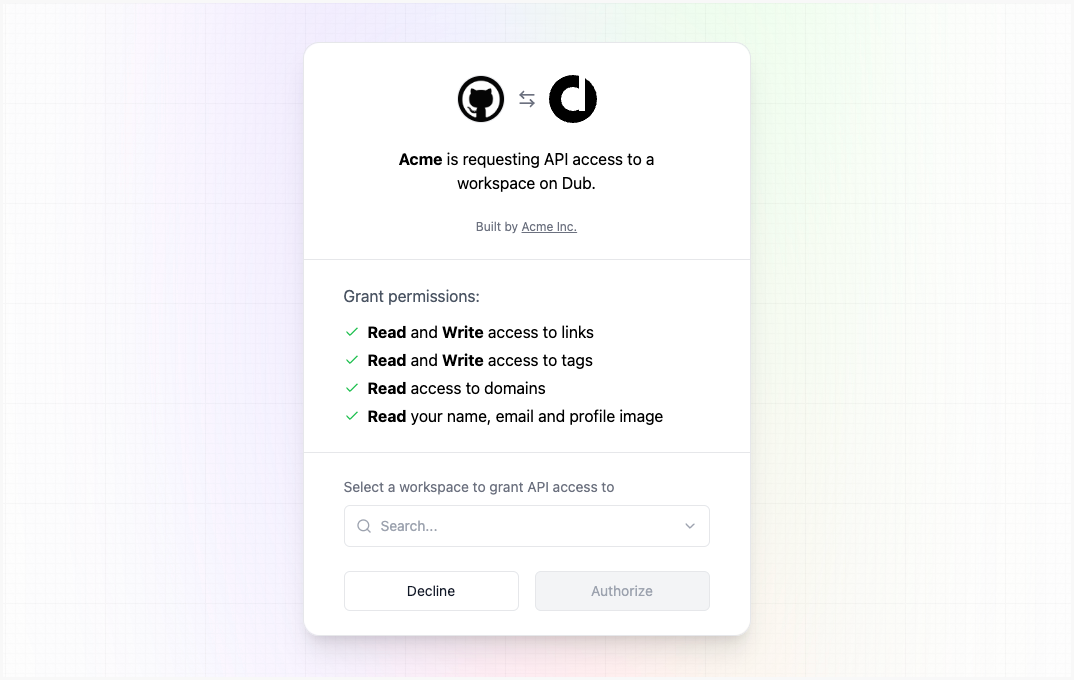 The `code` parameter is returned in the query string when the user is redirected back to your application. You can exchange this code for an access token by making a POST request to the Dub OAuth token URL.
```
POST https://api.dub.co/oauth/token
```
The `Content-Type` header should be set to `application/x-www-form-urlencoded`.
We recommend using the [PKCE](https://auth0.com/docs/get-started/authentication-and-authorization-flow/authorization-code-flow-with-pkce) flow for all applications, especially native desktop or mobile applications and single-page apps (SPAs) where the `client_secret` cannot be hidden.
With PKCE, the `client_secret` is **never sent to the authorization server**, preventing the `client_secret` from being leaked from the client application.
```js theme={null}
await fetch("https://api.dub.co/oauth/token", {
method: "POST",
headers: {
"Content-Type": "application/x-www-form-urlencoded",
},
body: new URLSearchParams({
code: "YOUR_AUTHORIZATION_CODE",
client_id: "YOUR_CLIENT_ID",
code_verifier: "YOUR_CODE_VERIFIER",
redirect_uri: "YOUR_REDIRECT_URI",
grant_type: "authorization_code",
}),
});
```
Parameters:
| Property | Description |
| --------------- | ---------------------------------------------------------------------------- |
| `code` | The code you received when the user was redirected back to your application. |
| `client_id` | The client ID of your OAuth application. |
| `code_verifier` | The original code verifier used to generate the `code_challenge` in Step 2. |
| `redirect_uri` | The same redirect URI you used in the authorization URL. |
| `grant_type` | The grant type. It should be `authorization_code`. |
For example, the [Dub Raycast extension](https://github.com/raycast/extensions/tree/main/extensions/dub) uses PKCE to authenticate users.
If you're building a server-side application where the `client_secret` can be securely stored, you can use the standard flow.
```js theme={null}
await fetch("https://api.dub.co/oauth/token", {
method: "POST",
headers: {
"Content-Type": "application/x-www-form-urlencoded",
},
body: new URLSearchParams({
code: "YOUR_AUTHORIZATION_CODE",
client_id: "YOUR_CLIENT_ID",
client_secret: "YOUR_CLIENT_SECRET",
redirect_uri: "YOUR_REDIRECT_URI",
grant_type: "authorization_code",
}),
});
```
Parameters:
| Property | Description |
| --------------- | ---------------------------------------------------------------------------- |
| `code` | The code you received when the user was redirected back to your application. |
| `client_id` | The client ID of your OAuth application. |
| `client_secret` | The client secret of your OAuth application. |
| `redirect_uri` | The same redirect URI you used in the authorization URL. |
| `grant_type` | The grant type. It should be `authorization_code`. |
Response:
After a successful request, you will receive a JSON response with the access token.
```json theme={null}
{
"access_token": "dub_access_token_ae8ebf6f97e6200d886ef48a5...",
"refresh_token": "7f5acfbe14bca0a20fe6e430ddb7bb494eed160bd...",
"token_type": "Bearer",
"expires_in": 7200,
"scope": "links.write tags.write domains.read"
}
```
After obtaining an access token, you can retrieve information about the authenticated user and their workspace by calling the userinfo endpoint:
```
GET https://api.dub.co/oauth/userinfo
```
Here's an example using curl:
```bash theme={null}
curl --request GET \
--url https://api.dub.co/oauth/userinfo \
--header 'Authorization: Bearer '
```
Response:
```json theme={null}
{
"id": "user_id",
"name": "John Doe",
"image": "https://example.com/avatar.png",
"workspace": {
"id": "ws_abc123",
"slug": "acme",
"name": "Acme Inc",
"logo": "https://example.com/logo.png"
}
}
```
Once you have obtained a valid access token, you can use it to make requests to the Dub API.
You can initialize [Dub SDK](/docs/sdks/overview) with the access token.
Here is an example of how you can create a link using the [Dub TypeScript SDK](/docs/sdks/typescript):
```javascript theme={null}
import { Dub } from "dub";
const dub = new Dub({
token: ,
});
const link = await dub.links.create({
url: "https://google.com",
});
```
Or pass the access token in the header: `Authorization: Bearer `
```shell theme={null}
curl --request POST \
--url https://api.dub.co/links \
--header 'Authorization: Bearer ' \
--header 'Content-Type: application/json'
```
Dub access tokens are short-lived, depending on the `expires_in` value (the default value is **7,200 seconds**, or **2 hours**). Dub will respond with `401 Unauthorized` if you try to use an expired access token.
To refresh the access token, you need to make a POST request to the Dub OAuth token URL with the `refresh_token` you obtained when exchanging the code for an `access_token`.
```
POST https://api.dub.co/oauth/token
```
The `Content-Type` header should be set to `application/x-www-form-urlencoded`.
Parameters:
| Property | Description |
| --------------- | ---------------------------------------------------------------------------- |
| `client_id` | The client ID of your OAuth application. |
| `client_secret` | The client secret of your OAuth application. |
| `grant_type` | The grant type. It should be `refresh_token`. |
| `refresh_token` | The refresh token you received when exchanging the code for an access token. |
Response:
After a successful request, you will receive a JSON response with the new access token.
```json theme={null}
{
"access_token": "dub_access_token_ae8ebf6f97e6200d886ef48a5...",
"refresh_token": "7f5acfbe14bca0a20fe6e430ddb7bb494eed160bd...",
"token_type": "Bearer",
"expires_in": 7200,
"scope": "links.write tags.write domains.read"
}
```
This will invalidate the old access token and refresh token.
### Scopes
You can request access to specific scopes when redirecting users to the Dub OAuth authorization URL. Scopes are permissions that the user needs to grant to your application.
Dub supports the following scopes for OAuth 2.0:
| Scope | Description |
| ---------------- | ------------------------------------------------------------------- |
| `links.read` | Read access to links. |
| `links.write` | Write access to links. |
| `tags.read` | Read access to tags. |
| `tags.write` | Write access to tags. |
| `analytics.read` | Read access to analytics. |
| `domains.read` | Read access to domains. |
| `domains.write` | Write access to domains. |
| `folders.read` | Read access to folders. |
| `folders.write` | Write access to folders. |
| `user.read` | Read access to user information. This scope is included by default. |
### Examples
See the full example on GitHub.
## Integrating via API keys (not recommended)
Dub also supports API key authentication; however, it is **not recommended** for building integrations. It should only be used for internal integrations or personal projects that do not require user consent.
Learn more about [API Keys](/docs/api-reference/authentication#api-keys).
The `code` parameter is returned in the query string when the user is redirected back to your application. You can exchange this code for an access token by making a POST request to the Dub OAuth token URL.
```
POST https://api.dub.co/oauth/token
```
The `Content-Type` header should be set to `application/x-www-form-urlencoded`.
We recommend using the [PKCE](https://auth0.com/docs/get-started/authentication-and-authorization-flow/authorization-code-flow-with-pkce) flow for all applications, especially native desktop or mobile applications and single-page apps (SPAs) where the `client_secret` cannot be hidden.
With PKCE, the `client_secret` is **never sent to the authorization server**, preventing the `client_secret` from being leaked from the client application.
```js theme={null}
await fetch("https://api.dub.co/oauth/token", {
method: "POST",
headers: {
"Content-Type": "application/x-www-form-urlencoded",
},
body: new URLSearchParams({
code: "YOUR_AUTHORIZATION_CODE",
client_id: "YOUR_CLIENT_ID",
code_verifier: "YOUR_CODE_VERIFIER",
redirect_uri: "YOUR_REDIRECT_URI",
grant_type: "authorization_code",
}),
});
```
Parameters:
| Property | Description |
| --------------- | ---------------------------------------------------------------------------- |
| `code` | The code you received when the user was redirected back to your application. |
| `client_id` | The client ID of your OAuth application. |
| `code_verifier` | The original code verifier used to generate the `code_challenge` in Step 2. |
| `redirect_uri` | The same redirect URI you used in the authorization URL. |
| `grant_type` | The grant type. It should be `authorization_code`. |
For example, the [Dub Raycast extension](https://github.com/raycast/extensions/tree/main/extensions/dub) uses PKCE to authenticate users.
If you're building a server-side application where the `client_secret` can be securely stored, you can use the standard flow.
```js theme={null}
await fetch("https://api.dub.co/oauth/token", {
method: "POST",
headers: {
"Content-Type": "application/x-www-form-urlencoded",
},
body: new URLSearchParams({
code: "YOUR_AUTHORIZATION_CODE",
client_id: "YOUR_CLIENT_ID",
client_secret: "YOUR_CLIENT_SECRET",
redirect_uri: "YOUR_REDIRECT_URI",
grant_type: "authorization_code",
}),
});
```
Parameters:
| Property | Description |
| --------------- | ---------------------------------------------------------------------------- |
| `code` | The code you received when the user was redirected back to your application. |
| `client_id` | The client ID of your OAuth application. |
| `client_secret` | The client secret of your OAuth application. |
| `redirect_uri` | The same redirect URI you used in the authorization URL. |
| `grant_type` | The grant type. It should be `authorization_code`. |
Response:
After a successful request, you will receive a JSON response with the access token.
```json theme={null}
{
"access_token": "dub_access_token_ae8ebf6f97e6200d886ef48a5...",
"refresh_token": "7f5acfbe14bca0a20fe6e430ddb7bb494eed160bd...",
"token_type": "Bearer",
"expires_in": 7200,
"scope": "links.write tags.write domains.read"
}
```
After obtaining an access token, you can retrieve information about the authenticated user and their workspace by calling the userinfo endpoint:
```
GET https://api.dub.co/oauth/userinfo
```
Here's an example using curl:
```bash theme={null}
curl --request GET \
--url https://api.dub.co/oauth/userinfo \
--header 'Authorization: Bearer '
```
Response:
```json theme={null}
{
"id": "user_id",
"name": "John Doe",
"image": "https://example.com/avatar.png",
"workspace": {
"id": "ws_abc123",
"slug": "acme",
"name": "Acme Inc",
"logo": "https://example.com/logo.png"
}
}
```
Once you have obtained a valid access token, you can use it to make requests to the Dub API.
You can initialize [Dub SDK](/docs/sdks/overview) with the access token.
Here is an example of how you can create a link using the [Dub TypeScript SDK](/docs/sdks/typescript):
```javascript theme={null}
import { Dub } from "dub";
const dub = new Dub({
token: ,
});
const link = await dub.links.create({
url: "https://google.com",
});
```
Or pass the access token in the header: `Authorization: Bearer `
```shell theme={null}
curl --request POST \
--url https://api.dub.co/links \
--header 'Authorization: Bearer ' \
--header 'Content-Type: application/json'
```
Dub access tokens are short-lived, depending on the `expires_in` value (the default value is **7,200 seconds**, or **2 hours**). Dub will respond with `401 Unauthorized` if you try to use an expired access token.
To refresh the access token, you need to make a POST request to the Dub OAuth token URL with the `refresh_token` you obtained when exchanging the code for an `access_token`.
```
POST https://api.dub.co/oauth/token
```
The `Content-Type` header should be set to `application/x-www-form-urlencoded`.
Parameters:
| Property | Description |
| --------------- | ---------------------------------------------------------------------------- |
| `client_id` | The client ID of your OAuth application. |
| `client_secret` | The client secret of your OAuth application. |
| `grant_type` | The grant type. It should be `refresh_token`. |
| `refresh_token` | The refresh token you received when exchanging the code for an access token. |
Response:
After a successful request, you will receive a JSON response with the new access token.
```json theme={null}
{
"access_token": "dub_access_token_ae8ebf6f97e6200d886ef48a5...",
"refresh_token": "7f5acfbe14bca0a20fe6e430ddb7bb494eed160bd...",
"token_type": "Bearer",
"expires_in": 7200,
"scope": "links.write tags.write domains.read"
}
```
This will invalidate the old access token and refresh token.
### Scopes
You can request access to specific scopes when redirecting users to the Dub OAuth authorization URL. Scopes are permissions that the user needs to grant to your application.
Dub supports the following scopes for OAuth 2.0:
| Scope | Description |
| ---------------- | ------------------------------------------------------------------- |
| `links.read` | Read access to links. |
| `links.write` | Write access to links. |
| `tags.read` | Read access to tags. |
| `tags.write` | Write access to tags. |
| `analytics.read` | Read access to analytics. |
| `domains.read` | Read access to domains. |
| `domains.write` | Write access to domains. |
| `folders.read` | Read access to folders. |
| `folders.write` | Write access to folders. |
| `user.read` | Read access to user information. This scope is included by default. |
### Examples
See the full example on GitHub.
## Integrating via API keys (not recommended)
Dub also supports API key authentication; however, it is **not recommended** for building integrations. It should only be used for internal integrations or personal projects that do not require user consent.
Learn more about [API Keys](/docs/api-reference/authentication#api-keys).