> ## Documentation Index
> Fetch the complete documentation index at: https://dub.co/llms.txt
> Use this file to discover all available pages before exploring further.
# Direct sale tracking
> Learn how to track sales without a prior lead event using Dub
This feature is only available on [Business plans and
above](https://dub.co/pricing/partners).
When it comes to [conversion tracking](/docs/concepts/attribution), a `sale` event happens when a user purchases your product or service. Examples include:
* Subscribing to a paid plan
* Usage expansion (upgrading from one plan to another)
* Purchasing a product from your online store
 In this guide, we will be focusing on tracking sales conversion events **without a prior lead event**. This is useful when you want to attribute a sale directly to a click, bypassing the lead tracking step.
## When to use direct sale tracking
Direct sale tracking is ideal for scenarios where:
* You don't need to track leads separately (e.g., one-time purchases)
* You want to attribute sales directly to clicks without intermediate steps
* You're tracking sales for users who haven't signed up or created an account
If you're tracking both leads and sales in your conversion funnel, refer to
our [server-side tracking](/docs/quickstart/server) or [client-side
tracking](/docs/quickstart/client) guides instead.
[Lead commission
rewards](/help/article/partner-rewards#configuring-reward-types) will not be
created when using direct sale tracking.
## Prerequisites
First, you'll need to enable conversion tracking for your Dub links to be able to start tracking conversions:
If you're using [Dub Partners](https://dub.co/partners), you can skip this
step since partner links will have conversion tracking enabled by default.
To enable conversion tracking for all future links in a workspace, you can do the following:
To enable conversion tracking for all future links in a workspace, you can do the following:
1. Navigate to your [workspace's Tracking settings page](https://app.dub.co/settings/tracking).
2. Toggle the **Workspace-level Conversion Tracking** switch to enable conversion tracking for the workspace.
In this guide, we will be focusing on tracking sales conversion events **without a prior lead event**. This is useful when you want to attribute a sale directly to a click, bypassing the lead tracking step.
## When to use direct sale tracking
Direct sale tracking is ideal for scenarios where:
* You don't need to track leads separately (e.g., one-time purchases)
* You want to attribute sales directly to clicks without intermediate steps
* You're tracking sales for users who haven't signed up or created an account
If you're tracking both leads and sales in your conversion funnel, refer to
our [server-side tracking](/docs/quickstart/server) or [client-side
tracking](/docs/quickstart/client) guides instead.
[Lead commission
rewards](/help/article/partner-rewards#configuring-reward-types) will not be
created when using direct sale tracking.
## Prerequisites
First, you'll need to enable conversion tracking for your Dub links to be able to start tracking conversions:
If you're using [Dub Partners](https://dub.co/partners), you can skip this
step since partner links will have conversion tracking enabled by default.
To enable conversion tracking for all future links in a workspace, you can do the following:
To enable conversion tracking for all future links in a workspace, you can do the following:
1. Navigate to your [workspace's Tracking settings page](https://app.dub.co/settings/tracking).
2. Toggle the **Workspace-level Conversion Tracking** switch to enable conversion tracking for the workspace.
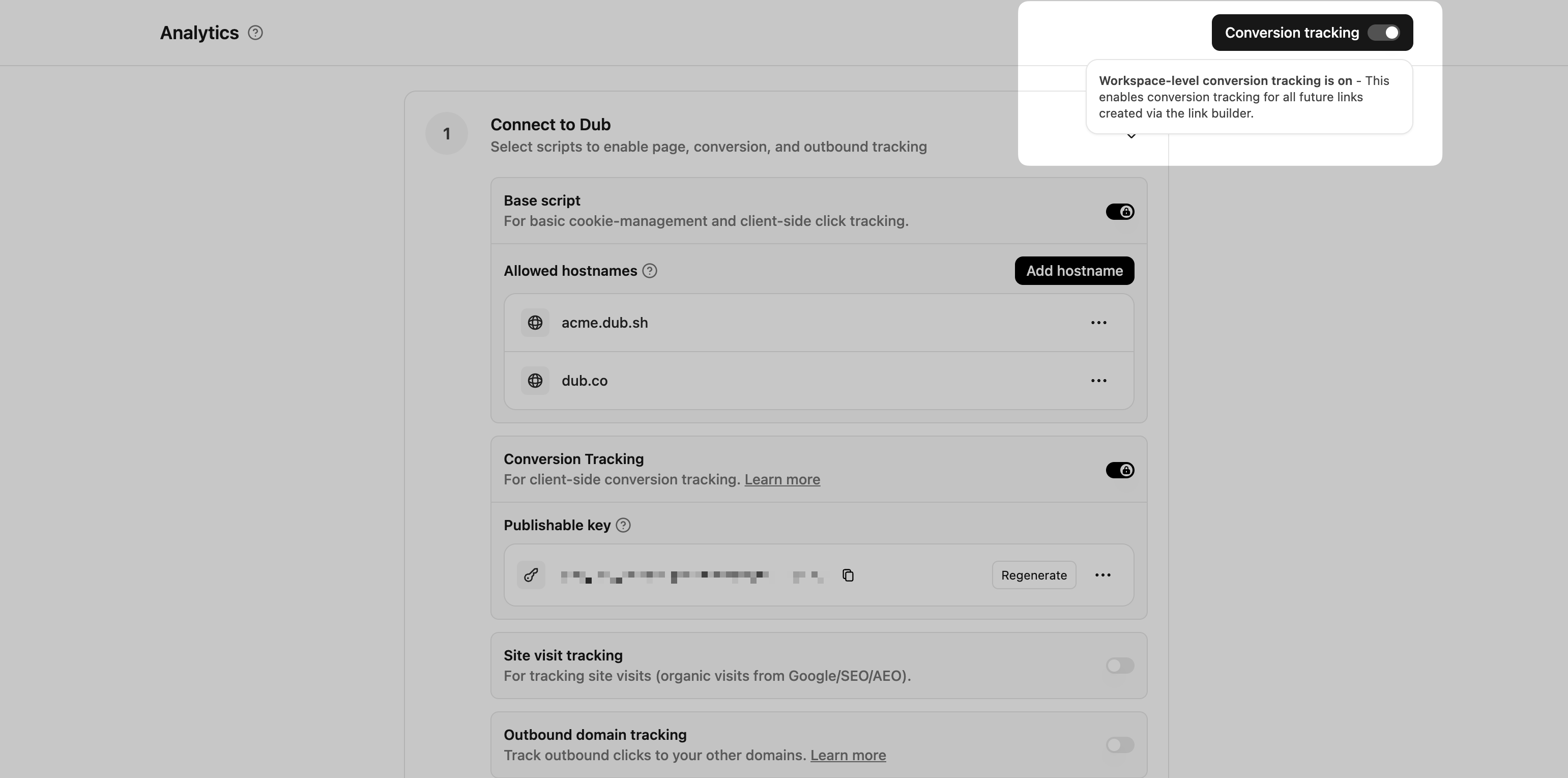 This option will enable conversion tracking in the [Dub Link Builder](/help/article/dub-link-builder) for all future links.
If you don't want to enable conversion tracking for all your links in a workspace, you can also opt to enable it on a link-level.
To enable conversion tracking for a specific link, open the [Dub Link Builder](/help/article/dub-link-builder) for a link and toggle the **Conversion Tracking** switch.
This option will enable conversion tracking in the [Dub Link Builder](/help/article/dub-link-builder) for all future links.
If you don't want to enable conversion tracking for all your links in a workspace, you can also opt to enable it on a link-level.
To enable conversion tracking for a specific link, open the [Dub Link Builder](/help/article/dub-link-builder) for a link and toggle the **Conversion Tracking** switch.
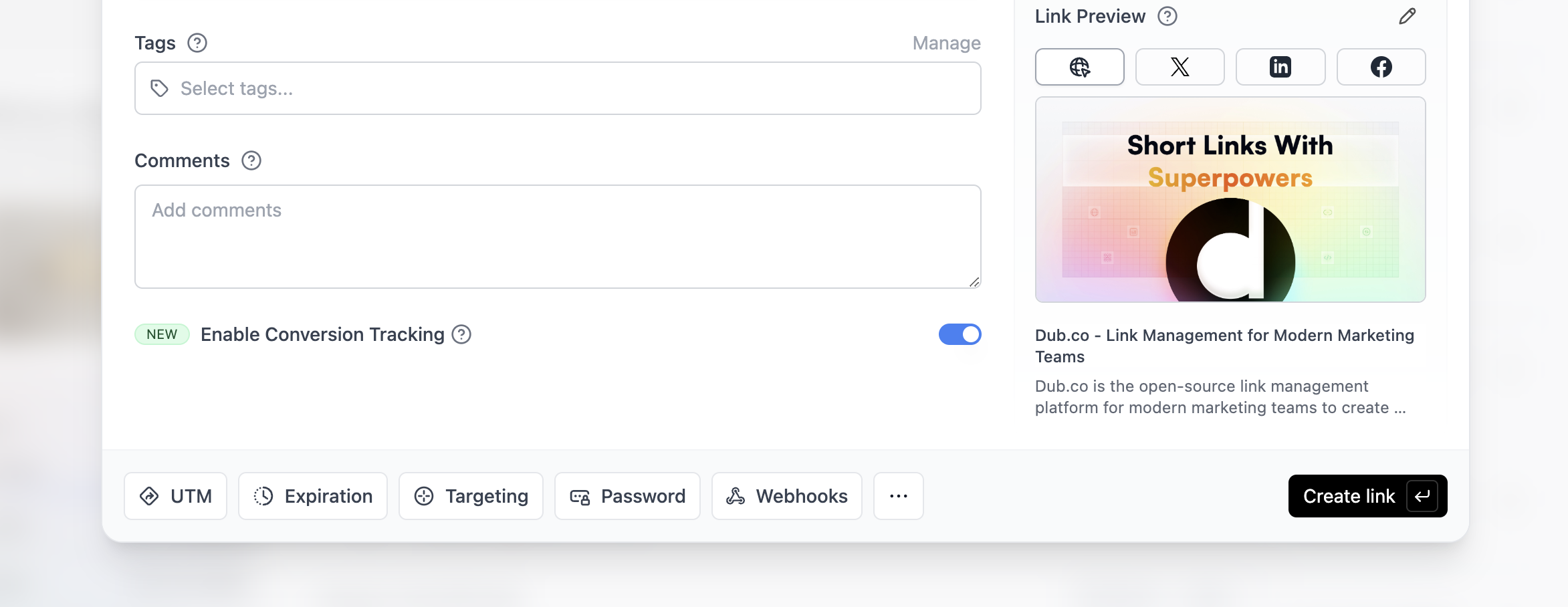 You can also use the `C` keyboard shortcut when inside the link builder to
quickly enable conversion tracking for a given link.
Alternatively, you can also enable conversion tracking programmatically via the [Dub API](/docs/api-reference/introduction). All you need to do is pass `trackConversion: true` when creating or updating a link:
```javascript Node.js theme={null}
const link = await dub.links.create({
url: "https://dub.co",
trackConversion: true,
});
```
```python Python theme={null}
link = d.links.create(url="https://dub.co", track_conversion=True)
```
```go Go theme={null}
link, err := d.Links.Create(ctx, &dub.CreateLinkRequest{
URL: "https://dub.co",
TrackConversion: true,
})
```
```ruby Ruby theme={null}
s.links.create_many(
::OpenApiSDK::Operations::CreateLinkRequest.new(
url: "https://dub.co",
track_conversion: true,
)
)
```
Then, you'll need to install the Dub Analytics script and set up the necessary configuration for client-side conversion tracking:
Then, you'll need to allowlist your site's domain to allow the client-side conversion events to be ingested by Dub.
To do that, navigate to your [workspace's Tracking settings page](https://app.dub.co/settings/tracking) and add your site's domain to the **Allowed Hostnames** list.
This provides an additional layer of security by ensuring only authorized domains can track conversions using your publishable key.
You can also use the `C` keyboard shortcut when inside the link builder to
quickly enable conversion tracking for a given link.
Alternatively, you can also enable conversion tracking programmatically via the [Dub API](/docs/api-reference/introduction). All you need to do is pass `trackConversion: true` when creating or updating a link:
```javascript Node.js theme={null}
const link = await dub.links.create({
url: "https://dub.co",
trackConversion: true,
});
```
```python Python theme={null}
link = d.links.create(url="https://dub.co", track_conversion=True)
```
```go Go theme={null}
link, err := d.Links.Create(ctx, &dub.CreateLinkRequest{
URL: "https://dub.co",
TrackConversion: true,
})
```
```ruby Ruby theme={null}
s.links.create_many(
::OpenApiSDK::Operations::CreateLinkRequest.new(
url: "https://dub.co",
track_conversion: true,
)
)
```
Then, you'll need to install the Dub Analytics script and set up the necessary configuration for client-side conversion tracking:
Then, you'll need to allowlist your site's domain to allow the client-side conversion events to be ingested by Dub.
To do that, navigate to your [workspace's Tracking settings page](https://app.dub.co/settings/tracking) and add your site's domain to the **Allowed Hostnames** list.
This provides an additional layer of security by ensuring only authorized domains can track conversions using your publishable key.
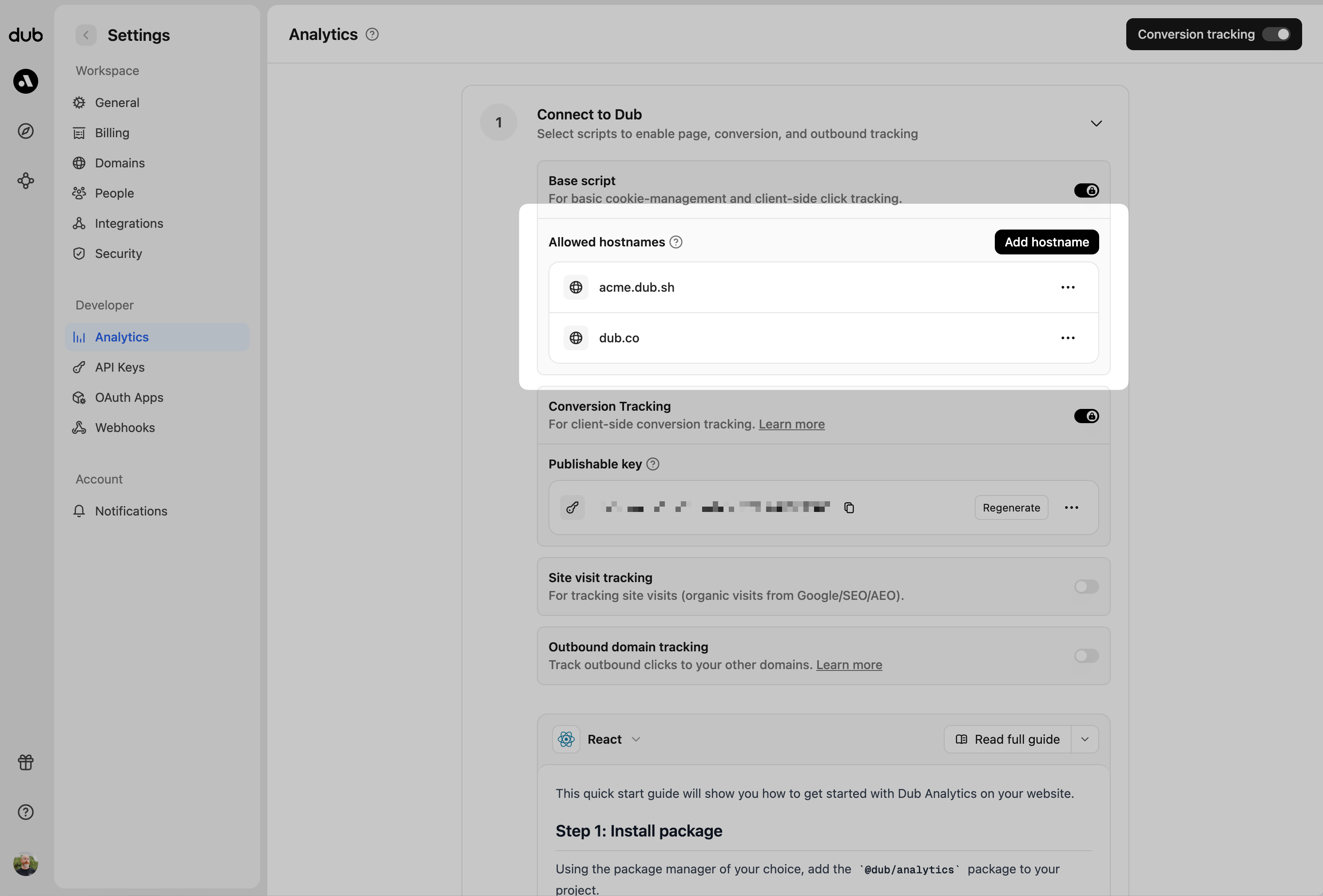 You can group your hostnames when adding them to the allow list:
* `example.com`: Tracks traffic **only** from `example.com`.
* `*.example.com`: Tracks traffic from **all subdomains** of `example.com`, but **not** from `example.com` itself.
When testing things out locally, you can add `localhost` to the **Allowed
Hostnames** list temporarily. This will allow local events to be ingested by
Dub. Don't forget to remove it once you're ready to go live!
Before you can track conversions on the client-side, you need to generate a [publishable key](/docs/api-reference/authentication#publishable-keys) from your Dub workspace.
To do that, navigate to your [workspace's Tracking settings page](https://app.dub.co/settings/tracking) and generate a new publishable key under the **Publishable Key** section.
You can group your hostnames when adding them to the allow list:
* `example.com`: Tracks traffic **only** from `example.com`.
* `*.example.com`: Tracks traffic from **all subdomains** of `example.com`, but **not** from `example.com` itself.
When testing things out locally, you can add `localhost` to the **Allowed
Hostnames** list temporarily. This will allow local events to be ingested by
Dub. Don't forget to remove it once you're ready to go live!
Before you can track conversions on the client-side, you need to generate a [publishable key](/docs/api-reference/authentication#publishable-keys) from your Dub workspace.
To do that, navigate to your [workspace's Tracking settings page](https://app.dub.co/settings/tracking) and generate a new publishable key under the **Publishable Key** section.
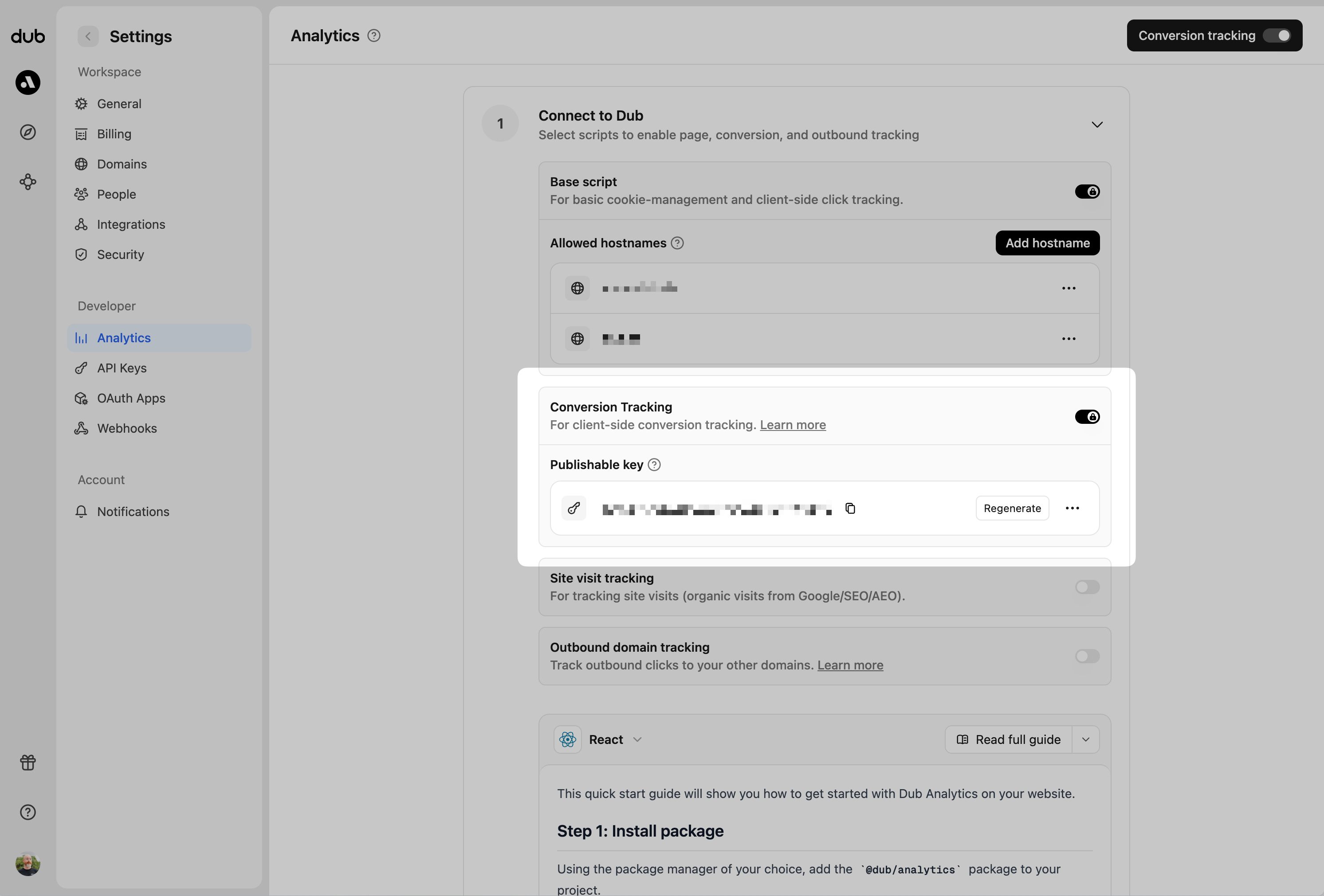 Next, install the Dub Analytics script on your website/web application.
You can install the Dub Analytics script in several different ways:
}
href="/docs/sdks/client-side/installation-guides/framer"
horizontal
/>
You must configure the **publishable key** you generated in step 1 when
installing the analytics script. Without this key, client-side conversion
tracking will not work.
```html HTML theme={null}
```
```typescript React/Next.js theme={null}
import { Analytics as DubAnalytics } from '@dub/analytics/react';
export default function RootLayout({
children,
}) {
return (
{children}
);
}
```
## Track direct sale conversions
To track a direct sale, you need to pass the `clickId` parameter along with customer information when tracking the sale event. The `clickId` can be read from the `dub_id` cookie that's automatically set when a user clicks on your Dub link.
### Track direct sales from URL query parameters
If you redirect users to a confirmation page after a successful purchase, you can track direct sales by reading query parameters from the URL and the `dub_id` cookie.
```typescript React/Next.js theme={null}
import { useAnalytics } from "@dub/analytics/react";
import { useEffect } from "react";
// Helper function to read cookie
function getCookie(name: string) {
const value = `; ${document.cookie}`;
const parts = value.split(`; ${name}=`);
if (parts.length === 2) return parts.pop()?.split(";").shift();
}
export function OrderConfirmationPage() {
const { trackSale } = useAnalytics();
useEffect(() => {
// Get query parameters from URL
const params = new URLSearchParams(window.location.search);
const customerId = params.get("customer_id");
const amount = params.get("amount");
const invoiceId = params.get("invoice_id");
// Get click ID from cookie
const clickId = getCookie("dub_id");
if (customerId && amount && clickId) {
// Track the direct sale event
trackSale({
eventName: "Purchase",
customerExternalId: customerId,
amount: parseInt(amount), // Amount in cents
invoiceId: invoiceId || undefined,
// Required for direct sale tracking:
clickId: clickId,
customerName: "John Doe", // Optional: customer name
customerEmail: "john@example.com", // Optional: customer email
customerAvatar: "https://example.com/avatar.jpg", // Optional: avatar URL
});
}
}, [trackSale]);
return
Next, install the Dub Analytics script on your website/web application.
You can install the Dub Analytics script in several different ways:
}
href="/docs/sdks/client-side/installation-guides/framer"
horizontal
/>
You must configure the **publishable key** you generated in step 1 when
installing the analytics script. Without this key, client-side conversion
tracking will not work.
```html HTML theme={null}
```
```typescript React/Next.js theme={null}
import { Analytics as DubAnalytics } from '@dub/analytics/react';
export default function RootLayout({
children,
}) {
return (
{children}
);
}
```
## Track direct sale conversions
To track a direct sale, you need to pass the `clickId` parameter along with customer information when tracking the sale event. The `clickId` can be read from the `dub_id` cookie that's automatically set when a user clicks on your Dub link.
### Track direct sales from URL query parameters
If you redirect users to a confirmation page after a successful purchase, you can track direct sales by reading query parameters from the URL and the `dub_id` cookie.
```typescript React/Next.js theme={null}
import { useAnalytics } from "@dub/analytics/react";
import { useEffect } from "react";
// Helper function to read cookie
function getCookie(name: string) {
const value = `; ${document.cookie}`;
const parts = value.split(`; ${name}=`);
if (parts.length === 2) return parts.pop()?.split(";").shift();
}
export function OrderConfirmationPage() {
const { trackSale } = useAnalytics();
useEffect(() => {
// Get query parameters from URL
const params = new URLSearchParams(window.location.search);
const customerId = params.get("customer_id");
const amount = params.get("amount");
const invoiceId = params.get("invoice_id");
// Get click ID from cookie
const clickId = getCookie("dub_id");
if (customerId && amount && clickId) {
// Track the direct sale event
trackSale({
eventName: "Purchase",
customerExternalId: customerId,
amount: parseInt(amount), // Amount in cents
invoiceId: invoiceId || undefined,
// Required for direct sale tracking:
clickId: clickId,
customerName: "John Doe", // Optional: customer name
customerEmail: "john@example.com", // Optional: customer email
customerAvatar: "https://example.com/avatar.jpg", // Optional: avatar URL
});
}
}, [trackSale]);
return Thank you for your purchase!
;
}
```
```html HTML / Other Frameworks theme={null}
Order Confirmation
Thank you for your purchase!
```
### Track direct sales from form submissions
You can also track direct sales when users complete a checkout form on your website.
```typescript React/Next.js theme={null}
import { useAnalytics } from "@dub/analytics/react";
import { useState } from "react";
// Helper function to read cookie
function getCookie(name: string) {
const value = `; ${document.cookie}`;
const parts = value.split(`; ${name}=`);
if (parts.length === 2) return parts.pop()?.split(";").shift();
}
export function CheckoutForm() {
const { trackSale } = useAnalytics();
const handleSubmit = (e: React.FormEvent) => {
e.preventDefault();
// Get click ID from cookie
const clickId = getCookie("dub_id");
if (clickId) {
// Track the direct sale event
trackSale({
eventName: "Purchase",
customerExternalId: "cus_RBfbD57H",
amount: 5000, // $50.00
invoiceId: "in_1MtHbELkdIwH",
// Required for direct sale tracking:
clickId: clickId,
customerName: "John Doe",
customerEmail: "john@example.com",
customerAvatar: "https://example.com/avatar.jpg",
});
}
};
return (
);
}
```
```html HTML / Other Frameworks theme={null}
Checkout
```
### Server-side direct sale tracking
You can also track direct sales from your backend by passing the `clickId` parameter when calling the track sale API:
```javascript Node.js theme={null}
import { Dub } from "dub";
const dub = new Dub();
await dub.track.sale({
customerExternalId: "cus_RBfbD57HDzPKpduI8elr5qHA",
amount: 5000,
paymentProcessor: "stripe",
eventName: "Purchase",
invoiceId: "in_1MtHbELkdIwH",
currency: "usd",
// Required for direct sale tracking:
clickId: "cm3w...", // Pass the click ID from your frontend
customerName: "John Doe",
customerEmail: "john@example.com",
customerAvatar: "https://example.com/avatar.jpg",
});
```
```python Python theme={null}
from dub import Dub
import os
dub = Dub(token=os.environ['DUB_API_KEY'])
dub.track.sale({
'external_id': 'cus_RBfbD57HDzPKpduI8elr5qHA',
'amount': 5000,
'payment_processor': 'stripe',
'event_name': 'Purchase',
'invoice_id': 'in_1MtHbELkdIwH',
'currency': 'usd',
# Required for direct sale tracking:
'click_id': 'cm3w...', # Pass the click ID from your frontend
'customer_name': 'John Doe',
'customer_email': 'john@example.com',
'customer_avatar': 'https://example.com/avatar.jpg'
})
```
```go Go theme={null}
package main
import (
"context"
dub "github.com/dubinc/dub-go"
)
d := dub.New(
dub.WithSecurity(os.Getenv("DUB_API_KEY")),
)
_, err := d.Track.Sale(context.Background(), &operations.TrackSaleRequest{
CustomerExternalId: "cus_RBfbD57HDzPKpduI8elr5qHA",
Amount: 5000,
PaymentProcessor: "stripe",
EventName: "Purchase",
InvoiceId: "in_1MtHbELkdIwH",
Currency: "usd",
// Required for direct sale tracking:
ClickId: "cm3w...", // Pass the click ID from your frontend
CustomerName: "John Doe",
CustomerEmail: "john@example.com",
CustomerAvatar: "https://example.com/avatar.jpg",
})
```
```ruby Ruby theme={null}
require 'dub'
dub = ::OpenApiSDK::Dub.new
dub.config_security(
::OpenApiSDK::Shared::Security.new(
token: ENV['DUB_API_KEY']
)
)
req = ::OpenApiSDK::Operations::TrackSaleRequest.new(
external_id: 'cus_RBfbD57HDzPKpduI8elr5qHA',
amount: 5000,
payment_processor: 'stripe',
event_name: 'Purchase',
invoice_id: 'in_1MtHbELkdIwH',
currency: 'usd',
# Required for direct sale tracking:
click_id: 'cm3w...', # Pass the click ID from your frontend
customer_name: 'John Doe',
customer_email: 'john@example.com',
customer_avatar: 'https://example.com/avatar.jpg'
)
dub.track.sale(req)
```
```php PHP theme={null}
setSecurity($_ENV["DUB_API_KEY"])->build();
$request = new Operations\TrackSaleRequest();
$request->customerExternalId = 'cus_RBfbD57HDzPKpduI8elr5qHA';
$request->amount = 5000;
$request->paymentProcessor = 'stripe';
$request->eventName = 'Purchase';
$request->invoiceId = 'in_1MtHbELkdIwH';
$request->currency = 'usd';
// Required for direct sale tracking:
$request->clickId = 'cm3w...'; // Pass the click ID from your frontend
$request->customerName = 'John Doe';
$request->customerEmail = 'john@example.com';
$request->customerAvatar = 'https://example.com/avatar.jpg';
$dub->track->sale($request);
```
Here are the properties you can include when sending a sale event:
| Property | Required | Description |
| :------------------- | :------- | :--------------------------------------------------------------------------------------------------------------------------------------------------------- |
| `customerExternalId` | **Yes** | The unique ID of the customer in your system. Will be used to identify and attribute all future events to this customer. |
| `amount` | **Yes** | The amount of the sale in cents. |
| `paymentProcessor` | No | The payment processor that processed the sale (e.g. [Stripe](/docs/integrations/stripe), [Shopify](/docs/integrations/stripe)). Defaults to "custom". |
| `eventName` | No | The name of the event. Defaults to "Purchase". |
| `invoiceId` | No | The invoice ID of the sale. Can be used as a idempotency key – only one sale event can be recorded for a given invoice ID. |
| `currency` | No | The currency of the sale. Defaults to "usd". |
| `metadata` | No | An object containing additional information about the sale. |
| `clickId` | No | **\[For direct sale tracking]**: The unique ID of the click that the sale conversion event is attributed to. You can read this value from `dub_id` cookie. |
| `customerName` | No | **\[For direct sale tracking]**: The name of the customer. If not passed, a random name will be generated. |
| `customerEmail` | No | **\[For direct sale tracking]**: The email address of the customer. |
| `customerAvatar` | No | **\[For direct sale tracking]**: The avatar URL of the customer. |
**When to track sale**: Track sale events only after a user successfully
completes a purchase or payment-related action. Ensure the event is triggered
**only after the backend confirms the payment was successful**.
## View your conversions
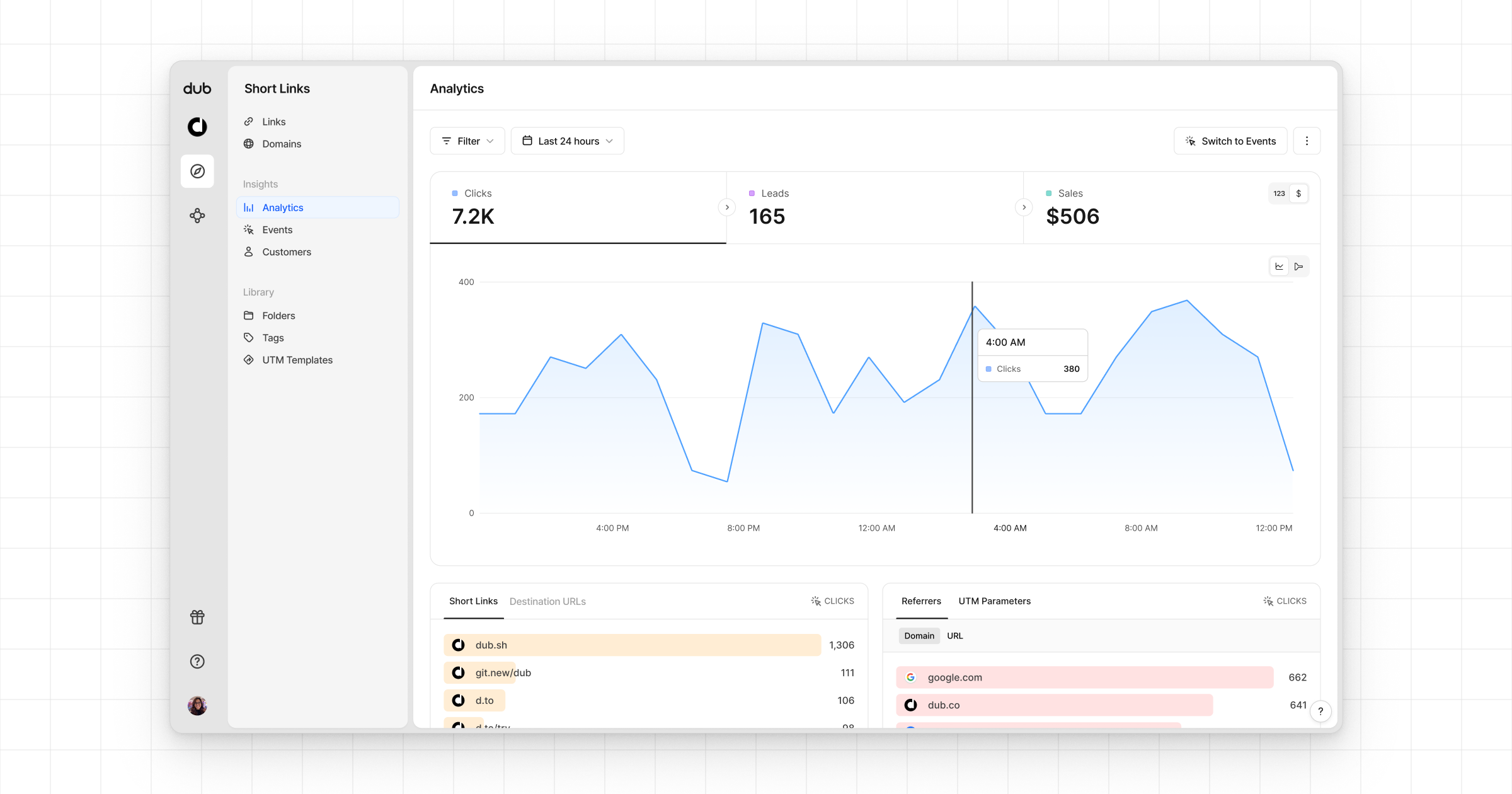
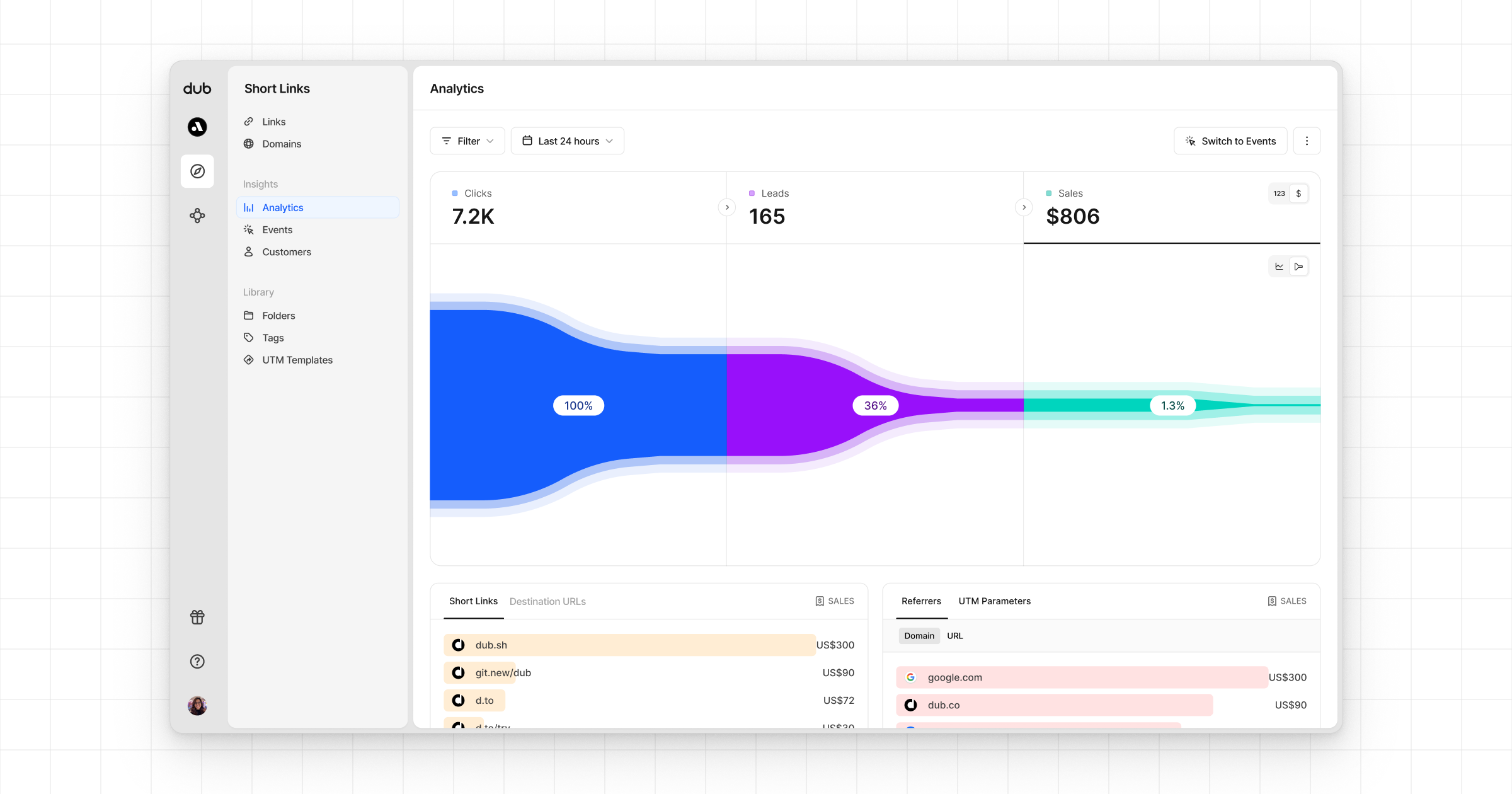
And that's it – you're all set! You can now sit back, relax, and watch your conversion revenue grow. We provide 3 different views to help you understand your conversions:
* **Time-series**: A [time-series view](https://app.dub.co/dub/analytics?view=timeseries) of the number clicks, leads and sales.
 * **Funnel chart**: A [funnel chart view](http://app.dub.co/analytics?view=funnel) visualizing the conversion & dropoff rates across the different steps in the conversion funnel (clicks → leads → sales).
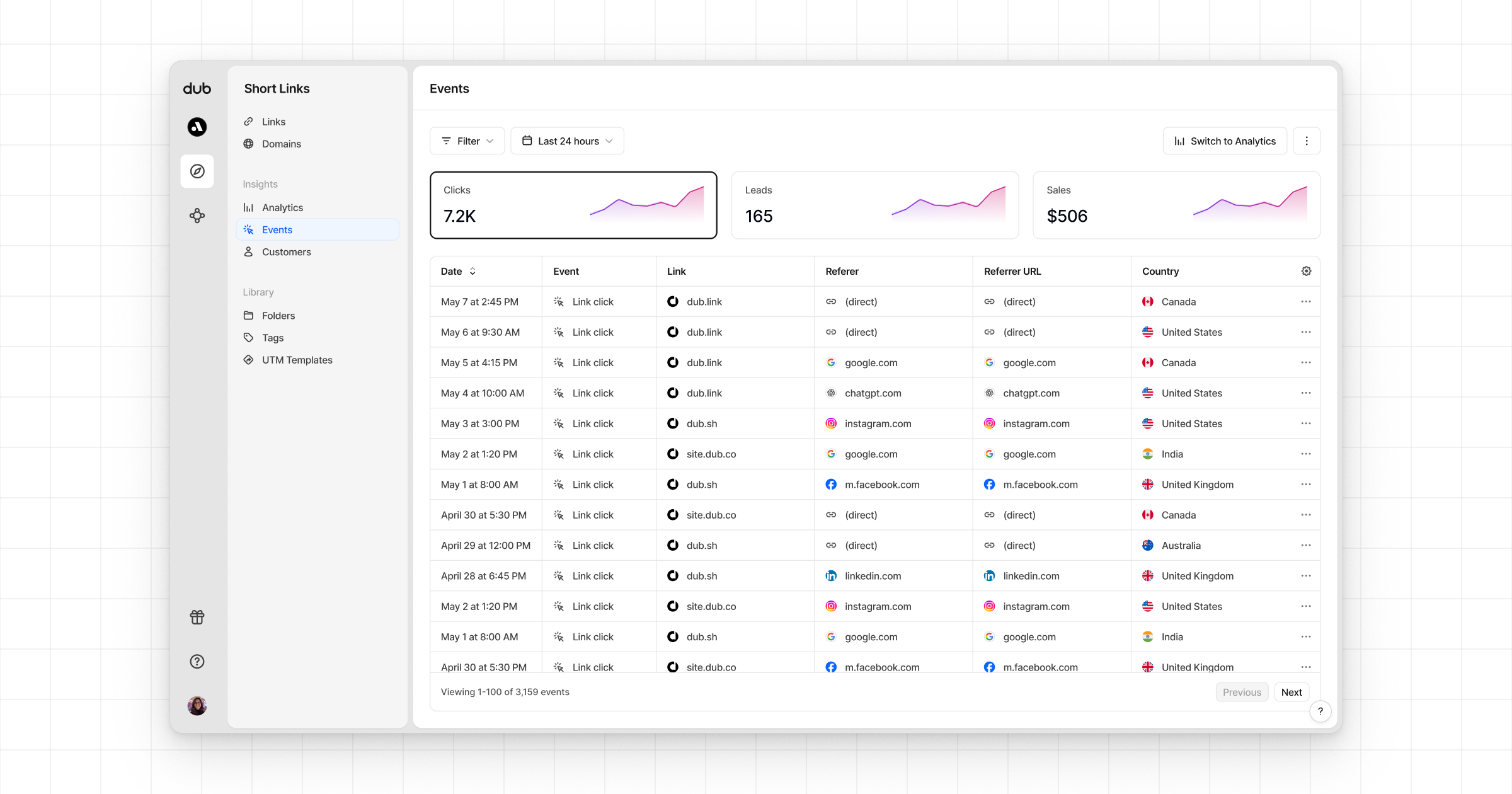
 * **Real-time events stream**: A [real-time events stream](https://app.dub.co/events) of every single conversion event that occurs across all your links in your workspace.