> ## Documentation Index
> Fetch the complete documentation index at: https://dub.co/llms.txt
> Use this file to discover all available pages before exploring further.
# Supabase
> Learn how to track lead conversion events with Supabase and Dub
This feature is only available on [Business plans and
above](https://dub.co/pricing/partners).
When it comes to [conversion tracking](/docs/concepts/attribution), a `lead` event happens when a user performs an action that indicates interest in your product or service. This could be anything from:
* Signing up for an account
* Booking a demo meeting
* Joining a mailing list
 In this guide, we will be focusing on tracking new user sign-ups for a SaaS application that uses Supabase for user authentication.
## Prerequisites
First, you'll need to enable conversion tracking for your Dub links to be able to start tracking conversions:
If you're using [Dub Partners](https://dub.co/partners), you can skip this
step since partner links will have conversion tracking enabled by default.
To enable conversion tracking for all future links in a workspace, you can do the following:
To enable conversion tracking for all future links in a workspace, you can do the following:
1. Navigate to your [workspace's Tracking settings page](https://app.dub.co/settings/tracking).
2. Toggle the **Workspace-level Conversion Tracking** switch to enable conversion tracking for the workspace.
In this guide, we will be focusing on tracking new user sign-ups for a SaaS application that uses Supabase for user authentication.
## Prerequisites
First, you'll need to enable conversion tracking for your Dub links to be able to start tracking conversions:
If you're using [Dub Partners](https://dub.co/partners), you can skip this
step since partner links will have conversion tracking enabled by default.
To enable conversion tracking for all future links in a workspace, you can do the following:
To enable conversion tracking for all future links in a workspace, you can do the following:
1. Navigate to your [workspace's Tracking settings page](https://app.dub.co/settings/tracking).
2. Toggle the **Workspace-level Conversion Tracking** switch to enable conversion tracking for the workspace.
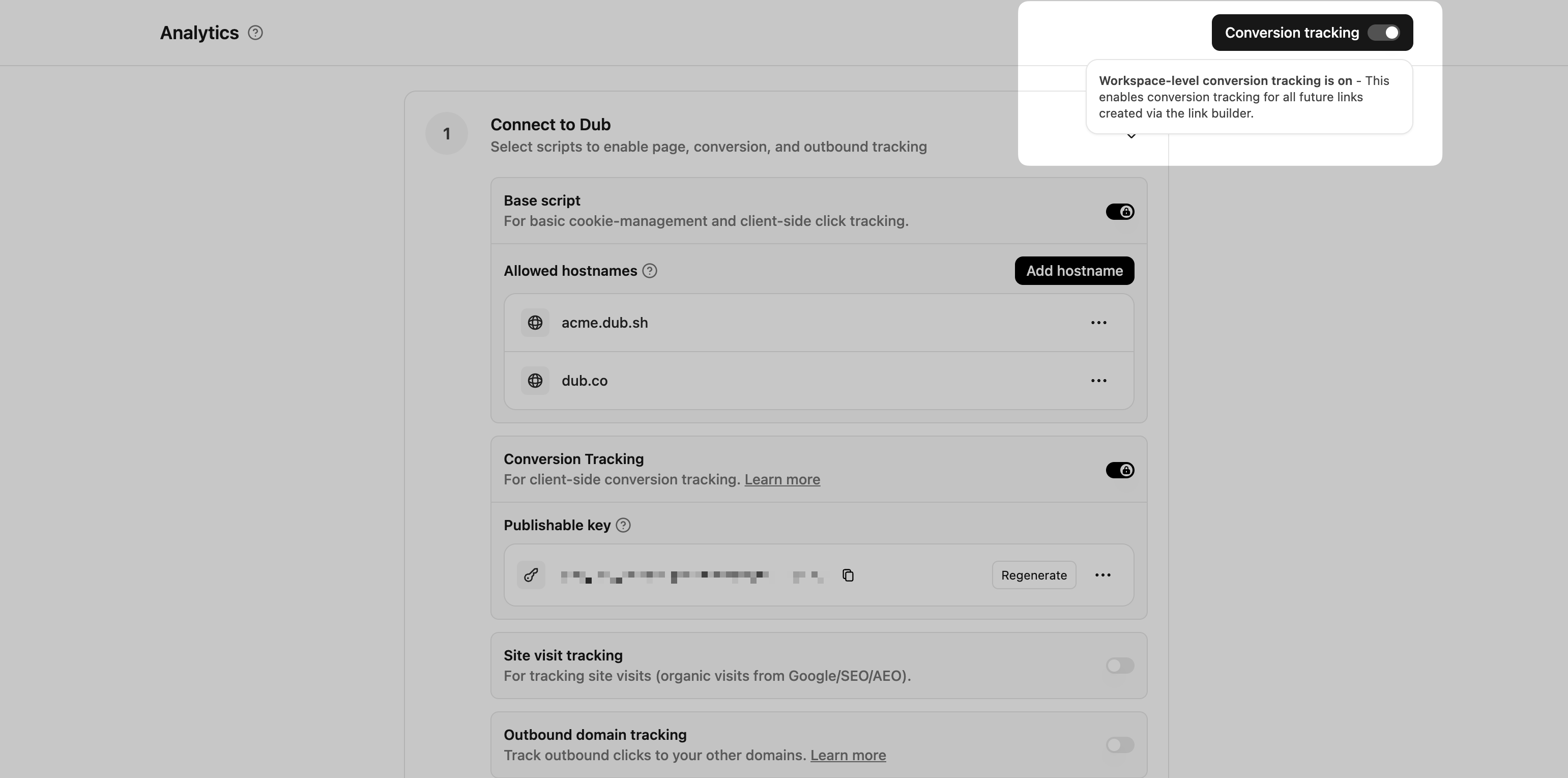 This option will enable conversion tracking in the [Dub Link Builder](/help/article/dub-link-builder) for all future links.
If you don't want to enable conversion tracking for all your links in a workspace, you can also opt to enable it on a link-level.
To enable conversion tracking for a specific link, open the [Dub Link Builder](/help/article/dub-link-builder) for a link and toggle the **Conversion Tracking** switch.
This option will enable conversion tracking in the [Dub Link Builder](/help/article/dub-link-builder) for all future links.
If you don't want to enable conversion tracking for all your links in a workspace, you can also opt to enable it on a link-level.
To enable conversion tracking for a specific link, open the [Dub Link Builder](/help/article/dub-link-builder) for a link and toggle the **Conversion Tracking** switch.
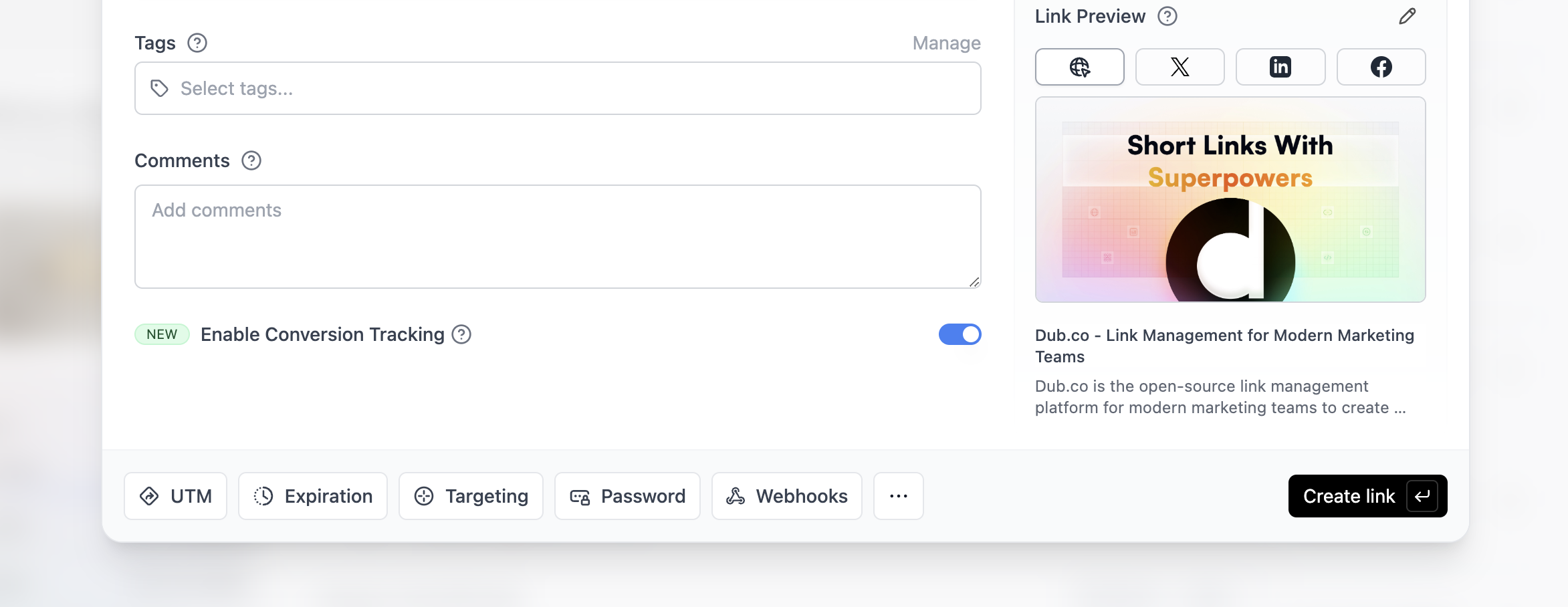 You can also use the `C` keyboard shortcut when inside the link builder to
quickly enable conversion tracking for a given link.
Alternatively, you can also enable conversion tracking programmatically via the [Dub API](/docs/api-reference/introduction). All you need to do is pass `trackConversion: true` when creating or updating a link:
```javascript Node.js theme={null}
const link = await dub.links.create({
url: "https://dub.co",
trackConversion: true,
});
```
```python Python theme={null}
link = d.links.create(url="https://dub.co", track_conversion=True)
```
```go Go theme={null}
link, err := d.Links.Create(ctx, &dub.CreateLinkRequest{
URL: "https://dub.co",
TrackConversion: true,
})
```
```ruby Ruby theme={null}
s.links.create_many(
::OpenApiSDK::Operations::CreateLinkRequest.new(
url: "https://dub.co",
track_conversion: true,
)
)
```
Then, you'd want to install the Dub Analytics script to your website to track conversion events.
You can install the Dub Analytics script in several different ways:
}
href="/docs/sdks/client-side/installation-guides/framer"
horizontal
/>
You can **verify the installation** with the following tests:
1. Open the browser console and type in `_dubAnalytics` – if the script is installed correctly, you should see the `_dubAnalytics` object in the console.
2. Add the `?dub_id=test` query parameter to your website URL and make sure that the `dub_id` cookie is being set in your browser.
If both of these checks pass, the script is installed correctly. Otherwise, please make sure:
* The analytics script was added to the `` section of the page
* If you're using a content delivery network (CDN), make sure to purge any cached content
## Configure Supabase
Next, configure Supabase to track lead conversion events in the auth callback function.
Here's how it works in a nutshell:
1. In the `/api/auth/callback` route, check if:
* the `dub_id` cookie is present.
* the user is a new sign up (created in the last 10 minutes).
2. If the `dub_id` cookie is present and the user is a new sign up, send a lead event to Dub using `dub.track.lead`
3. Delete the `dub_id` cookie.
```typescript Next.js App Router theme={null}
// app/api/auth/callback/route.ts
import { cookies } from "next/headers";
import { NextResponse } from "next/server";
import { createClient } from "@/lib/supabase/server";
import { waitUntil } from "@vercel/functions";
import { dub } from "@/lib/dub";
export async function GET(request: Request) {
const { searchParams, origin } = new URL(request.url);
const code = searchParams.get("code");
// if "next" is in param, use it as the redirect URL
const next = searchParams.get("next") ?? "/";
if (code) {
const supabase = createClient(cookies());
const { data, error } = await supabase.auth.exchangeCodeForSession(code);
if (!error) {
const { user } = data;
const dub_id = cookies().get("dub_id")?.value;
// if the user is created in the last 10 minutes, consider them new
const isNewUser =
new Date(user.created_at) > new Date(Date.now() - 10 * 60 * 1000);
// if the user is new and has a dub_id cookie, track the lead
if (dub_id && isNewUser) {
waitUntil(
dub.track.lead({
clickId: dub_id,
eventName: "Sign Up",
customerExternalId: user.id,
customerName: user.user_metadata.name,
customerEmail: user.email,
customerAvatar: user.user_metadata.avatar_url,
}),
);
// delete the clickId cookie
cookies().delete("dub_id");
}
return NextResponse.redirect(`${origin}${next}`);
}
}
// return the user to an error page with instructions
return NextResponse.redirect(`${origin}/auth/auth-code-error`);
}
```
```typescript Next.js Pages Router theme={null}
// pages/api/auth/callback.ts
import { NextApiRequest, NextApiResponse } from "next";
import { createClient } from "@supabase/supabase-js";
import { dub } from "@/lib/dub";
export default async function handler(
req: NextApiRequest,
res: NextApiResponse,
) {
const { code, next = "/" } = req.query;
const origin = `${req.headers["x-forwarded-proto"]}://${req.headers.host}`;
if (typeof code === "string") {
const supabase = createClient(
process.env.NEXT_PUBLIC_SUPABASE_URL!,
process.env.SUPABASE_SERVICE_ROLE_KEY!,
);
const { data, error } = await supabase.auth.exchangeCodeForSession(code);
if (!error) {
const { user } = data;
const { dub_id } = req.cookies;
// if the user is created in the last 10 minutes, consider them new
const isNewUser =
new Date(user.created_at) > new Date(Date.now() - 10 * 60 * 1000);
// if the user is new and has a dub_id cookie, track the lead
if (dub_id && isNewUser) {
dub.track
.lead({
clickId: dub_id,
eventName: "Sign Up",
customerExternalId: user.id,
customerName: user.user_metadata.name,
customerEmail: user.email,
customerAvatar: user.user_metadata.avatar_url,
})
.catch(console.error); // Handle any errors in tracking
// delete the clickId cookie
res.setHeader(
"Set-Cookie",
`dub_id=; Path=/; Expires=Thu, 01 Jan 1970 00:00:00 GMT`,
);
}
return res.redirect(`${origin}${next}`);
}
}
// return the user to an error page with instructions
return res.redirect(`${origin}/auth/auth-code-error`);
}
```
Here are the properties you can include when sending a lead event:
| Property | Required | Description |
| :------------------- | :------- | :------------------------------------------------------------------------------------------------------------------------------------------------------------------------------------------------------------------------------------------------------------------------------------------------------------------------------------------------------------------------------------- |
| `clickId` | **Yes** | The unique ID of the click that the lead conversion event is attributed to. You can read this value from `dub_id` cookie. If an empty string is provided (i.e. if you're using [tracking a deferred lead event](/docs/conversions/leads/deferred)), Dub will try to find an existing customer with the provided `customerExternalId` and use the `clickId` from the customer if found. |
| `eventName` | **Yes** | The name of the lead event to track. Can also be used as a unique identifier to associate a given lead event for a customer for a subsequent sale event (via the `leadEventName` prop in `/track/sale`). |
| `customerExternalId` | **Yes** | The unique ID of the customer in your system. Will be used to identify and attribute all future events to this customer. |
| `customerName` | No | The name of the customer. If not passed, a random name will be generated (e.g. "Big Red Caribou"). |
| `customerEmail` | No | The email address of the customer. |
| `customerAvatar` | No | The avatar URL of the customer. |
| `mode` | No | The mode to use for tracking the lead event. `async` will not block the request; `wait` will block the request until the lead event is fully recorded in Dub; `deferred` will defer the lead event creation to a subsequent request. |
| `metadata` | No | Additional metadata to be stored with the lead event. Max 10,000 characters. |
## Example App
To learn more about how to track leads with Supabase, check out the following example app:
Check out a real-world example of this in action – Extrapolate uses Supabase
Auth and Next.js App Router to track new user sign-ups.
## View your conversions
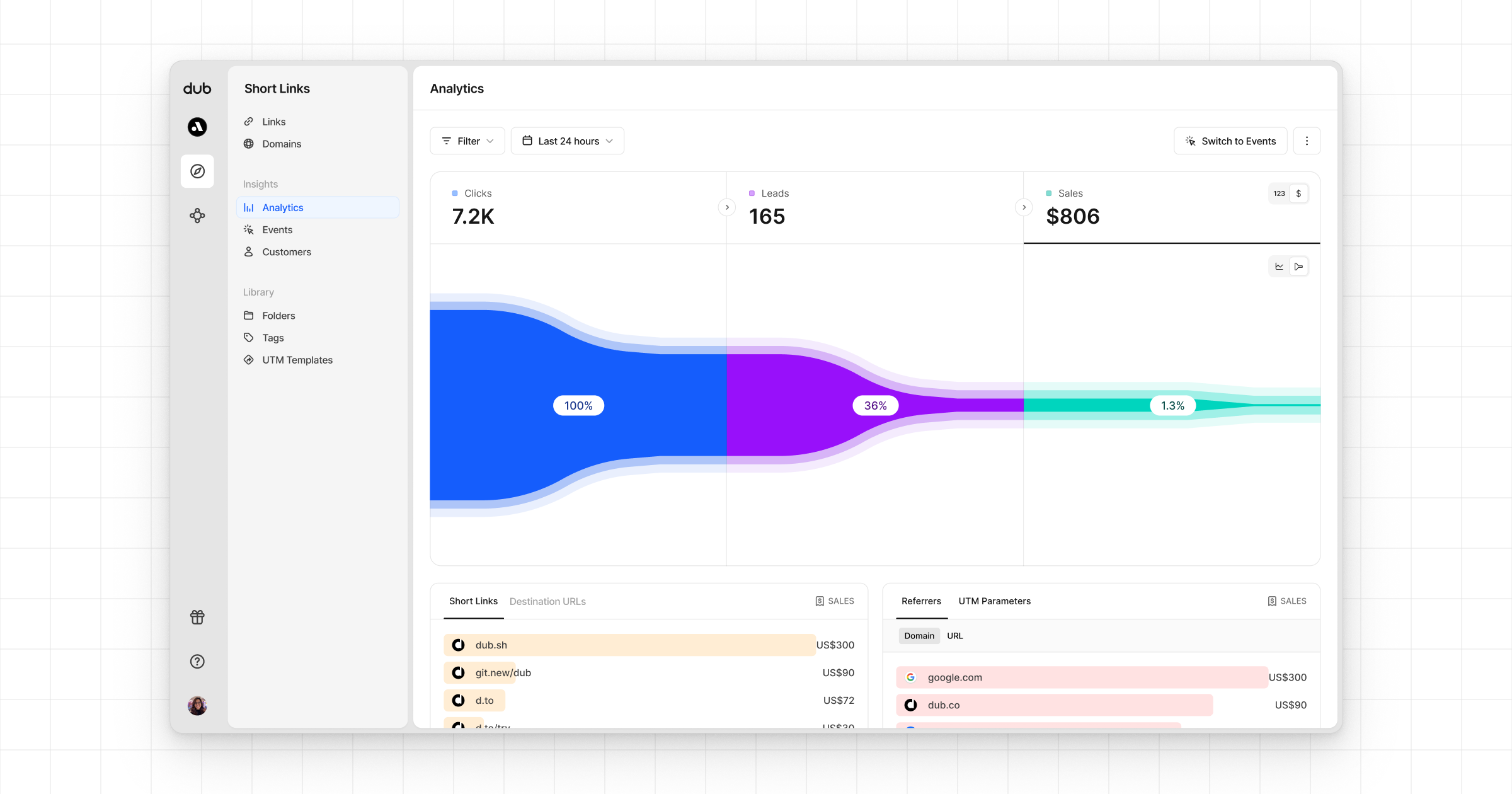
Once you've completed the setup, all your tracked conversions will show up in [Dub Analytics](https://dub.co/analytics). We provide 3 different views to help you understand your conversions:
* **Time-series**: A [time-series view](https://app.dub.co/dub/analytics?view=timeseries) of the number clicks, leads and sales.
You can also use the `C` keyboard shortcut when inside the link builder to
quickly enable conversion tracking for a given link.
Alternatively, you can also enable conversion tracking programmatically via the [Dub API](/docs/api-reference/introduction). All you need to do is pass `trackConversion: true` when creating or updating a link:
```javascript Node.js theme={null}
const link = await dub.links.create({
url: "https://dub.co",
trackConversion: true,
});
```
```python Python theme={null}
link = d.links.create(url="https://dub.co", track_conversion=True)
```
```go Go theme={null}
link, err := d.Links.Create(ctx, &dub.CreateLinkRequest{
URL: "https://dub.co",
TrackConversion: true,
})
```
```ruby Ruby theme={null}
s.links.create_many(
::OpenApiSDK::Operations::CreateLinkRequest.new(
url: "https://dub.co",
track_conversion: true,
)
)
```
Then, you'd want to install the Dub Analytics script to your website to track conversion events.
You can install the Dub Analytics script in several different ways:
}
href="/docs/sdks/client-side/installation-guides/framer"
horizontal
/>
You can **verify the installation** with the following tests:
1. Open the browser console and type in `_dubAnalytics` – if the script is installed correctly, you should see the `_dubAnalytics` object in the console.
2. Add the `?dub_id=test` query parameter to your website URL and make sure that the `dub_id` cookie is being set in your browser.
If both of these checks pass, the script is installed correctly. Otherwise, please make sure:
* The analytics script was added to the `` section of the page
* If you're using a content delivery network (CDN), make sure to purge any cached content
## Configure Supabase
Next, configure Supabase to track lead conversion events in the auth callback function.
Here's how it works in a nutshell:
1. In the `/api/auth/callback` route, check if:
* the `dub_id` cookie is present.
* the user is a new sign up (created in the last 10 minutes).
2. If the `dub_id` cookie is present and the user is a new sign up, send a lead event to Dub using `dub.track.lead`
3. Delete the `dub_id` cookie.
```typescript Next.js App Router theme={null}
// app/api/auth/callback/route.ts
import { cookies } from "next/headers";
import { NextResponse } from "next/server";
import { createClient } from "@/lib/supabase/server";
import { waitUntil } from "@vercel/functions";
import { dub } from "@/lib/dub";
export async function GET(request: Request) {
const { searchParams, origin } = new URL(request.url);
const code = searchParams.get("code");
// if "next" is in param, use it as the redirect URL
const next = searchParams.get("next") ?? "/";
if (code) {
const supabase = createClient(cookies());
const { data, error } = await supabase.auth.exchangeCodeForSession(code);
if (!error) {
const { user } = data;
const dub_id = cookies().get("dub_id")?.value;
// if the user is created in the last 10 minutes, consider them new
const isNewUser =
new Date(user.created_at) > new Date(Date.now() - 10 * 60 * 1000);
// if the user is new and has a dub_id cookie, track the lead
if (dub_id && isNewUser) {
waitUntil(
dub.track.lead({
clickId: dub_id,
eventName: "Sign Up",
customerExternalId: user.id,
customerName: user.user_metadata.name,
customerEmail: user.email,
customerAvatar: user.user_metadata.avatar_url,
}),
);
// delete the clickId cookie
cookies().delete("dub_id");
}
return NextResponse.redirect(`${origin}${next}`);
}
}
// return the user to an error page with instructions
return NextResponse.redirect(`${origin}/auth/auth-code-error`);
}
```
```typescript Next.js Pages Router theme={null}
// pages/api/auth/callback.ts
import { NextApiRequest, NextApiResponse } from "next";
import { createClient } from "@supabase/supabase-js";
import { dub } from "@/lib/dub";
export default async function handler(
req: NextApiRequest,
res: NextApiResponse,
) {
const { code, next = "/" } = req.query;
const origin = `${req.headers["x-forwarded-proto"]}://${req.headers.host}`;
if (typeof code === "string") {
const supabase = createClient(
process.env.NEXT_PUBLIC_SUPABASE_URL!,
process.env.SUPABASE_SERVICE_ROLE_KEY!,
);
const { data, error } = await supabase.auth.exchangeCodeForSession(code);
if (!error) {
const { user } = data;
const { dub_id } = req.cookies;
// if the user is created in the last 10 minutes, consider them new
const isNewUser =
new Date(user.created_at) > new Date(Date.now() - 10 * 60 * 1000);
// if the user is new and has a dub_id cookie, track the lead
if (dub_id && isNewUser) {
dub.track
.lead({
clickId: dub_id,
eventName: "Sign Up",
customerExternalId: user.id,
customerName: user.user_metadata.name,
customerEmail: user.email,
customerAvatar: user.user_metadata.avatar_url,
})
.catch(console.error); // Handle any errors in tracking
// delete the clickId cookie
res.setHeader(
"Set-Cookie",
`dub_id=; Path=/; Expires=Thu, 01 Jan 1970 00:00:00 GMT`,
);
}
return res.redirect(`${origin}${next}`);
}
}
// return the user to an error page with instructions
return res.redirect(`${origin}/auth/auth-code-error`);
}
```
Here are the properties you can include when sending a lead event:
| Property | Required | Description |
| :------------------- | :------- | :------------------------------------------------------------------------------------------------------------------------------------------------------------------------------------------------------------------------------------------------------------------------------------------------------------------------------------------------------------------------------------- |
| `clickId` | **Yes** | The unique ID of the click that the lead conversion event is attributed to. You can read this value from `dub_id` cookie. If an empty string is provided (i.e. if you're using [tracking a deferred lead event](/docs/conversions/leads/deferred)), Dub will try to find an existing customer with the provided `customerExternalId` and use the `clickId` from the customer if found. |
| `eventName` | **Yes** | The name of the lead event to track. Can also be used as a unique identifier to associate a given lead event for a customer for a subsequent sale event (via the `leadEventName` prop in `/track/sale`). |
| `customerExternalId` | **Yes** | The unique ID of the customer in your system. Will be used to identify and attribute all future events to this customer. |
| `customerName` | No | The name of the customer. If not passed, a random name will be generated (e.g. "Big Red Caribou"). |
| `customerEmail` | No | The email address of the customer. |
| `customerAvatar` | No | The avatar URL of the customer. |
| `mode` | No | The mode to use for tracking the lead event. `async` will not block the request; `wait` will block the request until the lead event is fully recorded in Dub; `deferred` will defer the lead event creation to a subsequent request. |
| `metadata` | No | Additional metadata to be stored with the lead event. Max 10,000 characters. |
## Example App
To learn more about how to track leads with Supabase, check out the following example app:
Check out a real-world example of this in action – Extrapolate uses Supabase
Auth and Next.js App Router to track new user sign-ups.
## View your conversions
Once you've completed the setup, all your tracked conversions will show up in [Dub Analytics](https://dub.co/analytics). We provide 3 different views to help you understand your conversions:
* **Time-series**: A [time-series view](https://app.dub.co/dub/analytics?view=timeseries) of the number clicks, leads and sales.
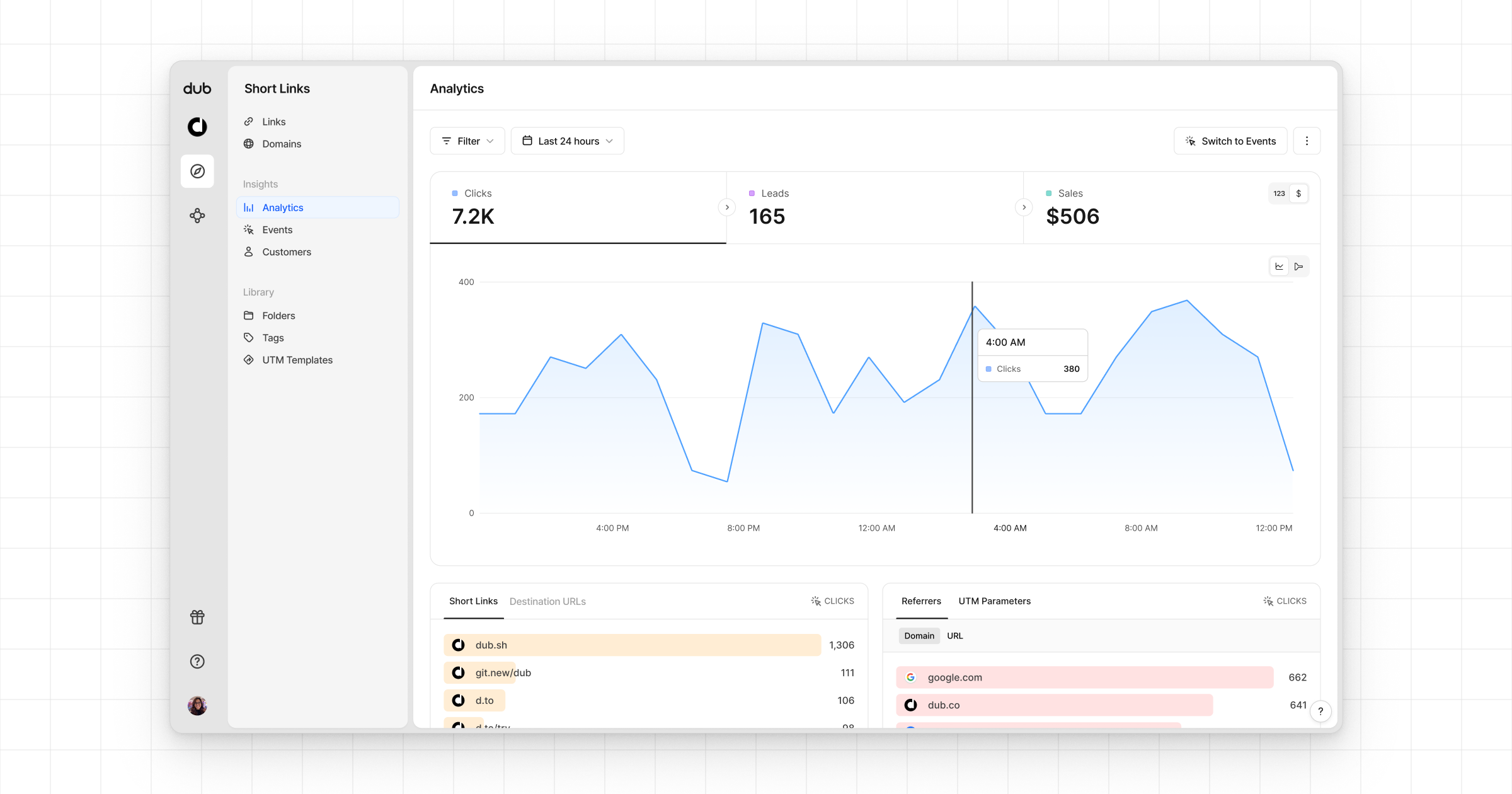 * **Funnel chart**: A [funnel chart view](http://app.dub.co/analytics?view=funnel) visualizing the conversion & dropoff rates across the different steps in the conversion funnel (clicks → leads → sales).
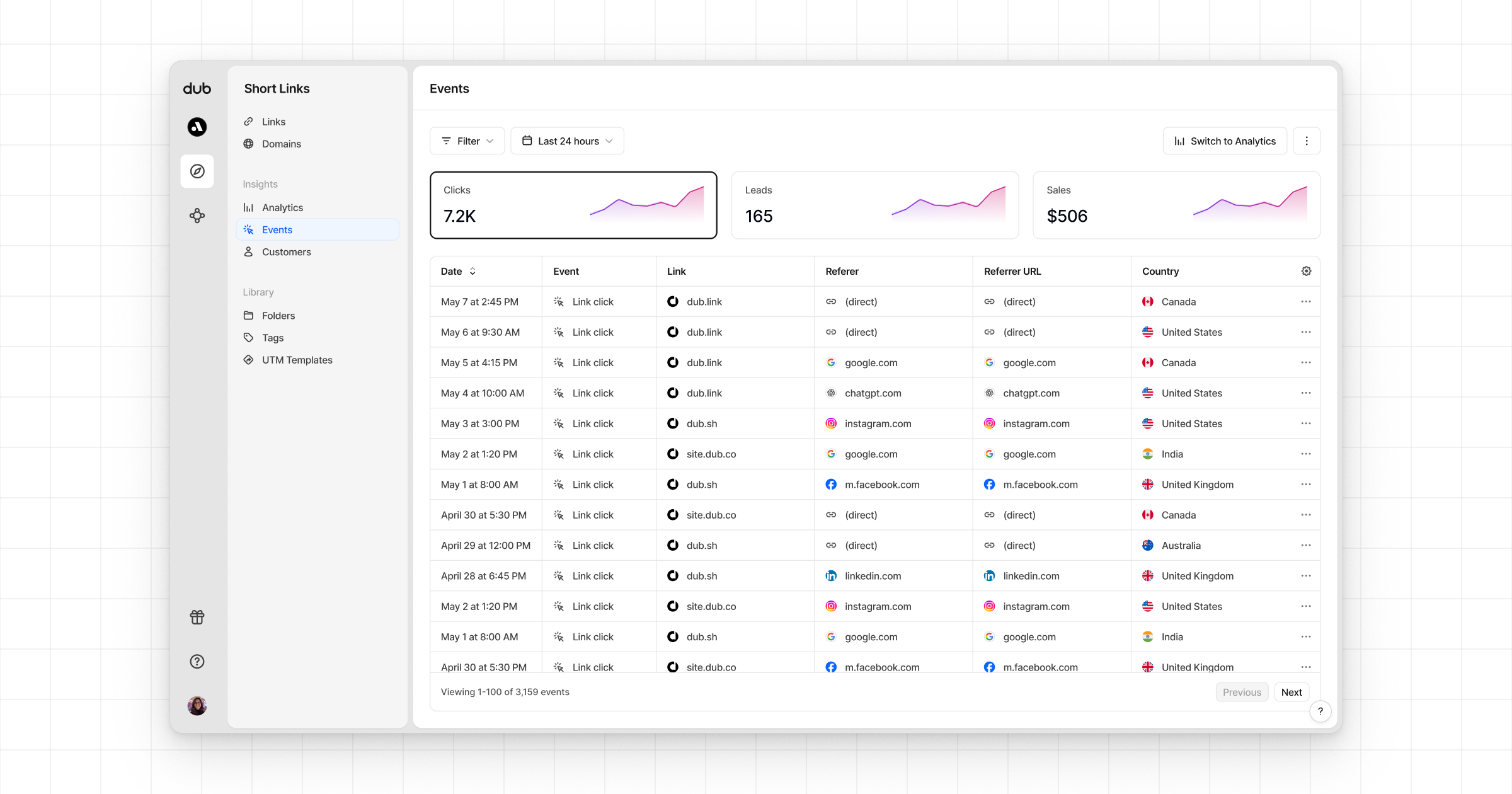
 * **Real-time events stream**: A [real-time events stream](https://app.dub.co/events) of every single conversion event that occurs across all your links in your workspace.