> ## Documentation Index
> Fetch the complete documentation index at: https://dub.co/llms.txt
> Use this file to discover all available pages before exploring further.
# Deferred lead tracking
> Learn how to track a deferred lead conversion event with Dub
This feature is only available on [Business plans and
above](https://dub.co/pricing/partners).
When it comes to [conversion tracking](/docs/concepts/attribution), a `lead` event happens when a user performs an action that indicates interest in your product or service. This could be anything from:
* Signing up for an account
* Booking a demo meeting
* Joining a mailing list
 However, there are times where signups alone might not be the clearest indicator of a lead conversion event. For instance, you might want to track a more meaningful lead event such as:
* A user completing their first meeting on [Granola](https://partners.dub.co/granola)
* A user making their first search query on [Perplexity](https://partners.dub.co/perplexity)
* A user dictating their first 2,000 words on [Wispr Flow](https://partners.dub.co/flow)
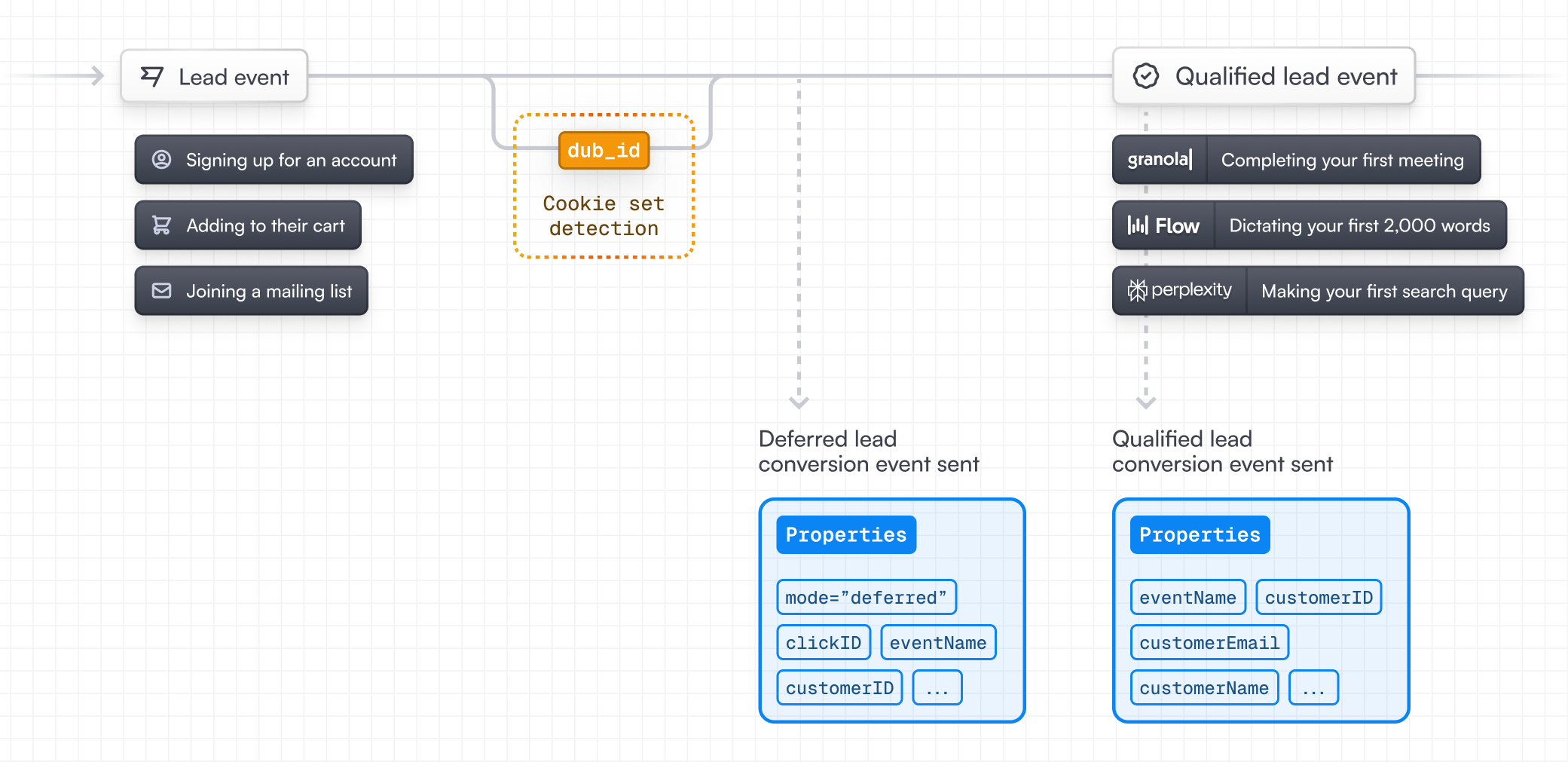
In these cases, you can use deferred lead tracking to defer the actual lead event creation to a subsequent request:
However, there are times where signups alone might not be the clearest indicator of a lead conversion event. For instance, you might want to track a more meaningful lead event such as:
* A user completing their first meeting on [Granola](https://partners.dub.co/granola)
* A user making their first search query on [Perplexity](https://partners.dub.co/perplexity)
* A user dictating their first 2,000 words on [Wispr Flow](https://partners.dub.co/flow)
In these cases, you can use deferred lead tracking to defer the actual lead event creation to a subsequent request:
 Deferred lead tracking is particularly useful for tracking **sales-qualified
leads (SQLs)** – both for marketing attribution purposes, as well as to make
sure that you're [rewarding partners](/help/article/partner-rewards) for
qualified leads (instead of just pure signups) with [Dub
Partners](https://dub.co/partners).
## Prerequisites
First, you'll need to enable conversion tracking for your Dub links to be able to start tracking conversions:
If you're using [Dub Partners](https://dub.co/partners), you can skip this
step since partner links will have conversion tracking enabled by default.
To enable conversion tracking for all future links in a workspace, you can do the following:
To enable conversion tracking for all future links in a workspace, you can do the following:
1. Navigate to your [workspace's Tracking settings page](https://app.dub.co/settings/tracking).
2. Toggle the **Workspace-level Conversion Tracking** switch to enable conversion tracking for the workspace.
Deferred lead tracking is particularly useful for tracking **sales-qualified
leads (SQLs)** – both for marketing attribution purposes, as well as to make
sure that you're [rewarding partners](/help/article/partner-rewards) for
qualified leads (instead of just pure signups) with [Dub
Partners](https://dub.co/partners).
## Prerequisites
First, you'll need to enable conversion tracking for your Dub links to be able to start tracking conversions:
If you're using [Dub Partners](https://dub.co/partners), you can skip this
step since partner links will have conversion tracking enabled by default.
To enable conversion tracking for all future links in a workspace, you can do the following:
To enable conversion tracking for all future links in a workspace, you can do the following:
1. Navigate to your [workspace's Tracking settings page](https://app.dub.co/settings/tracking).
2. Toggle the **Workspace-level Conversion Tracking** switch to enable conversion tracking for the workspace.
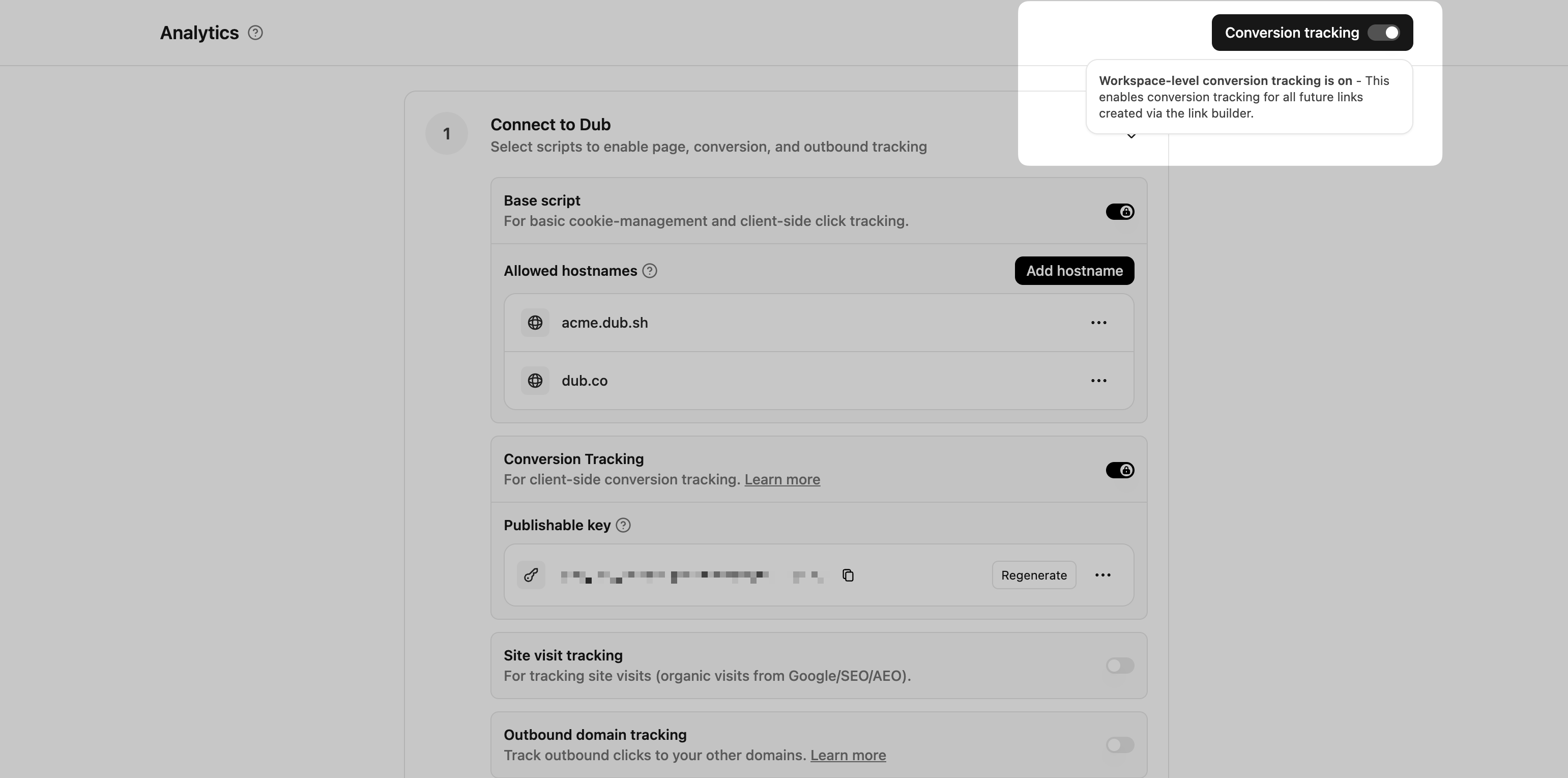 This option will enable conversion tracking in the [Dub Link Builder](/help/article/dub-link-builder) for all future links.
If you don't want to enable conversion tracking for all your links in a workspace, you can also opt to enable it on a link-level.
To enable conversion tracking for a specific link, open the [Dub Link Builder](/help/article/dub-link-builder) for a link and toggle the **Conversion Tracking** switch.
This option will enable conversion tracking in the [Dub Link Builder](/help/article/dub-link-builder) for all future links.
If you don't want to enable conversion tracking for all your links in a workspace, you can also opt to enable it on a link-level.
To enable conversion tracking for a specific link, open the [Dub Link Builder](/help/article/dub-link-builder) for a link and toggle the **Conversion Tracking** switch.
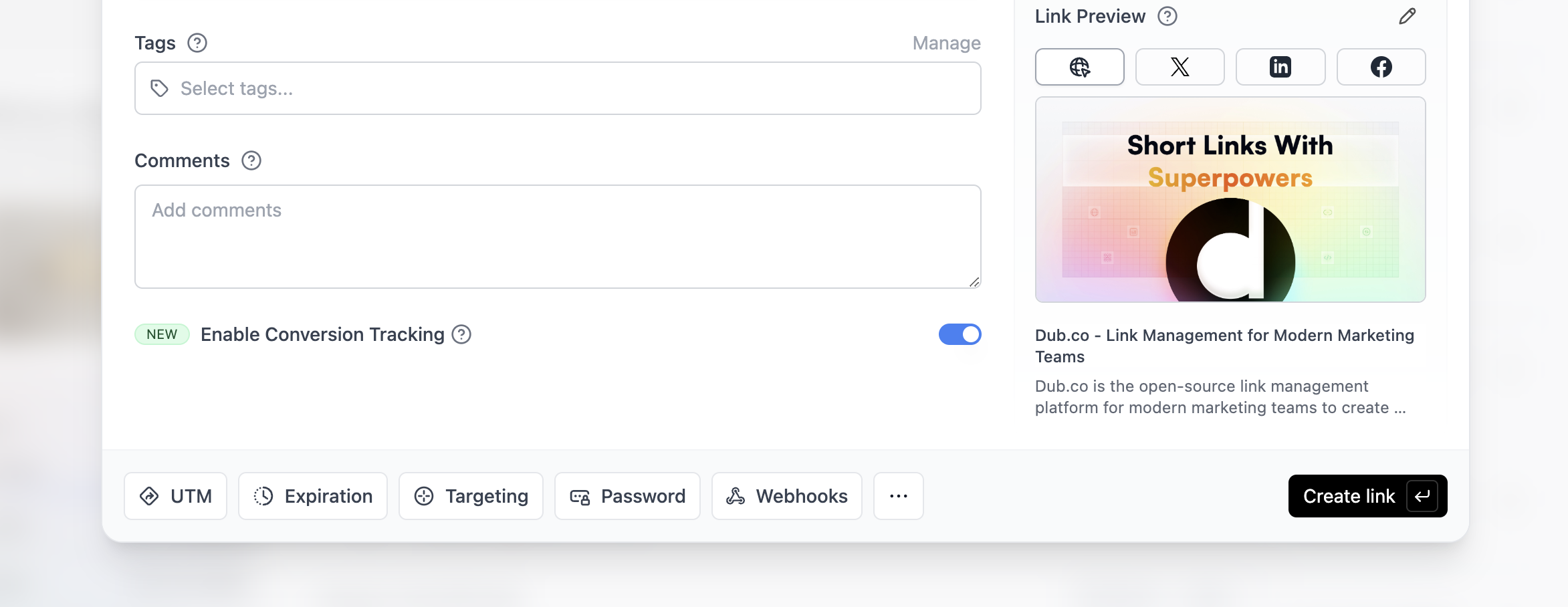 You can also use the `C` keyboard shortcut when inside the link builder to
quickly enable conversion tracking for a given link.
Alternatively, you can also enable conversion tracking programmatically via the [Dub API](/docs/api-reference/introduction). All you need to do is pass `trackConversion: true` when creating or updating a link:
```javascript Node.js theme={null}
const link = await dub.links.create({
url: "https://dub.co",
trackConversion: true,
});
```
```python Python theme={null}
link = d.links.create(url="https://dub.co", track_conversion=True)
```
```go Go theme={null}
link, err := d.Links.Create(ctx, &dub.CreateLinkRequest{
URL: "https://dub.co",
TrackConversion: true,
})
```
```ruby Ruby theme={null}
s.links.create_many(
::OpenApiSDK::Operations::CreateLinkRequest.new(
url: "https://dub.co",
track_conversion: true,
)
)
```
Then, you'd want to install the Dub Analytics script to your website to track conversion events.
You can install the Dub Analytics script in several different ways:
}
href="/docs/sdks/client-side/installation-guides/framer"
horizontal
/>
You can **verify the installation** with the following tests:
1. Open the browser console and type in `_dubAnalytics` – if the script is installed correctly, you should see the `_dubAnalytics` object in the console.
2. Add the `?dub_id=test` query parameter to your website URL and make sure that the `dub_id` cookie is being set in your browser.
If both of these checks pass, the script is installed correctly. Otherwise, please make sure:
* The analytics script was added to the `` section of the page
* If you're using a content delivery network (CDN), make sure to purge any cached content
## Step 1: Track a deferred lead event
First, when the user completes the action that indicates interest in your product or service, you'll need to track a deferred lead event. Examples include:
* Signing up for an account
* [Booking a demo meeting on HubSpot](/docs/integrations/hubspot)
* Joining a mailing list
To do this, you'll need to set the `mode` property to `deferred` when tracking the lead event. With this, Dub will still track the customer and the click ID they came from, but defer the actual lead event creation to a subsequent request.
```javascript Node.js theme={null}
import { Dub } from "dub";
const dub = new Dub();
const dubId = req.cookies["dub_id"];
if (dubId) {
await dub.track.lead({
clickId: dubId,
mode: "deferred",
eventName: "Sign Up",
customerExternalId: customer.id,
customerName: customer.name,
customerEmail: customer.email,
customerAvatar: customer.avatar,
});
// delete the dub_id cookie
res.cookies.set("dub_id", "", {
expires: new Date(0),
});
}
```
```python Python theme={null}
from dub import Dub
import os
dub = Dub(token=os.environ['DUB_API_KEY'])
dub_id = request.cookies.get('dub_id')
if dub_id:
dub.track.lead({
'click_id': dub_id,
'mode': 'deferred',
'event_name': 'Sign Up',
'external_id': customer.id,
'customer_name': customer.name,
'customer_email': customer.email,
'customer_avatar': customer.avatar
})
# delete the dub_id cookie
response.delete_cookie('dub_id')
```
```go Go theme={null}
package main
import (
"context"
dub "github.com/dubinc/dub-go"
"net/http"
)
d := dub.New(
dub.WithSecurity(os.Getenv("DUB_API_KEY")),
)
dubId, err := r.Cookie("dub_id")
if err == nil {
_, err = d.Track.Lead(context.Background(), &operations.TrackLeadRequest{
ClickId: dubId.Value,
Mode: "deferred",
EventName: "Sign Up",
customerExternalId: customer.ID,
CustomerName: customer.Name,
CustomerEmail: customer.Email,
CustomerAvatar: customer.Avatar,
})
// delete the dub_id cookie
http.SetCookie(w, &http.Cookie{
Name: "dub_id",
Value: "",
Expires: time.Unix(0, 0),
})
}
```
```ruby Ruby theme={null}
require 'dub'
dub = ::OpenApiSDK::Dub.new
dub.config_security(
::OpenApiSDK::Shared::Security.new(
token: ENV['DUB_API_KEY']
)
)
dub_id = cookies[:dub_id]
if dub_id
req = ::OpenApiSDK::Operations::TrackLeadRequest.new(
click_id: dub_id,
mode: 'deferred',
event_name: 'Sign Up',
external_id: customer.id,
customer_name: customer.name,
customer_email: customer.email,
customer_avatar: customer.avatar
)
dub.track.lead(req)
# delete the dub_id cookie
cookies.delete(:dub_id)
end
```
```php PHP theme={null}
setSecurity($_ENV["DUB_API_KEY"])->build();
$dubId = $_COOKIE['dub_id'] ?? null;
if ($dubId) {
$request = new Operations\TrackLeadRequest();
$request->clickId = $dubId;
$request->mode = 'deferred';
$request->eventName = 'Sign Up';
$request->customerExternalId = $customer->id;
$request->customerNasme = $customer->name;
$request->customerEmail = $customer->email;
$request->customerAvatar = $customer->avatar;
$dub->track->lead($request);
// delete the dub_id cookie
setcookie('dub_id', '', time() - 3600);
}
```
## Step 2: Track a qualified lead event
Once the user completes the action that makes them a qualified lead, you can then track a qualified lead event. To do this, you'll repeat the same lead tracking request as before, but without the `mode` property and by setting the `clickId` property to an empty string.
```javascript Node.js theme={null}
import { Dub } from "dub";
const dub = new Dub();
await dub.track.lead({
clickId: "",
eventName: "Sign Up",
customerExternalId: customer.id,
customerName: customer.name,
customerEmail: customer.email,
customerAvatar: customer.avatar,
});
```
```python Python theme={null}
from dub import Dub
import os
dub = Dub(token=os.environ['DUB_API_KEY'])
dub.track.lead({
'click_id': '',
'event_name': 'Sign Up',
'external_id': customer.id,
'customer_name': customer.name,
'customer_email': customer.email,
'customer_avatar': customer.avatar
})
```
```go Go theme={null}
package main
import (
"context"
dub "github.com/dubinc/dub-go"
"net/http"
)
d := dub.New(
dub.WithSecurity(os.Getenv("DUB_API_KEY")),
)
d.Track.Lead(context.Background(), &operations.TrackLeadRequest{
ClickId: "",
EventName: "Sign Up",
customerExternalId: customer.ID,
CustomerName: customer.Name,
CustomerEmail: customer.Email,
CustomerAvatar: customer.Avatar,
})
```
```ruby Ruby theme={null}
require 'dub'
dub = ::OpenApiSDK::Dub.new
dub.config_security(
::OpenApiSDK::Shared::Security.new(
token: ENV['DUB_API_KEY']
)
)
req = ::OpenApiSDK::Operations::TrackLeadRequest.new(
click_id: '',
event_name: 'Sign Up',
external_id: customer.id,
customer_name: customer.name,
customer_email: customer.email,
customer_avatar: customer.avatar
)
dub.track.lead(req)
```
```php PHP theme={null}
setSecurity($_ENV["DUB_API_KEY"])->build();
$request = new Operations\TrackLeadRequest();
$request->clickId = '';
$request->eventName = 'Sign Up';
$request->customerExternalId = $customer->id;
$request->customerNasme = $customer->name;
$request->customerEmail = $customer->email;
$request->customerAvatar = $customer->avatar;
$dub->track->lead($request);
```
## View your conversions
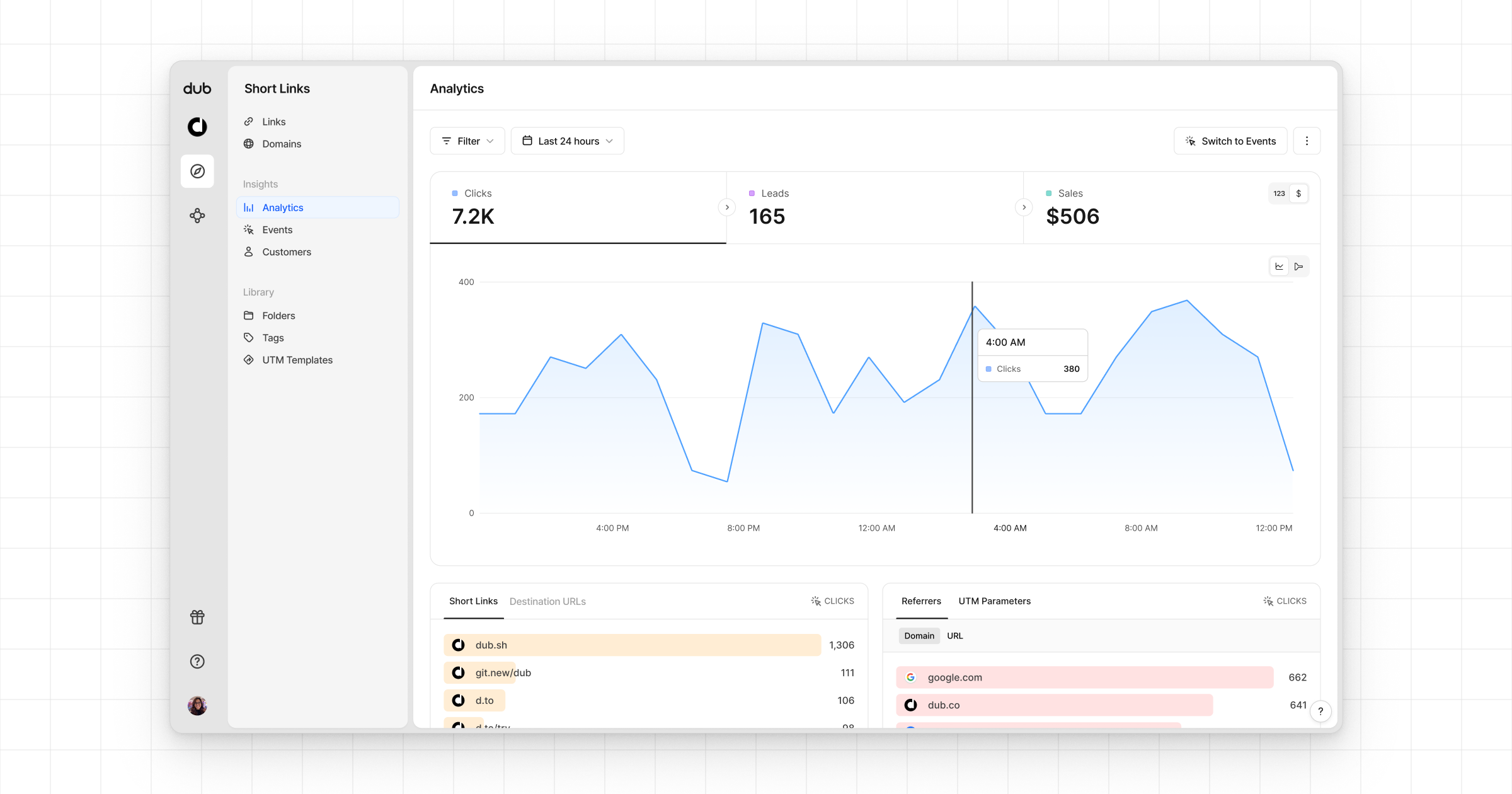
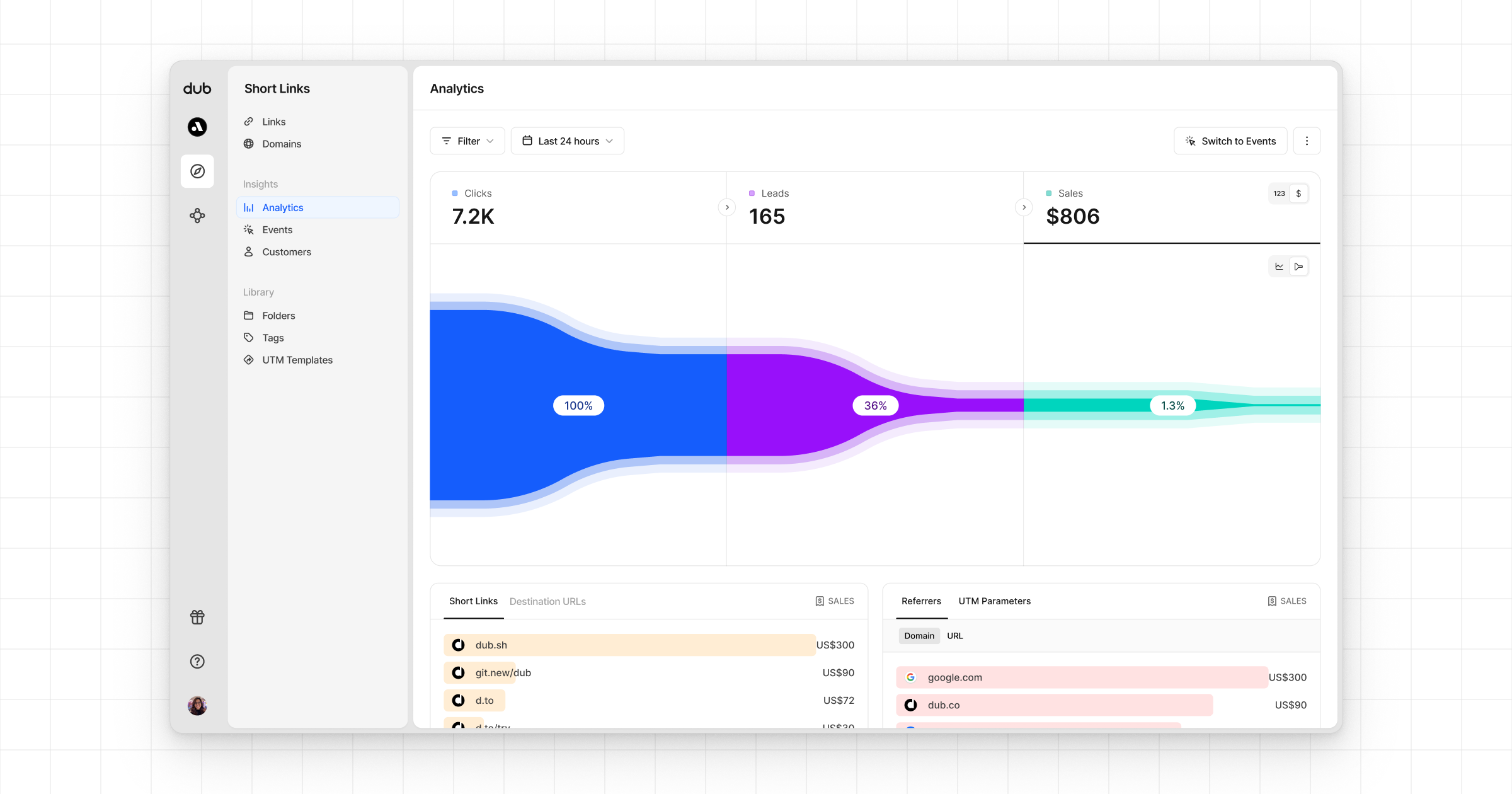
Once you've completed the setup, all your tracked conversions will show up in [Dub Analytics](https://dub.co/analytics). We provide 3 different views to help you understand your conversions:
* **Time-series**: A [time-series view](https://app.dub.co/dub/analytics?view=timeseries) of the number clicks, leads and sales.
You can also use the `C` keyboard shortcut when inside the link builder to
quickly enable conversion tracking for a given link.
Alternatively, you can also enable conversion tracking programmatically via the [Dub API](/docs/api-reference/introduction). All you need to do is pass `trackConversion: true` when creating or updating a link:
```javascript Node.js theme={null}
const link = await dub.links.create({
url: "https://dub.co",
trackConversion: true,
});
```
```python Python theme={null}
link = d.links.create(url="https://dub.co", track_conversion=True)
```
```go Go theme={null}
link, err := d.Links.Create(ctx, &dub.CreateLinkRequest{
URL: "https://dub.co",
TrackConversion: true,
})
```
```ruby Ruby theme={null}
s.links.create_many(
::OpenApiSDK::Operations::CreateLinkRequest.new(
url: "https://dub.co",
track_conversion: true,
)
)
```
Then, you'd want to install the Dub Analytics script to your website to track conversion events.
You can install the Dub Analytics script in several different ways:
}
href="/docs/sdks/client-side/installation-guides/framer"
horizontal
/>
You can **verify the installation** with the following tests:
1. Open the browser console and type in `_dubAnalytics` – if the script is installed correctly, you should see the `_dubAnalytics` object in the console.
2. Add the `?dub_id=test` query parameter to your website URL and make sure that the `dub_id` cookie is being set in your browser.
If both of these checks pass, the script is installed correctly. Otherwise, please make sure:
* The analytics script was added to the `` section of the page
* If you're using a content delivery network (CDN), make sure to purge any cached content
## Step 1: Track a deferred lead event
First, when the user completes the action that indicates interest in your product or service, you'll need to track a deferred lead event. Examples include:
* Signing up for an account
* [Booking a demo meeting on HubSpot](/docs/integrations/hubspot)
* Joining a mailing list
To do this, you'll need to set the `mode` property to `deferred` when tracking the lead event. With this, Dub will still track the customer and the click ID they came from, but defer the actual lead event creation to a subsequent request.
```javascript Node.js theme={null}
import { Dub } from "dub";
const dub = new Dub();
const dubId = req.cookies["dub_id"];
if (dubId) {
await dub.track.lead({
clickId: dubId,
mode: "deferred",
eventName: "Sign Up",
customerExternalId: customer.id,
customerName: customer.name,
customerEmail: customer.email,
customerAvatar: customer.avatar,
});
// delete the dub_id cookie
res.cookies.set("dub_id", "", {
expires: new Date(0),
});
}
```
```python Python theme={null}
from dub import Dub
import os
dub = Dub(token=os.environ['DUB_API_KEY'])
dub_id = request.cookies.get('dub_id')
if dub_id:
dub.track.lead({
'click_id': dub_id,
'mode': 'deferred',
'event_name': 'Sign Up',
'external_id': customer.id,
'customer_name': customer.name,
'customer_email': customer.email,
'customer_avatar': customer.avatar
})
# delete the dub_id cookie
response.delete_cookie('dub_id')
```
```go Go theme={null}
package main
import (
"context"
dub "github.com/dubinc/dub-go"
"net/http"
)
d := dub.New(
dub.WithSecurity(os.Getenv("DUB_API_KEY")),
)
dubId, err := r.Cookie("dub_id")
if err == nil {
_, err = d.Track.Lead(context.Background(), &operations.TrackLeadRequest{
ClickId: dubId.Value,
Mode: "deferred",
EventName: "Sign Up",
customerExternalId: customer.ID,
CustomerName: customer.Name,
CustomerEmail: customer.Email,
CustomerAvatar: customer.Avatar,
})
// delete the dub_id cookie
http.SetCookie(w, &http.Cookie{
Name: "dub_id",
Value: "",
Expires: time.Unix(0, 0),
})
}
```
```ruby Ruby theme={null}
require 'dub'
dub = ::OpenApiSDK::Dub.new
dub.config_security(
::OpenApiSDK::Shared::Security.new(
token: ENV['DUB_API_KEY']
)
)
dub_id = cookies[:dub_id]
if dub_id
req = ::OpenApiSDK::Operations::TrackLeadRequest.new(
click_id: dub_id,
mode: 'deferred',
event_name: 'Sign Up',
external_id: customer.id,
customer_name: customer.name,
customer_email: customer.email,
customer_avatar: customer.avatar
)
dub.track.lead(req)
# delete the dub_id cookie
cookies.delete(:dub_id)
end
```
```php PHP theme={null}
setSecurity($_ENV["DUB_API_KEY"])->build();
$dubId = $_COOKIE['dub_id'] ?? null;
if ($dubId) {
$request = new Operations\TrackLeadRequest();
$request->clickId = $dubId;
$request->mode = 'deferred';
$request->eventName = 'Sign Up';
$request->customerExternalId = $customer->id;
$request->customerNasme = $customer->name;
$request->customerEmail = $customer->email;
$request->customerAvatar = $customer->avatar;
$dub->track->lead($request);
// delete the dub_id cookie
setcookie('dub_id', '', time() - 3600);
}
```
## Step 2: Track a qualified lead event
Once the user completes the action that makes them a qualified lead, you can then track a qualified lead event. To do this, you'll repeat the same lead tracking request as before, but without the `mode` property and by setting the `clickId` property to an empty string.
```javascript Node.js theme={null}
import { Dub } from "dub";
const dub = new Dub();
await dub.track.lead({
clickId: "",
eventName: "Sign Up",
customerExternalId: customer.id,
customerName: customer.name,
customerEmail: customer.email,
customerAvatar: customer.avatar,
});
```
```python Python theme={null}
from dub import Dub
import os
dub = Dub(token=os.environ['DUB_API_KEY'])
dub.track.lead({
'click_id': '',
'event_name': 'Sign Up',
'external_id': customer.id,
'customer_name': customer.name,
'customer_email': customer.email,
'customer_avatar': customer.avatar
})
```
```go Go theme={null}
package main
import (
"context"
dub "github.com/dubinc/dub-go"
"net/http"
)
d := dub.New(
dub.WithSecurity(os.Getenv("DUB_API_KEY")),
)
d.Track.Lead(context.Background(), &operations.TrackLeadRequest{
ClickId: "",
EventName: "Sign Up",
customerExternalId: customer.ID,
CustomerName: customer.Name,
CustomerEmail: customer.Email,
CustomerAvatar: customer.Avatar,
})
```
```ruby Ruby theme={null}
require 'dub'
dub = ::OpenApiSDK::Dub.new
dub.config_security(
::OpenApiSDK::Shared::Security.new(
token: ENV['DUB_API_KEY']
)
)
req = ::OpenApiSDK::Operations::TrackLeadRequest.new(
click_id: '',
event_name: 'Sign Up',
external_id: customer.id,
customer_name: customer.name,
customer_email: customer.email,
customer_avatar: customer.avatar
)
dub.track.lead(req)
```
```php PHP theme={null}
setSecurity($_ENV["DUB_API_KEY"])->build();
$request = new Operations\TrackLeadRequest();
$request->clickId = '';
$request->eventName = 'Sign Up';
$request->customerExternalId = $customer->id;
$request->customerNasme = $customer->name;
$request->customerEmail = $customer->email;
$request->customerAvatar = $customer->avatar;
$dub->track->lead($request);
```
## View your conversions
Once you've completed the setup, all your tracked conversions will show up in [Dub Analytics](https://dub.co/analytics). We provide 3 different views to help you understand your conversions:
* **Time-series**: A [time-series view](https://app.dub.co/dub/analytics?view=timeseries) of the number clicks, leads and sales.
 * **Funnel chart**: A [funnel chart view](http://app.dub.co/analytics?view=funnel) visualizing the conversion & dropoff rates across the different steps in the conversion funnel (clicks → leads → sales).
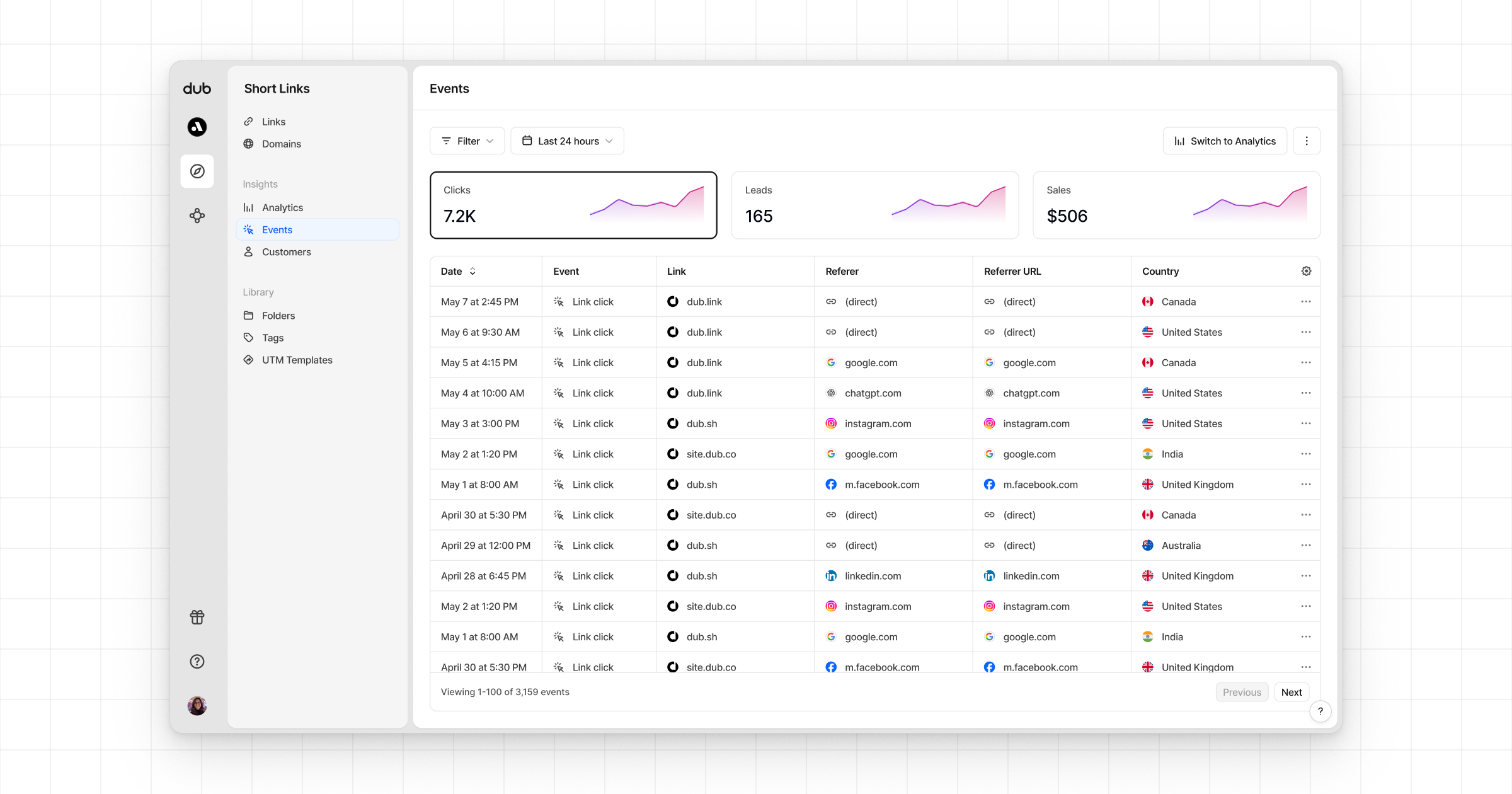
 * **Real-time events stream**: A [real-time events stream](https://app.dub.co/events) of every single conversion event that occurs across all your links in your workspace.