> ## Documentation Index
> Fetch the complete documentation index at: https://dub.co/llms.txt
> Use this file to discover all available pages before exploring further.
# Deferred deep linking
> Learn how to use deferred deep linking to track conversions and traffic.
Deep links require a [Pro plan](https://dub.co/pricing) subscription or
higher.
Deferred deep linking allows you to track which link a user came from even when they don't have your app installed.
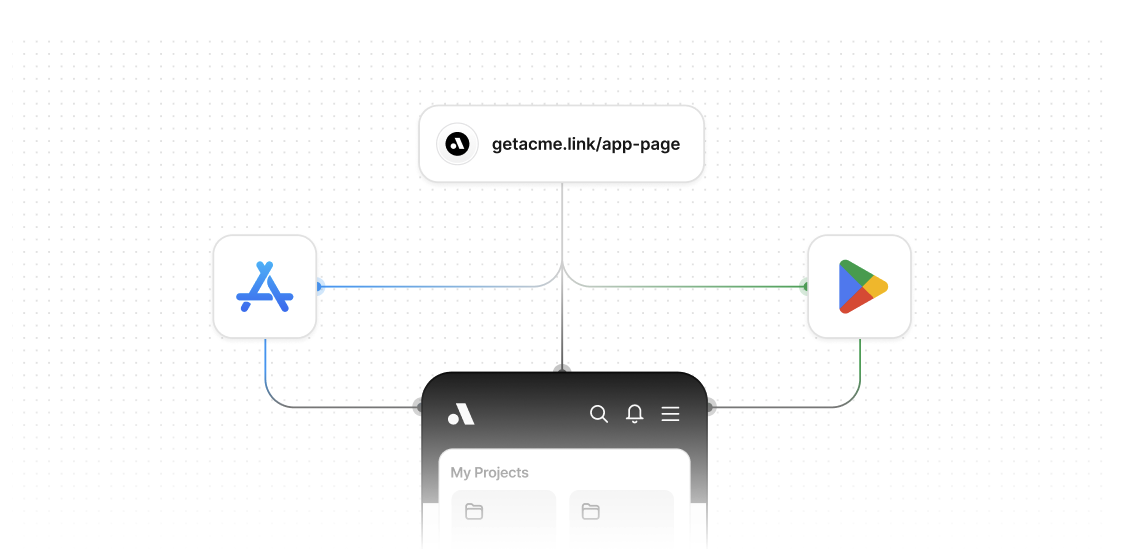 When a user clicks a link without the app installed, they're redirected to the app store. After installing and opening the app, you can retrieve the original link information and redirect them to the appropriate screen.
## Android Play Store
Android provides the [Install Referrer API](https://developer.android.com/google/play/installreferrer) which allows you to retrieve information about how a user came to install your app, including the referrer URL.
Here is how it works in a nutshell:
1. User taps a deep link on a device without your app installed
2. Dub redirects the user to the App Store or Play Store by using [device targeting](/help/article/device-targeting)
3. User installs your app from the app store
4. App reads the install referrer on first launch
5. App extracts the deep link from the referrer URL and tracks the deep link open event using the [`/track/open` endpoint](/docs/api-reference/endpoint/track-open)
6. Redirect the user to the appropriate screen using the destination URL returned by the `/track/open` endpoint
### Understanding the Referrer URL Structure
When Dub redirects users to the Play Store, the referrer URL contains the deep link information in a nested structure. The referrer URL looks like this:
```
https://play.google.com/store/apps/details?id=com.example.app&referrer=deepLink%3Dhttps%253A%252F%252Fdub.sh%252Fgps
```
To extract the original deep link, you need to:
1. Parse the `referrer` parameter from the Play Store URL
2. URL decode it to get the `deepLink` parameter
3. URL decode the `deepLink` value to get the actual deep link
The code examples below show how to implement this extraction process.
### Step 1: Add the Install Referrer dependency
First, you'll need to add the Google Play Install Referrer library to your project.
```javascript React Native theme={null}
// package.json
{
"dependencies": {
"react-native-play-install-referrer": "latest"
}
}
```
```kotlin Android theme={null}
// app/build.gradle
dependencies {
implementation 'com.android.installreferrer:installreferrer:2.2'
}
```
### Step 2: Implement the Install Referrer logic
Now you'll need to implement the logic to read the install referrer, extract the deep link, and track the deep link open.
```javascript React Native expandable theme={null}
// InstallReferrerTracker.js
import { PlayInstallReferrer } from "react-native-play-install-referrer";
class InstallReferrerTracker {
constructor() {
this.isFirstLaunch = true;
}
trackInstallReferrer() {
// Check if this is the first launch
if (!this.isFirstLaunch) {
return;
}
PlayInstallReferrer.getInstallReferrerInfo((installReferrerInfo, error) => {
if (!error) {
console.log(
"Install referrer = " + installReferrerInfo.installReferrer,
);
if (installReferrerInfo.installReferrer) {
// Extract the deep link from the referrer URL
const deepLink = this.extractDeepLinkFromReferrer(
installReferrerInfo.installReferrer,
);
if (deepLink) {
// Track the deep link open with the extracted URL
this.trackDeepLinkOpen(deepLink);
}
}
} else {
console.log("Failed to get install referrer info!");
console.log("Response code: " + error.responseCode);
console.log("Message: " + error.message);
}
this.isFirstLaunch = false;
});
}
extractDeepLinkFromReferrer(referrerUrl) {
try {
// Parse the referrer URL to extract the deep link
// e.g. for referrer=deepLink%3Dhttps%253A%252F%252Fdub.sh%252Fgps
// the deep link is https://dub.sh/gps
const referrerUrlObj = new URL(referrerUrl);
const deepLinkParam = referrerUrlObj.searchParams.get("deepLink");
return decodeURIComponent(deepLinkParam);
return null;
} catch (error) {
console.error("Error extracting deep link from referrer:", error);
return null;
}
}
async trackDeepLinkOpen(deepLink) {
try {
const response = await fetch("https://api.dub.co/track/open", {
method: "POST",
headers: {
"Content-Type": "application/json",
},
body: JSON.stringify({
deepLink,
}),
});
if (response.ok) {
const data = await response.json();
const destinationUrl = data.link.url;
// Navigate to the destination URL in your app
this.navigateToDestination(destinationUrl);
}
} catch (error) {
console.error("Error tracking deep link open:", error);
}
}
navigateToDestination(destinationUrl) {
// Implement your navigation logic here
// This will depend on your navigation library (React Navigation, etc.)
console.log("Navigating to:", destinationUrl);
}
}
export default InstallReferrerTracker;
```
```kotlin Android expandable theme={null}
// InstallReferrerTracker.kt
import android.content.Context
import com.android.installreferrer.api.InstallReferrerClient
import com.android.installreferrer.api.InstallReferrerResponse
import com.android.installreferrer.api.ReferrerDetails
import com.android.installreferrer.api.InstallReferrerStateListener
import org.json.JSONObject
import java.net.HttpURLConnection
import java.net.URL
class InstallReferrerTracker(private val context: Context) {
private var isFirstLaunch = true
fun trackInstallReferrer() {
if (!isFirstLaunch) {
return
}
val referrerClient = InstallReferrerClient.newBuilder(context).build()
referrerClient.startConnection(object : InstallReferrerStateListener {
override fun onInstallReferrerSetupFinished(responseCode: Int) {
when (responseCode) {
InstallReferrerResponse.OK -> {
val response: ReferrerDetails = referrerClient.installReferrer
val referrerUrl = response.installReferrer
if (!referrerUrl.isNullOrEmpty()) {
// Extract the deep link from the referrer URL
val deepLink = extractDeepLinkFromReferrer(referrerUrl)
if (!deepLink.isNullOrEmpty()) {
// Track the deep link open with the extracted URL
trackDeepLinkOpen(deepLink)
}
}
}
InstallReferrerResponse.FEATURE_NOT_SUPPORTED -> {
// API not available on the current Play Store app
println("Install Referrer API not supported")
}
InstallReferrerResponse.SERVICE_UNAVAILABLE -> {
// Connection couldn't be established
println("Install Referrer service unavailable")
}
}
referrerClient.endConnection()
}
override fun onInstallReferrerServiceDisconnected() {
// Try to restart the connection on the next request
}
})
}
private fun extractDeepLinkFromReferrer(referrerUrl: String): String? {
return try {
// e.g. for referrer=deepLink%3Dhttps%253A%252F%252Fdub.sh%252Fgps
// the deep link is https://dub.sh/gps
val referrerUrlObj = java.net.URL(referrerUrl)
val query = referrerUrlObj.query ?: return null
// Parse query parameters
val params = query.split("&").associate { param ->
val keyValue = param.split("=", limit = 2)
if (keyValue.size == 2) {
keyValue[0] to keyValue[1]
} else {
keyValue[0] to ""
}
}
val deepLinkParam = params["deepLink"] ?: return null
// URL decode the deepLinkParam value to get the actual deep link
java.net.URLDecoder.decode(deepLinkParam, "UTF-8")
} catch (e: Exception) {
println("Error extracting deep link from referrer: ${e.message}")
null
}
}
private fun trackDeepLinkOpen(deepLink: String) {
Thread {
try {
val url = URL("https://api.dub.co/track/open")
val connection = url.openConnection() as HttpURLConnection
connection.requestMethod = "POST"
connection.setRequestProperty("Content-Type", "application/json")
connection.doOutput = true
val body = JSONObject().apply {
put("deepLink", deepLink)
}
connection.outputStream.use { os ->
os.write(body.toString().toByteArray())
}
val responseCode = connection.responseCode
if (responseCode == HttpURLConnection.HTTP_OK) {
val response = connection.inputStream.bufferedReader().use { it.readText() }
val jsonResponse = JSONObject(response)
val link = jsonResponse.getJSONObject("link")
val destinationUrl = link.getString("url")
// Navigate to the destination URL on the main thread
navigateToDestination(destinationUrl)
}
} catch (e: Exception) {
println("Error tracking deep link open: ${e.message}")
}
}.start()
}
private fun navigateToDestination(destinationUrl: String) {
// Implement your navigation logic here
// This will depend on your navigation library (Navigation Component, etc.)
println("Navigating to: $destinationUrl")
}
}
```
### Step 3: Initialize the tracker in your app
Now you need to initialize the Install Referrer tracker when your app starts.
```javascript React Native theme={null}
// App.js
import React, { useEffect } from 'react';
import InstallReferrerTracker from './InstallReferrerTracker';
const App = () => {
useEffect(() => {
const tracker = new InstallReferrerTracker();
// Track install referrer on app launch
tracker.trackInstallReferrer();
}, []);
return (
// Your app components
);
};
export default App;
```
```kotlin Android theme={null}
// MainActivity.kt
import android.os.Bundle
import androidx.appcompat.app.AppCompatActivity
class MainActivity : AppCompatActivity() {
override fun onCreate(savedInstanceState: Bundle?) {
super.onCreate(savedInstanceState)
setContentView(R.layout.activity_main)
// Initialize and track install referrer
val tracker = InstallReferrerTracker(this)
tracker.trackInstallReferrer()
}
}
```
### Step 4: Handle the navigation
Finally, implement the navigation logic to redirect users to the appropriate screen based on the destination URL.
```javascript React Native expandable theme={null}
// InstallReferrerTracker.js (navigation method)
navigateToDestination(destinationUrl) {
// Parse the destination URL to determine which screen to navigate to
const url = new URL(destinationUrl);
const path = url.pathname;
// Example navigation logic
if (path.includes('/product/')) {
const productId = path.split('/product/')[1];
// Navigate to product detail screen
navigation.navigate('ProductDetail', { productId });
} else if (path.includes('/category/')) {
const categoryId = path.split('/category/')[1];
// Navigate to category screen
navigation.navigate('Category', { categoryId });
} else {
// Navigate to home screen
navigation.navigate('Home');
}
}
```
```kotlin Android expandable theme={null}
// InstallReferrerTracker.kt (navigation method)
import android.content.Intent
import android.net.Uri
import android.os.Handler
import android.os.Looper
private fun navigateToDestination(destinationUrl: String) {
Handler(Looper.getMainLooper()).post {
try {
val uri = Uri.parse(destinationUrl)
val path = uri.path ?: ""
// Example navigation logic
when {
path.contains("/product/") -> {
val productId = path.split("/product/").lastOrNull()
// Navigate to product detail screen
val intent = Intent(context, ProductDetailActivity::class.java).apply {
putExtra("productId", productId)
}
context.startActivity(intent)
}
path.contains("/category/") -> {
val categoryId = path.split("/category/").lastOrNull()
// Navigate to category screen
val intent = Intent(context, CategoryActivity::class.java).apply {
putExtra("categoryId", categoryId)
}
context.startActivity(intent)
}
else -> {
// Navigate to home screen
val intent = Intent(context, HomeActivity::class.java)
context.startActivity(intent)
}
}
} catch (e: Exception) {
println("Error navigating to destination: ${e.message}")
}
}
}
```
### Important notes
1. **First Launch Detection**: The install referrer is only available on the first launch after installation. Make sure to track this properly to avoid duplicate tracking.
2. **URL Decoding**: The referrer URL is URL-encoded multiple times. Make sure to properly decode it to extract the original deep link.
3. **Network Operations**: Ensure that all API calls are made in background threads to avoid blocking the main thread and ensure smooth app performance.
4. **Error Handling**: Always implement proper error handling for network requests and URL parsing.
5. **Testing**: Test your implementation thoroughly using the Google Play Console's internal testing track.
To get started, we recommend using the [quickstart guide](/docs/concepts/deep-links/quickstart) to set up your deep links on Dub.
### Related resources
* [Google Play Install Referrer API Documentation](https://developer.android.com/google/play/installreferrer)
* [Android Deep Linking Guide](https://developer.android.com/training/app-links)
* [Dub API Documentation](/docs/api-reference/introduction)
## iOS App Store
Unlike Android, iOS doesn't provide a built-in install referrer API. Dub implements a hybrid approach combining **deterministic tracking** (clipboard-based) and **probabilistic tracking** (IP-based) to ensure reliable deferred deep linking on iOS.
### How iOS deferred deep linking works on Dub
Dub's iOS deferred deep linking solution provides two tracking approaches:
1. **Deterministic clipboard-based tracking**: Uses iOS clipboard data to reliably identify and open the exact deep link the user interacted with.
2. **Probabilistic IP-based tracking**: Matches users from the web to the app based on their IP address.
For the deterministic approach, when an iOS user who doesn't have your app installed clicks on your deep link, Dub redirects them to a custom landing page:
When a user clicks a link without the app installed, they're redirected to the app store. After installing and opening the app, you can retrieve the original link information and redirect them to the appropriate screen.
## Android Play Store
Android provides the [Install Referrer API](https://developer.android.com/google/play/installreferrer) which allows you to retrieve information about how a user came to install your app, including the referrer URL.
Here is how it works in a nutshell:
1. User taps a deep link on a device without your app installed
2. Dub redirects the user to the App Store or Play Store by using [device targeting](/help/article/device-targeting)
3. User installs your app from the app store
4. App reads the install referrer on first launch
5. App extracts the deep link from the referrer URL and tracks the deep link open event using the [`/track/open` endpoint](/docs/api-reference/endpoint/track-open)
6. Redirect the user to the appropriate screen using the destination URL returned by the `/track/open` endpoint
### Understanding the Referrer URL Structure
When Dub redirects users to the Play Store, the referrer URL contains the deep link information in a nested structure. The referrer URL looks like this:
```
https://play.google.com/store/apps/details?id=com.example.app&referrer=deepLink%3Dhttps%253A%252F%252Fdub.sh%252Fgps
```
To extract the original deep link, you need to:
1. Parse the `referrer` parameter from the Play Store URL
2. URL decode it to get the `deepLink` parameter
3. URL decode the `deepLink` value to get the actual deep link
The code examples below show how to implement this extraction process.
### Step 1: Add the Install Referrer dependency
First, you'll need to add the Google Play Install Referrer library to your project.
```javascript React Native theme={null}
// package.json
{
"dependencies": {
"react-native-play-install-referrer": "latest"
}
}
```
```kotlin Android theme={null}
// app/build.gradle
dependencies {
implementation 'com.android.installreferrer:installreferrer:2.2'
}
```
### Step 2: Implement the Install Referrer logic
Now you'll need to implement the logic to read the install referrer, extract the deep link, and track the deep link open.
```javascript React Native expandable theme={null}
// InstallReferrerTracker.js
import { PlayInstallReferrer } from "react-native-play-install-referrer";
class InstallReferrerTracker {
constructor() {
this.isFirstLaunch = true;
}
trackInstallReferrer() {
// Check if this is the first launch
if (!this.isFirstLaunch) {
return;
}
PlayInstallReferrer.getInstallReferrerInfo((installReferrerInfo, error) => {
if (!error) {
console.log(
"Install referrer = " + installReferrerInfo.installReferrer,
);
if (installReferrerInfo.installReferrer) {
// Extract the deep link from the referrer URL
const deepLink = this.extractDeepLinkFromReferrer(
installReferrerInfo.installReferrer,
);
if (deepLink) {
// Track the deep link open with the extracted URL
this.trackDeepLinkOpen(deepLink);
}
}
} else {
console.log("Failed to get install referrer info!");
console.log("Response code: " + error.responseCode);
console.log("Message: " + error.message);
}
this.isFirstLaunch = false;
});
}
extractDeepLinkFromReferrer(referrerUrl) {
try {
// Parse the referrer URL to extract the deep link
// e.g. for referrer=deepLink%3Dhttps%253A%252F%252Fdub.sh%252Fgps
// the deep link is https://dub.sh/gps
const referrerUrlObj = new URL(referrerUrl);
const deepLinkParam = referrerUrlObj.searchParams.get("deepLink");
return decodeURIComponent(deepLinkParam);
return null;
} catch (error) {
console.error("Error extracting deep link from referrer:", error);
return null;
}
}
async trackDeepLinkOpen(deepLink) {
try {
const response = await fetch("https://api.dub.co/track/open", {
method: "POST",
headers: {
"Content-Type": "application/json",
},
body: JSON.stringify({
deepLink,
}),
});
if (response.ok) {
const data = await response.json();
const destinationUrl = data.link.url;
// Navigate to the destination URL in your app
this.navigateToDestination(destinationUrl);
}
} catch (error) {
console.error("Error tracking deep link open:", error);
}
}
navigateToDestination(destinationUrl) {
// Implement your navigation logic here
// This will depend on your navigation library (React Navigation, etc.)
console.log("Navigating to:", destinationUrl);
}
}
export default InstallReferrerTracker;
```
```kotlin Android expandable theme={null}
// InstallReferrerTracker.kt
import android.content.Context
import com.android.installreferrer.api.InstallReferrerClient
import com.android.installreferrer.api.InstallReferrerResponse
import com.android.installreferrer.api.ReferrerDetails
import com.android.installreferrer.api.InstallReferrerStateListener
import org.json.JSONObject
import java.net.HttpURLConnection
import java.net.URL
class InstallReferrerTracker(private val context: Context) {
private var isFirstLaunch = true
fun trackInstallReferrer() {
if (!isFirstLaunch) {
return
}
val referrerClient = InstallReferrerClient.newBuilder(context).build()
referrerClient.startConnection(object : InstallReferrerStateListener {
override fun onInstallReferrerSetupFinished(responseCode: Int) {
when (responseCode) {
InstallReferrerResponse.OK -> {
val response: ReferrerDetails = referrerClient.installReferrer
val referrerUrl = response.installReferrer
if (!referrerUrl.isNullOrEmpty()) {
// Extract the deep link from the referrer URL
val deepLink = extractDeepLinkFromReferrer(referrerUrl)
if (!deepLink.isNullOrEmpty()) {
// Track the deep link open with the extracted URL
trackDeepLinkOpen(deepLink)
}
}
}
InstallReferrerResponse.FEATURE_NOT_SUPPORTED -> {
// API not available on the current Play Store app
println("Install Referrer API not supported")
}
InstallReferrerResponse.SERVICE_UNAVAILABLE -> {
// Connection couldn't be established
println("Install Referrer service unavailable")
}
}
referrerClient.endConnection()
}
override fun onInstallReferrerServiceDisconnected() {
// Try to restart the connection on the next request
}
})
}
private fun extractDeepLinkFromReferrer(referrerUrl: String): String? {
return try {
// e.g. for referrer=deepLink%3Dhttps%253A%252F%252Fdub.sh%252Fgps
// the deep link is https://dub.sh/gps
val referrerUrlObj = java.net.URL(referrerUrl)
val query = referrerUrlObj.query ?: return null
// Parse query parameters
val params = query.split("&").associate { param ->
val keyValue = param.split("=", limit = 2)
if (keyValue.size == 2) {
keyValue[0] to keyValue[1]
} else {
keyValue[0] to ""
}
}
val deepLinkParam = params["deepLink"] ?: return null
// URL decode the deepLinkParam value to get the actual deep link
java.net.URLDecoder.decode(deepLinkParam, "UTF-8")
} catch (e: Exception) {
println("Error extracting deep link from referrer: ${e.message}")
null
}
}
private fun trackDeepLinkOpen(deepLink: String) {
Thread {
try {
val url = URL("https://api.dub.co/track/open")
val connection = url.openConnection() as HttpURLConnection
connection.requestMethod = "POST"
connection.setRequestProperty("Content-Type", "application/json")
connection.doOutput = true
val body = JSONObject().apply {
put("deepLink", deepLink)
}
connection.outputStream.use { os ->
os.write(body.toString().toByteArray())
}
val responseCode = connection.responseCode
if (responseCode == HttpURLConnection.HTTP_OK) {
val response = connection.inputStream.bufferedReader().use { it.readText() }
val jsonResponse = JSONObject(response)
val link = jsonResponse.getJSONObject("link")
val destinationUrl = link.getString("url")
// Navigate to the destination URL on the main thread
navigateToDestination(destinationUrl)
}
} catch (e: Exception) {
println("Error tracking deep link open: ${e.message}")
}
}.start()
}
private fun navigateToDestination(destinationUrl: String) {
// Implement your navigation logic here
// This will depend on your navigation library (Navigation Component, etc.)
println("Navigating to: $destinationUrl")
}
}
```
### Step 3: Initialize the tracker in your app
Now you need to initialize the Install Referrer tracker when your app starts.
```javascript React Native theme={null}
// App.js
import React, { useEffect } from 'react';
import InstallReferrerTracker from './InstallReferrerTracker';
const App = () => {
useEffect(() => {
const tracker = new InstallReferrerTracker();
// Track install referrer on app launch
tracker.trackInstallReferrer();
}, []);
return (
// Your app components
);
};
export default App;
```
```kotlin Android theme={null}
// MainActivity.kt
import android.os.Bundle
import androidx.appcompat.app.AppCompatActivity
class MainActivity : AppCompatActivity() {
override fun onCreate(savedInstanceState: Bundle?) {
super.onCreate(savedInstanceState)
setContentView(R.layout.activity_main)
// Initialize and track install referrer
val tracker = InstallReferrerTracker(this)
tracker.trackInstallReferrer()
}
}
```
### Step 4: Handle the navigation
Finally, implement the navigation logic to redirect users to the appropriate screen based on the destination URL.
```javascript React Native expandable theme={null}
// InstallReferrerTracker.js (navigation method)
navigateToDestination(destinationUrl) {
// Parse the destination URL to determine which screen to navigate to
const url = new URL(destinationUrl);
const path = url.pathname;
// Example navigation logic
if (path.includes('/product/')) {
const productId = path.split('/product/')[1];
// Navigate to product detail screen
navigation.navigate('ProductDetail', { productId });
} else if (path.includes('/category/')) {
const categoryId = path.split('/category/')[1];
// Navigate to category screen
navigation.navigate('Category', { categoryId });
} else {
// Navigate to home screen
navigation.navigate('Home');
}
}
```
```kotlin Android expandable theme={null}
// InstallReferrerTracker.kt (navigation method)
import android.content.Intent
import android.net.Uri
import android.os.Handler
import android.os.Looper
private fun navigateToDestination(destinationUrl: String) {
Handler(Looper.getMainLooper()).post {
try {
val uri = Uri.parse(destinationUrl)
val path = uri.path ?: ""
// Example navigation logic
when {
path.contains("/product/") -> {
val productId = path.split("/product/").lastOrNull()
// Navigate to product detail screen
val intent = Intent(context, ProductDetailActivity::class.java).apply {
putExtra("productId", productId)
}
context.startActivity(intent)
}
path.contains("/category/") -> {
val categoryId = path.split("/category/").lastOrNull()
// Navigate to category screen
val intent = Intent(context, CategoryActivity::class.java).apply {
putExtra("categoryId", categoryId)
}
context.startActivity(intent)
}
else -> {
// Navigate to home screen
val intent = Intent(context, HomeActivity::class.java)
context.startActivity(intent)
}
}
} catch (e: Exception) {
println("Error navigating to destination: ${e.message}")
}
}
}
```
### Important notes
1. **First Launch Detection**: The install referrer is only available on the first launch after installation. Make sure to track this properly to avoid duplicate tracking.
2. **URL Decoding**: The referrer URL is URL-encoded multiple times. Make sure to properly decode it to extract the original deep link.
3. **Network Operations**: Ensure that all API calls are made in background threads to avoid blocking the main thread and ensure smooth app performance.
4. **Error Handling**: Always implement proper error handling for network requests and URL parsing.
5. **Testing**: Test your implementation thoroughly using the Google Play Console's internal testing track.
To get started, we recommend using the [quickstart guide](/docs/concepts/deep-links/quickstart) to set up your deep links on Dub.
### Related resources
* [Google Play Install Referrer API Documentation](https://developer.android.com/google/play/installreferrer)
* [Android Deep Linking Guide](https://developer.android.com/training/app-links)
* [Dub API Documentation](/docs/api-reference/introduction)
## iOS App Store
Unlike Android, iOS doesn't provide a built-in install referrer API. Dub implements a hybrid approach combining **deterministic tracking** (clipboard-based) and **probabilistic tracking** (IP-based) to ensure reliable deferred deep linking on iOS.
### How iOS deferred deep linking works on Dub
Dub's iOS deferred deep linking solution provides two tracking approaches:
1. **Deterministic clipboard-based tracking**: Uses iOS clipboard data to reliably identify and open the exact deep link the user interacted with.
2. **Probabilistic IP-based tracking**: Matches users from the web to the app based on their IP address.
For the deterministic approach, when an iOS user who doesn't have your app installed clicks on your deep link, Dub redirects them to a custom landing page:
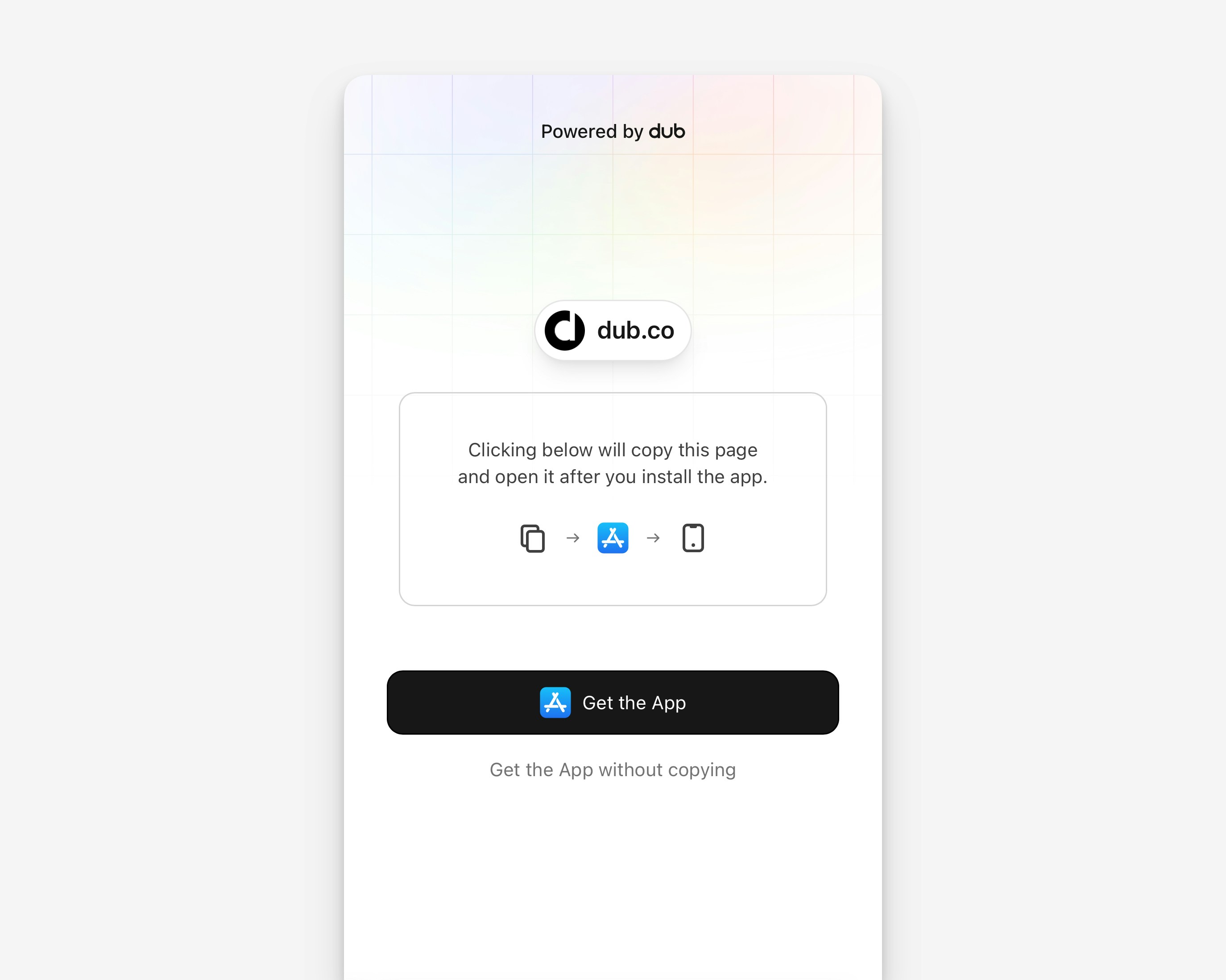 This page displays two options:
* **Get the App**: Copies the deep link to the clipboard before redirecting to the App Store.
* **Get the App without Copying**: Redirects directly to the App Store without copying the deep link to the clipboard.
After the user installs your app, the deep link resolution method depends on the button they clicked.
#### 1. Deterministic clipboard-based tracking
This method uses the iOS clipboard to pass the deep link into your app after installation, ensuring reliable and direct link resolution.
Here is how it works in a nutshell:
1. User taps **Get the App** button on the landing page.
2. Dub copies the deep link URL to the clipboard.
3. The user is redirected to the App Store to download your app.
4. After installation, your app reads the clipboard to retrieve the deep link.
5. Your app calls the [`/track/open` endpoint](/docs/api-reference/endpoint/track-open) with the `deepLink` parameter in the request body either directly or via a supported [Dub Mobile SDK](/docs/sdks/client-side-mobile/introduction).
6. Dub returns the destination URL, and your app navigates the user to the appropriate screen (see [deep links quickstart](/docs/concepts/deep-links/quickstart) for more details).
#### 2. Probabilistic IP-based tracking
This method relies on matching the user’s device IP address from the initial click event to the app open event after installation.
1. User taps **Get the App without Copying** button on the landing page.
2. The user is redirected directly to the App Store to download your app.
3. Dub has already tracked the click and stored the IP address at the time of deep link click.
4. After installation, your app calls the [`/track/open` endpoint](/docs/api-reference/endpoint/track-open) with the `dubDomain` parameter in the request body either directly or via a supported [Dub Mobile SDK](/docs/sdks/client-side-mobile/introduction) .
5. Dub matches the user using IP-based tracking and returns the destination URL.
6. If a destination URL is returned, your app navigates the user to the appropriate screen (see [deep links quickstart](/docs/concepts/deep-links/quickstart) for more details).
### Track the deep link open
The following logic determines whether to use clipboard-based tracking or IP-based tracking:
* **Clipboard-based tracking**: Used when a deep link is found in the clipboard (e.g., `acme.link`). The app sends the `deepLink` parameter in the request body.
* **IP-based tracking**: Used when no deep link is found in the clipboard or the user declined paste permissions. The app sends only the `dubDomain` parameter, allowing Dub to match the user based on their IP address.
This ensures the most reliable tracking method is chosen automatically.
```javascript React Native expandable theme={null}
// App.js
import React, { useEffect } from 'react';
import Clipboard from '@react-native-clipboard/clipboard';
import AsyncStorage from '@react-native-async-storage/async-storage';
export default function App() {
useEffect(() => {
trackOpen();
}, []);
return (
// Your app components
);
}
// Make request to /track/open endpoint
async function trackOpen() {
try {
// Check if this is first launch
const hasLaunched = await AsyncStorage.getItem('app_first_launch');
if (hasLaunched !== null) {
return;
}
await AsyncStorage.setItem('app_first_launch', 'false');
// Check clipboard for deep link
const clipboard = await Clipboard.getString();
let requestBody;
if (clipboard && clipboard.includes('acme.link')) {
// Clipboard-based tracking
requestBody = { deepLink: clipboard };
} else {
// IP-based tracking fallback
requestBody = { dubDomain: 'acme.link' };
}
const response = await fetch('https://api.dub.co/track/open', {
method: 'POST',
headers: {
'Content-Type': 'application/json',
},
body: JSON.stringify(requestBody),
});
if (response.ok) {
const data = await response.json();
const destinationURL = data.link?.url;
if (destinationURL) {
// Navigate to the destination URL
console.log('Navigating to:', destinationURL);
}
}
} catch (error) {
console.error('Error tracking open:', error);
}
}
```
```swift iOS (SwiftUI) expandable theme={null}
import SwiftUI
@main
struct MyApp: App {
var body: some Scene {
WindowGroup {
ContentView().onAppear {
trackOpen()
}
}
}
}
// Make request to /track/open endpoint
func trackOpen(completion: @escaping (String?) -> Void) {
let clipboard = UIPasteboard.general.string
var requestBody: [String: String]
if let deepLink = clipboard, deepLink.contains("acme.link") {
// Clipboard-based tracking
requestBody = ["deepLink": deepLink]
} else {
// IP-based tracking fallback
requestBody = ["dubDomain": "acme.link"]
}
guard let url = URL(string: "https://api.dub.co/track/open") else {
completion(nil)
return
}
var request = URLRequest(url: url)
request.httpMethod = "POST"
request.addValue("application/json", forHTTPHeaderField: "Content-Type")
do {
request.httpBody = try JSONSerialization.data(withJSONObject: requestBody)
} catch {
print("Error creating request body:", error)
completion(nil)
return
}
URLSession.shared.dataTask(with: request) { data, response, error in
if let error = error {
print("Error tracking open:", error)
completion(nil)
return
}
guard let data = data else {
print("No data received")
completion(nil)
return
}
do {
let json = try JSONSerialization.jsonObject(with: data) as? [String: Any]
let link = json?["link"] as? [String: Any]
let destinationURL = link?["url"] as? String
completion(destinationURL)
} catch {
print("Error parsing response:", error)
completion(nil)
}
}.resume()
}
```
### Handle the navigation
Once you have the deep link URL from your `trackOpen` function, you can route the user to the appropriate screen.
```javascript React Native expandable theme={null}
// App.js with React Navigation
import React, { useEffect, useRef } from "react";
import { NavigationContainer } from "@react-navigation/native";
import { createNativeStackNavigator } from "@react-navigation/native-stack";
const Stack = createNativeStackNavigator();
export default function App() {
const navigationRef = useRef();
useEffect(() => {
const handleDeepLink = async () => {
const destinationURL = await trackOpen();
if (destinationURL && navigationRef.current) {
// Parse URL and navigate
const url = new URL(destinationURL);
const path = url.pathname;
if (path.includes("/product/")) {
const productId = path.split("/product/")[1];
navigationRef.current.navigate("Product", { productId });
} else {
navigationRef.current.navigate("Home");
}
}
};
handleDeepLink();
}, []);
return (
);
}
```
```swift iOS (SwiftUI) expandable theme={null}
import SwiftUI
struct ContentView: View {
@State private var deepLinkURL: String?
@State private var shouldNavigate = false
var body: some View {
NavigationStack {
VStack {
Text("Home Screen")
}
.onAppear {
trackOpen { url in
if let url = url {
DispatchQueue.main.async {
deepLinkURL = url
shouldNavigate = true
}
}
}
}
.navigationDestination(isPresented: $shouldNavigate) {
if let url = deepLinkURL {
DetailView(url: url)
}
}
}
}
}
struct DetailView: View {
let url: String
var body: some View {
Text("Navigated to: \(url)")
}
}
```
### Important notes
1. **IP-based Tracking Limitations**: IP-based tracking relies on the device’s network IP, which can be less reliable in environments like corporate networks, VPNs, or shared Wi-Fi.
2. **Network Operations**: Ensure that all API calls are made in background threads to avoid blocking the main thread and ensure smooth app performance.
3. **Error Handling**: Implement proper error handling for network requests, clipboard access to ensure the app behaves gracefully under failures.
4. **Testing**: Test thoroughly using TestFlight or an internal distribution build to confirm the flow works for both clipboard-based and IP-based tracking scenarios.
5. **App Store Guidelines**: Ensure your app complies with Apple's App Store guidelines regarding clipboard access and user privacy.
### Related resources
* [iOS Deep Linking Guide](https://developer.apple.com/documentation/xcode/allowing-apps-and-websites-to-link-to-your-content)
* [`/track/open` API endpoint reference](/docs/api-reference/endpoint/track-open)
* [Dub Deep Links Quickstart](/docs/concepts/deep-links/quickstart)
This page displays two options:
* **Get the App**: Copies the deep link to the clipboard before redirecting to the App Store.
* **Get the App without Copying**: Redirects directly to the App Store without copying the deep link to the clipboard.
After the user installs your app, the deep link resolution method depends on the button they clicked.
#### 1. Deterministic clipboard-based tracking
This method uses the iOS clipboard to pass the deep link into your app after installation, ensuring reliable and direct link resolution.
Here is how it works in a nutshell:
1. User taps **Get the App** button on the landing page.
2. Dub copies the deep link URL to the clipboard.
3. The user is redirected to the App Store to download your app.
4. After installation, your app reads the clipboard to retrieve the deep link.
5. Your app calls the [`/track/open` endpoint](/docs/api-reference/endpoint/track-open) with the `deepLink` parameter in the request body either directly or via a supported [Dub Mobile SDK](/docs/sdks/client-side-mobile/introduction).
6. Dub returns the destination URL, and your app navigates the user to the appropriate screen (see [deep links quickstart](/docs/concepts/deep-links/quickstart) for more details).
#### 2. Probabilistic IP-based tracking
This method relies on matching the user’s device IP address from the initial click event to the app open event after installation.
1. User taps **Get the App without Copying** button on the landing page.
2. The user is redirected directly to the App Store to download your app.
3. Dub has already tracked the click and stored the IP address at the time of deep link click.
4. After installation, your app calls the [`/track/open` endpoint](/docs/api-reference/endpoint/track-open) with the `dubDomain` parameter in the request body either directly or via a supported [Dub Mobile SDK](/docs/sdks/client-side-mobile/introduction) .
5. Dub matches the user using IP-based tracking and returns the destination URL.
6. If a destination URL is returned, your app navigates the user to the appropriate screen (see [deep links quickstart](/docs/concepts/deep-links/quickstart) for more details).
### Track the deep link open
The following logic determines whether to use clipboard-based tracking or IP-based tracking:
* **Clipboard-based tracking**: Used when a deep link is found in the clipboard (e.g., `acme.link`). The app sends the `deepLink` parameter in the request body.
* **IP-based tracking**: Used when no deep link is found in the clipboard or the user declined paste permissions. The app sends only the `dubDomain` parameter, allowing Dub to match the user based on their IP address.
This ensures the most reliable tracking method is chosen automatically.
```javascript React Native expandable theme={null}
// App.js
import React, { useEffect } from 'react';
import Clipboard from '@react-native-clipboard/clipboard';
import AsyncStorage from '@react-native-async-storage/async-storage';
export default function App() {
useEffect(() => {
trackOpen();
}, []);
return (
// Your app components
);
}
// Make request to /track/open endpoint
async function trackOpen() {
try {
// Check if this is first launch
const hasLaunched = await AsyncStorage.getItem('app_first_launch');
if (hasLaunched !== null) {
return;
}
await AsyncStorage.setItem('app_first_launch', 'false');
// Check clipboard for deep link
const clipboard = await Clipboard.getString();
let requestBody;
if (clipboard && clipboard.includes('acme.link')) {
// Clipboard-based tracking
requestBody = { deepLink: clipboard };
} else {
// IP-based tracking fallback
requestBody = { dubDomain: 'acme.link' };
}
const response = await fetch('https://api.dub.co/track/open', {
method: 'POST',
headers: {
'Content-Type': 'application/json',
},
body: JSON.stringify(requestBody),
});
if (response.ok) {
const data = await response.json();
const destinationURL = data.link?.url;
if (destinationURL) {
// Navigate to the destination URL
console.log('Navigating to:', destinationURL);
}
}
} catch (error) {
console.error('Error tracking open:', error);
}
}
```
```swift iOS (SwiftUI) expandable theme={null}
import SwiftUI
@main
struct MyApp: App {
var body: some Scene {
WindowGroup {
ContentView().onAppear {
trackOpen()
}
}
}
}
// Make request to /track/open endpoint
func trackOpen(completion: @escaping (String?) -> Void) {
let clipboard = UIPasteboard.general.string
var requestBody: [String: String]
if let deepLink = clipboard, deepLink.contains("acme.link") {
// Clipboard-based tracking
requestBody = ["deepLink": deepLink]
} else {
// IP-based tracking fallback
requestBody = ["dubDomain": "acme.link"]
}
guard let url = URL(string: "https://api.dub.co/track/open") else {
completion(nil)
return
}
var request = URLRequest(url: url)
request.httpMethod = "POST"
request.addValue("application/json", forHTTPHeaderField: "Content-Type")
do {
request.httpBody = try JSONSerialization.data(withJSONObject: requestBody)
} catch {
print("Error creating request body:", error)
completion(nil)
return
}
URLSession.shared.dataTask(with: request) { data, response, error in
if let error = error {
print("Error tracking open:", error)
completion(nil)
return
}
guard let data = data else {
print("No data received")
completion(nil)
return
}
do {
let json = try JSONSerialization.jsonObject(with: data) as? [String: Any]
let link = json?["link"] as? [String: Any]
let destinationURL = link?["url"] as? String
completion(destinationURL)
} catch {
print("Error parsing response:", error)
completion(nil)
}
}.resume()
}
```
### Handle the navigation
Once you have the deep link URL from your `trackOpen` function, you can route the user to the appropriate screen.
```javascript React Native expandable theme={null}
// App.js with React Navigation
import React, { useEffect, useRef } from "react";
import { NavigationContainer } from "@react-navigation/native";
import { createNativeStackNavigator } from "@react-navigation/native-stack";
const Stack = createNativeStackNavigator();
export default function App() {
const navigationRef = useRef();
useEffect(() => {
const handleDeepLink = async () => {
const destinationURL = await trackOpen();
if (destinationURL && navigationRef.current) {
// Parse URL and navigate
const url = new URL(destinationURL);
const path = url.pathname;
if (path.includes("/product/")) {
const productId = path.split("/product/")[1];
navigationRef.current.navigate("Product", { productId });
} else {
navigationRef.current.navigate("Home");
}
}
};
handleDeepLink();
}, []);
return (
);
}
```
```swift iOS (SwiftUI) expandable theme={null}
import SwiftUI
struct ContentView: View {
@State private var deepLinkURL: String?
@State private var shouldNavigate = false
var body: some View {
NavigationStack {
VStack {
Text("Home Screen")
}
.onAppear {
trackOpen { url in
if let url = url {
DispatchQueue.main.async {
deepLinkURL = url
shouldNavigate = true
}
}
}
}
.navigationDestination(isPresented: $shouldNavigate) {
if let url = deepLinkURL {
DetailView(url: url)
}
}
}
}
}
struct DetailView: View {
let url: String
var body: some View {
Text("Navigated to: \(url)")
}
}
```
### Important notes
1. **IP-based Tracking Limitations**: IP-based tracking relies on the device’s network IP, which can be less reliable in environments like corporate networks, VPNs, or shared Wi-Fi.
2. **Network Operations**: Ensure that all API calls are made in background threads to avoid blocking the main thread and ensure smooth app performance.
3. **Error Handling**: Implement proper error handling for network requests, clipboard access to ensure the app behaves gracefully under failures.
4. **Testing**: Test thoroughly using TestFlight or an internal distribution build to confirm the flow works for both clipboard-based and IP-based tracking scenarios.
5. **App Store Guidelines**: Ensure your app complies with Apple's App Store guidelines regarding clipboard access and user privacy.
### Related resources
* [iOS Deep Linking Guide](https://developer.apple.com/documentation/xcode/allowing-apps-and-websites-to-link-to-your-content)
* [`/track/open` API endpoint reference](/docs/api-reference/endpoint/track-open)
* [Dub Deep Links Quickstart](/docs/concepts/deep-links/quickstart)