> ## Documentation Index
> Fetch the complete documentation index at: https://dub.co/llms.txt
> Use this file to discover all available pages before exploring further.
# Introduction
> Learn how to use Dub's Analytics API to build real-time analytics dashboards for your links.
Analytics endpoints require a [Pro plan](https://dub.co/pricing) subscription
or higher.
Dub's [Analytics API](/docs/api-reference/analytics/retrieve) allows you to build real-time analytics dashboards for your links that lives directly inside your application.
## Fundamentals
At a high level, Dub's Analytics API allows you to retrieve data about your links by event type and group by different dimensions.
Dub's Analytics API supports the following `event` types:
* `clicks` – the number of clicks on a link
* `leads` – the number of leads generated from a link
* `sales` – the number of sales generated from a link
Each of these events can be aggregated in different ways by using the `groupBy` parameter:
The total number of events over the specified time period.
Example response:
```json theme={null}
{
"clicks": 100,
"leads": 5,
"sales": 2,
"saleAmount": 5000
}
```
The number of events over a given time interval, broken down by time periods.
Example response:
```json theme={null}
[
{
"start": "2024-01-01T00:00:00.000Z",
"clicks": 10,
"leads": 1,
"sales": 0,
"saleAmount": 0
},
{
"start": "2024-01-02T00:00:00.000Z",
"clicks": 15,
"leads": 2,
"sales": 1,
"saleAmount": 2500
}
]
```
The top links by event count, including link metadata.
Example response:
```json theme={null}
[
{
"id": "clux0rgak00011...",
"domain": "dub.co",
"key": "github",
"shortLink": "https://dub.co/github",
"url": "https://github.com",
"title": "GitHub",
"createdAt": "2024-01-01T00:00:00.000Z",
"clicks": 50,
"leads": 3,
"sales": 1,
"saleAmount": 2500
}
]
```
The top countries by event count, using ISO 3166-1 alpha-2 country codes.
Example response:
```json theme={null}
[
{
"country": "US",
"region": "*",
"city": "*",
"clicks": 30,
"leads": 2,
"sales": 1,
"saleAmount": 2500
}
]
```
The top cities by event count, including city names and ISO 3166-1 alpha-2 country codes.
Example response:
```json theme={null}
[
{
"country": "US",
"region": "CA",
"city": "San Francisco",
"clicks": 20,
"leads": 1,
"sales": 1,
"saleAmount": 2500
}
]
```
The top regions by event count, including region codes and ISO 3166-1 alpha-2 country codes.
Example response:
```json theme={null}
[
{
"country": "US",
"region": "CA",
"city": "*",
"clicks": 25,
"leads": 2,
"sales": 1,
"saleAmount": 2500
}
]
```
The top continents by event count, using 2-letter ISO continent codes.
Example response:
```json theme={null}
[
{
"continent": "NA",
"clicks": 40,
"leads": 3,
"sales": 2,
"saleAmount": 5000
}
]
```
The top devices by event count, including device names.
Example response:
```json theme={null}
[
{
"device": "iPhone",
"clicks": 35,
"leads": 2,
"sales": 1,
"saleAmount": 2500
}
]
```
The top browsers by event count, including browser names.
Example response:
```json theme={null}
[
{
"browser": "Chrome",
"clicks": 45,
"leads": 3,
"sales": 2,
"saleAmount": 5000
}
]
```
The top operating systems by event count, including OS names.
Example response:
```json theme={null}
[
{
"os": "iOS",
"clicks": 30,
"leads": 2,
"sales": 1,
"saleAmount": 2500
}
]
```
The top referrers by event count, including referrer names.
Example response:
```json theme={null}
[
{
"referer": "Google",
"clicks": 25,
"leads": 2,
"sales": 1,
"saleAmount": 2500
}
]
```
The top referrer URLs by event count, including full URLs.
Example response:
```json theme={null}
[
{
"refererUrl": "https://www.google.com",
"clicks": 20,
"leads": 1,
"sales": 1,
"saleAmount": 2500
}
]
```
The top UTM sources by event count.
Example response:
```json theme={null}
[
{
"utm_source": "newsletter",
"clicks": 25,
"leads": 2,
"sales": 1,
"saleAmount": 2500
}
]
```
The top UTM mediums by event count.
Example response:
```json theme={null}
[
{
"utm_medium": "email",
"clicks": 20,
"leads": 1,
"sales": 1,
"saleAmount": 2500
}
]
```
The top UTM campaigns by event count.
Example response:
```json theme={null}
[
{
"utm_campaign": "summer_sale",
"clicks": 30,
"leads": 2,
"sales": 1,
"saleAmount": 2500
}
]
```
The top UTM terms by event count.
Example response:
```json theme={null}
[
{
"utm_term": "discount",
"clicks": 15,
"leads": 1,
"sales": 1,
"saleAmount": 2500
}
]
```
The top UTM contents by event count.
Example response:
```json theme={null}
[
{
"utm_content": "banner",
"clicks": 20,
"leads": 1,
"sales": 1,
"saleAmount": 2500
}
]
```
## Example queries
Here are some examples of how to retrieve data using Dub's [Analytics API](/docs/api-reference/analytics/retrieve):
* [Total event count](#total-event-count)
* [Timeseries data](#timeseries-data)
* [Top links by event](#top-links-by-event)
### Total event count
```javascript Node.js theme={null}
import { Dub } from "dub";
export const dub = new Dub({
token: process.env.DUB_API_KEY,
});
const result = await dub.analytics.retrieve({
event: "clicks",
groupBy: "count",
linkId: "clux0rgak00011...",
interval: "30d",
});
```
```python Python theme={null}
from dub import Dub
with Dub(
token="DUB_API_KEY",
) as d_client:
res = d_client.analytics.retrieve(request={
"event": "clicks",
"groupBy": "count",
"linkId": "clux0rgak00011...",
"interval": "30d",
})
print(res)
```
```php PHP theme={null}
declare(strict_types=1);
require 'vendor/autoload.php';
use Dub;
use Dub\Models\Operations;
$sdk = Dub\Dub::builder()
->setSecurity('DUB_API_KEY')
->build();
$request = new Operations\RetrieveAnalyticsRequest(
event: 'clicks',
groupBy: 'count',
linkId: 'clux0rgak00011...',
interval: '30d',
);
$response = $sdk->analytics->retrieve(
request: $request
);
if ($response->oneOf !== null) {
// handle response
}
```
```go Go theme={null}
package main
import(
"context"
dubgo "github.com/dubinc/dub-go"
"github.com/dubinc/dub-go/models/operations"
"log"
)
func main() {
ctx := context.Background()
s := dubgo.New(
dubgo.WithSecurity("DUB_API_KEY"),
)
res, err := s.Analytics.Retrieve(ctx, operations.RetrieveAnalyticsRequest{
Event: dubgo.String("clicks"),
GroupBy: dubgo.String("count"),
LinkID: dubgo.String("clux0rgak00011..."),
Interval: dubgo.String("30d"),
})
if err != nil {
log.Fatal(err)
}
if res != nil {
// handle response
}
}
```
```ruby Ruby theme={null}
require 'dub'
s = ::OpenApiSDK::Dub.new(
security: ::OpenApiSDK::Shared::Security.new(
token: "DUB_API_KEY",
),
)
req = ::OpenApiSDK::Operations::RetrieveAnalyticsRequest.new(
event: "clicks",
groupBy: "count",
linkId: "clux0rgak00011...",
interval: "30d",
)
res = s.analytics.retrieve(req)
if ! res.one_of.nil?
# handle response
end
```
### Timeseries data
```javascript Node.js theme={null}
import { Dub } from "dub";
export const dub = new Dub({
token: process.env.DUB_API_KEY,
});
const result = await dub.analytics.retrieve({
event: "clicks",
groupBy: "timeseries",
linkId: "clux0rgak00011...",
interval: "30d",
});
```
```python Python theme={null}
from dub import Dub
with Dub(
token="DUB_API_KEY",
) as d_client:
res = d_client.analytics.retrieve(request={
"event": "clicks",
"groupBy": "timeseries",
"linkId": "clux0rgak00011...",
"interval": "30d",
})
print(res)
```
```php PHP theme={null}
declare(strict_types=1);
require 'vendor/autoload.php';
use Dub;
use Dub\Models\Operations;
$sdk = Dub\Dub::builder()
->setSecurity('DUB_API_KEY')
->build();
$request = new Operations\RetrieveAnalyticsRequest(
event: 'clicks',
groupBy: 'timeseries',
linkId: 'clux0rgak00011...',
interval: '30d',
);
$response = $sdk->analytics->retrieve(
request: $request
);
if ($response->oneOf !== null) {
// handle response
}
```
```go Go theme={null}
package main
import(
"context"
dubgo "github.com/dubinc/dub-go"
"github.com/dubinc/dub-go/models/operations"
"log"
)
func main() {
ctx := context.Background()
s := dubgo.New(
dubgo.WithSecurity("DUB_API_KEY"),
)
res, err := s.Analytics.Retrieve(ctx, operations.RetrieveAnalyticsRequest{
Event: dubgo.String("clicks"),
GroupBy: dubgo.String("timeseries"),
LinkID: dubgo.String("clux0rgak00011..."),
Interval: dubgo.String("30d"),
})
if err != nil {
log.Fatal(err)
}
if res != nil {
// handle response
}
}
```
```ruby Ruby theme={null}
require 'dub'
s = ::OpenApiSDK::Dub.new(
security: ::OpenApiSDK::Shared::Security.new(
token: "DUB_API_KEY",
),
)
req = ::OpenApiSDK::Operations::RetrieveAnalyticsRequest.new(
event: "clicks",
groupBy: "timeseries",
linkId: "clux0rgak00011...",
interval: "30d",
)
res = s.analytics.retrieve(req)
if ! res.one_of.nil?
# handle response
end
```
### Top links by event
```javascript Node.js theme={null}
import { Dub } from "dub";
export const dub = new Dub({
token: process.env.DUB_API_KEY,
});
const result = await dub.analytics.retrieve({
event: "clicks",
groupBy: "top_links",
linkId: "clux0rgak00011...",
interval: "30d",
});
```
```python Python theme={null}
from dub import Dub
with Dub(
token="DUB_API_KEY",
) as d_client:
res = d_client.analytics.retrieve(request={
"event": "clicks",
"groupBy": "top_links",
"linkId": "clux0rgak00011...",
"interval": "30d",
})
print(res)
```
```php PHP theme={null}
declare(strict_types=1);
require 'vendor/autoload.php';
use Dub;
use Dub\Models\Operations;
$sdk = Dub\Dub::builder()
->setSecurity('DUB_API_KEY')
->build();
$request = new Operations\RetrieveAnalyticsRequest(
event: 'clicks',
groupBy: 'top_links',
linkId: 'clux0rgak00011...',
interval: '30d',
);
$response = $sdk->analytics->retrieve(
request: $request
);
if ($response->oneOf !== null) {
// handle response
}
```
```go Go theme={null}
package main
import(
"context"
dubgo "github.com/dubinc/dub-go"
"github.com/dubinc/dub-go/models/operations"
"log"
)
func main() {
ctx := context.Background()
s := dubgo.New(
dubgo.WithSecurity("DUB_API_KEY"),
)
res, err := s.Analytics.Retrieve(ctx, operations.RetrieveAnalyticsRequest{
Event: dubgo.String("clicks"),
GroupBy: dubgo.String("top_links"),
LinkID: dubgo.String("clux0rgak00011..."),
Interval: dubgo.String("30d"),
})
if err != nil {
log.Fatal(err)
}
if res != nil {
// handle response
}
}
```
```ruby Ruby theme={null}
require 'dub'
s = ::OpenApiSDK::Dub.new(
security: ::OpenApiSDK::Shared::Security.new(
token: "DUB_API_KEY",
),
)
req = ::OpenApiSDK::Operations::RetrieveAnalyticsRequest.new(
event: "clicks",
groupBy: "top_links",
linkId: "clux0rgak00011...",
interval: "30d",
)
res = s.analytics.retrieve(req)
if ! res.one_of.nil?
# handle response
end
```
## Example apps
With Dub's [Analytics API](/docs/api-reference/analytics/retrieve), you can build user-facing analytics dashboards with the real-time click and conversion data for your links.
Here are some open-source examples of how you can use the Analytics API to build your own custom analytics dashboards:
Programmatically shorten links and fetch real-time click analytics with Dub
How Cap.so fetches real-time click analytics for their recording links
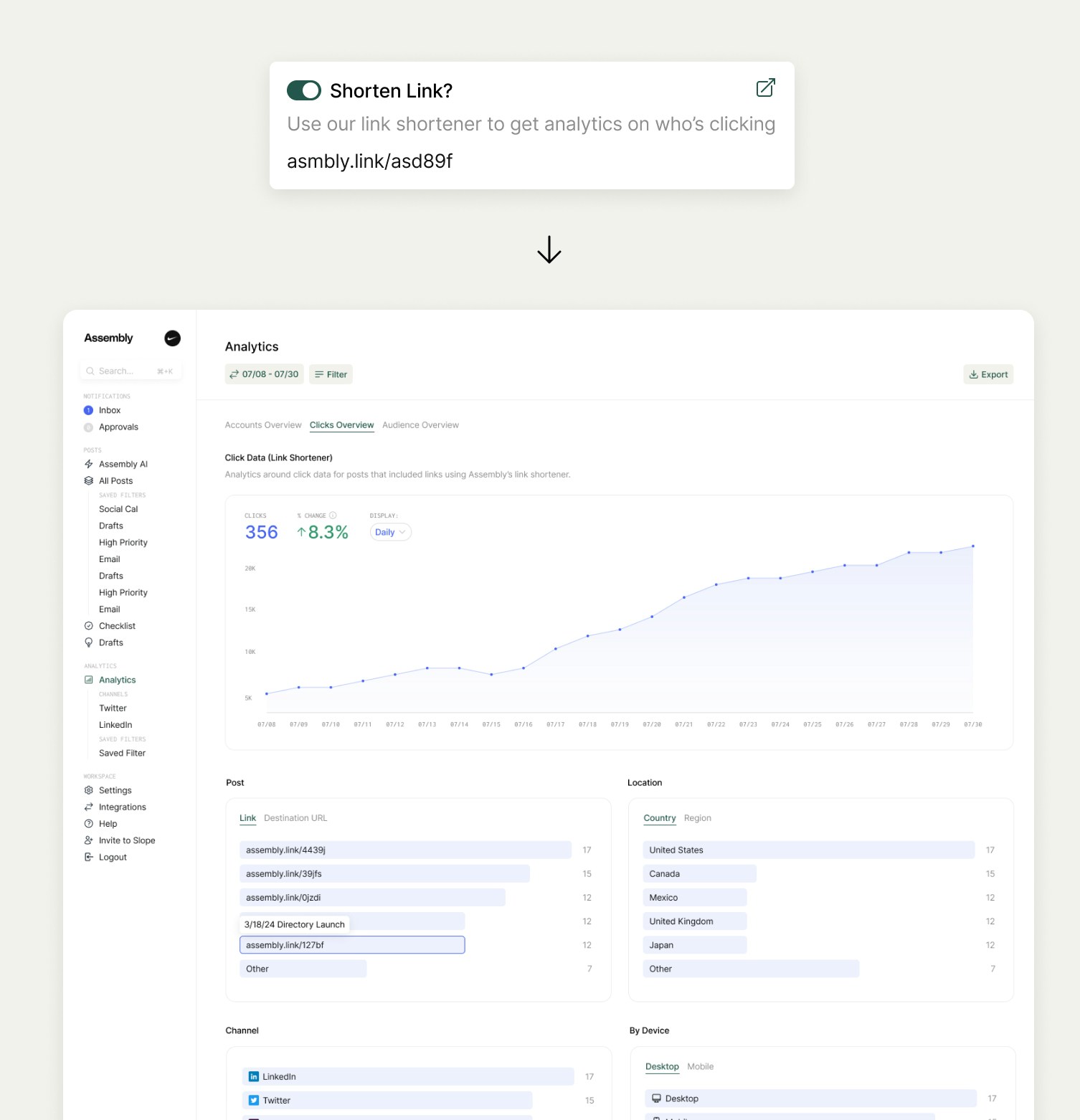
And here's another [real-world example](https://x.com/meetassembly/status/1901691081579794505) of a custom analytics dashboard built with the Analytics API: